Amara Social: a calmer social app for creators
Amara Social is a creator-first social app, and we built it. People share posts, short videos called Sparks, Stories, blogs, guides, recipes and workouts from a single app, and choose who sees each one. The feed is shaped by how people feel after using it, not how long they stay.
- iPhone
- Android
- 1K+downloads on Google Play
- 60%more content published by creators each month
- 30%growth in monthly active users within 6 months
- 7kinds of content in one app
The brief: social media that leaves people better off
The team behind Amara wanted a social app people enjoy and then put down. Most feeds are built to keep people scrolling. Amara’s feed is built to leave them better off.
Creators also needed room to work. A cook, a coach and a writer all post very differently. Most apps make each of them juggle several tools.
We built the app in React Native with TypeScript, on a Node.js backend. Six problems shaped the build.
Who the app is for
- The creator
Posts short videos, recipes, workouts and long reads, and wants each one to look right.
- Friends and family
Want to see the people they know without wading through creators first.
- The community member
Follows food, fitness and learning, and wants content they can act on.
- The careful sharer
Chooses who sees every post, Spark and Story, and wants that choice respected.
Six problems and what we did about each
- 01The problem
Endless scrolling is the default on most social apps, and it leaves people drained rather than inspired.
What we builtA calmer feed design that puts good content first, so people close the app in a better mood.
- 02The problem
Creators work across many formats, and most apps push them into a separate tool for each one.
What we builtOne app that creates and publishes every format: posts, Sparks, Stories, blogs, guides, recipes and workouts.
- 03The problem
Short videos must start fast and play smoothly, even on a weak mobile connection.
What we builtCompressed video and smart caching, so Sparks open quickly on most mobile networks.
- 04The problem
On big platforms it is hard to control who sees what you share.
What we builtPlain privacy settings. Each post, Spark and Story has its own audience, picked when it is shared.
- 05The problem
A recipe or a workout needs ingredients, steps and sets, and an ordinary post cannot lay those out clearly.
What we builtStructured templates for recipes, workouts and guides, with proper lists for ingredients, steps and exercises.
- 06The problem
The app holds personal details and messages, so it must protect them and let people leave cleanly.
What we builtEncryption for data in transit, and a simple route for anyone to have their data deleted.
What we built
Four features carry the app. Each one sits beside its real screen from the public App Store listing.
- 01
Every format behind one button
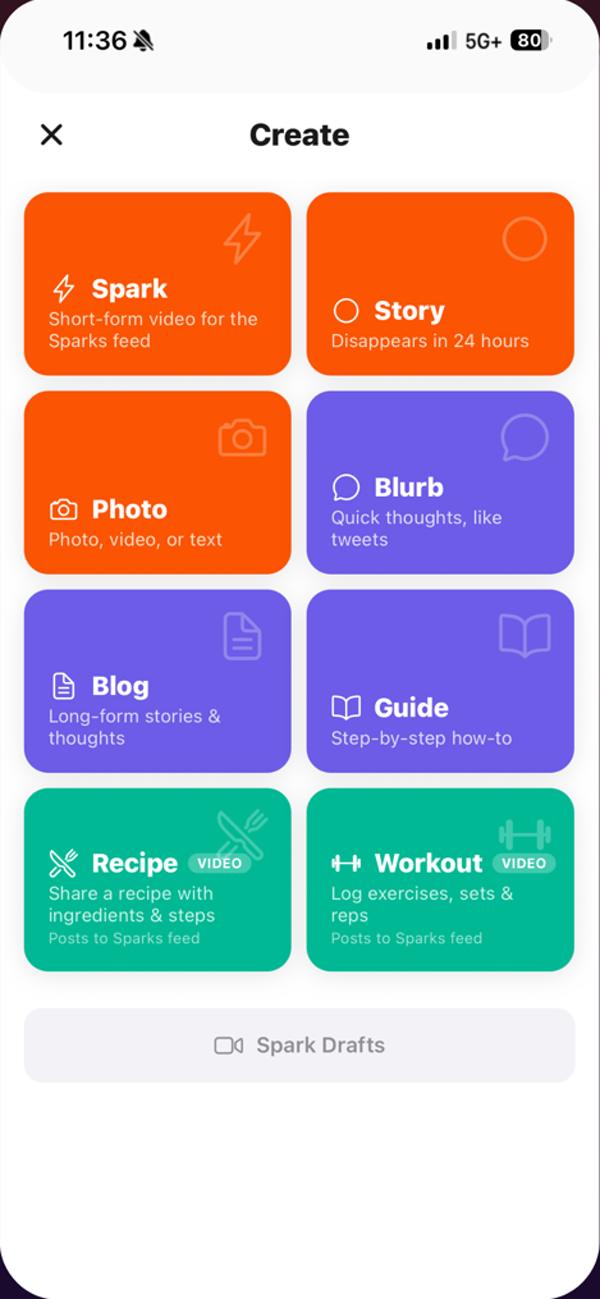
The create button opens one menu for everything. A Spark is a short video. A Story is a quick update that disappears after 24 hours. A Blurb is a short thought, and a Photo post covers pictures, video or text.
Longer formats sit beside them: blogs, guides, recipes and workouts. Blogs carry a cover image, reading time and word count for the longer story. A creator never leaves the app to publish something different.
This is what lets creators publish more. After launch, creators put out 60% more content each month, because every format lives in one place.
- 02
Sparks: short video that starts fast
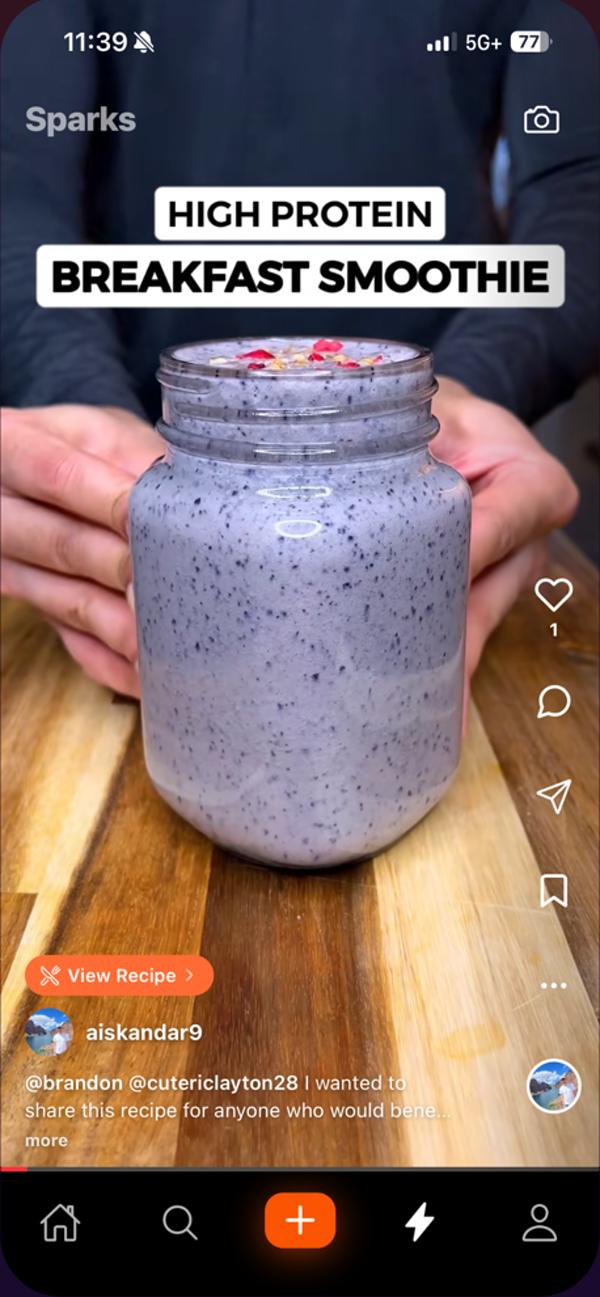
Sparks play full screen, one after another, with like, comment, share and save buttons on the side. A Spark can link to the full recipe or workout behind it.
Short video only works if it starts at once. We compress every upload and cache what comes next, so a Spark opens quickly on most mobile networks.
In early reviews, people call the app simple and free of bugs, and creators say their videos travel well.
- 03
Recipes people can cook from
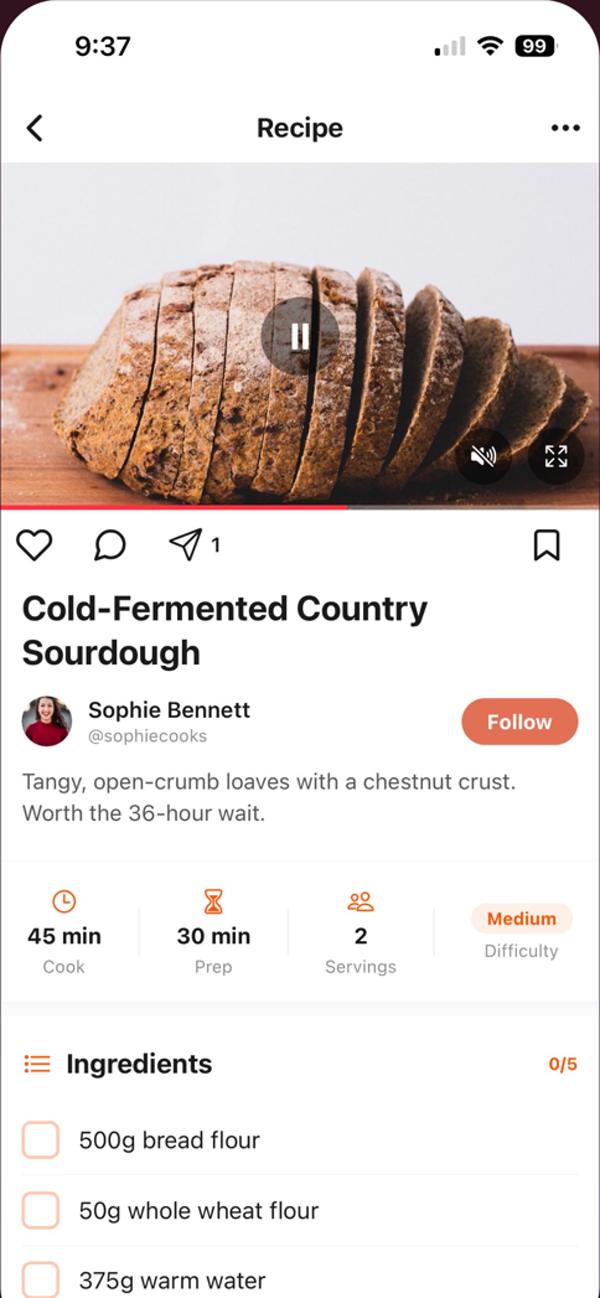
A recipe is not a caption. The template has cook time, prep time, servings and difficulty, then an ingredients list people can tick off as they go.
Steps follow the ingredients in order. Because the data has structure, the app can show it cleanly on any screen size.
- 04
Workouts with sets and tags
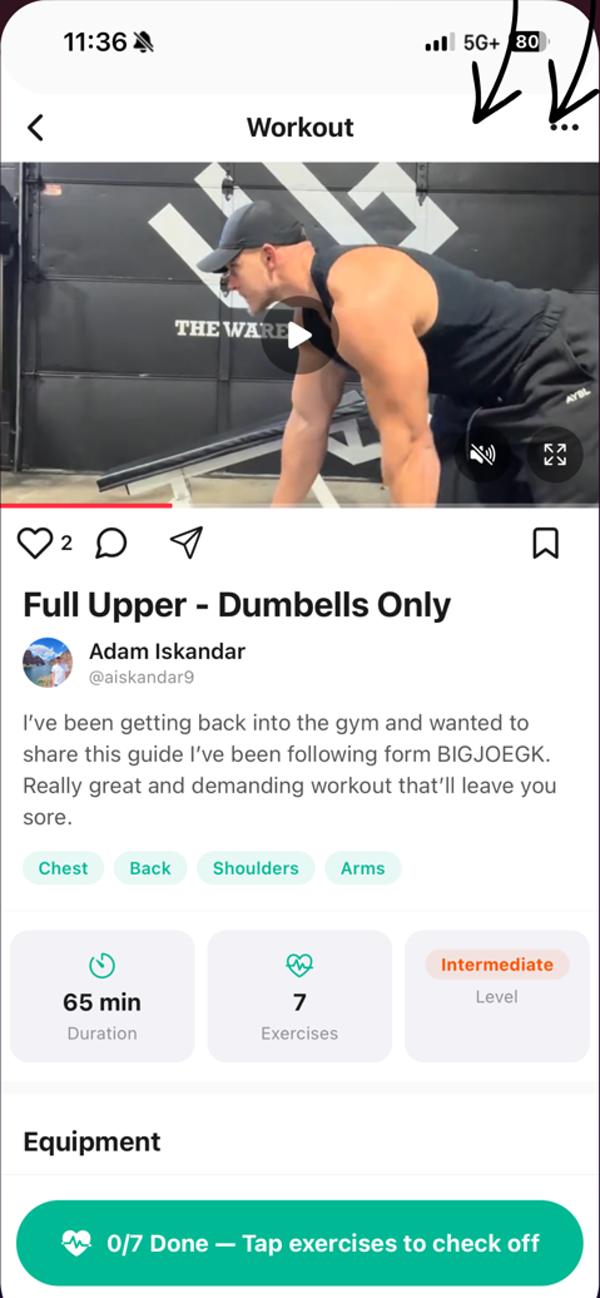
Workout posts carry a video, muscle group tags, the total time, the number of exercises and a level. Equipment is listed before the exercises.
People tick off each exercise as they finish it. The post becomes something to follow in the gym, not just something to watch.
Planning something like this? Talk it through with the team that built it, in a free 30-minute call.
Book a free 30-minute callHow it works
A creator app is two systems side by side. One moves large media files from phones to viewers. The other decides who may see what. This is how we build both for an app like Amara Social.
The architecture
Video never passes through the API. Phones upload straight to S3 with a short-lived link and stream from the CDN, while the API decides who may see each post.
People and devices
Record
 iPhone appReact Native with TypeScript
 Android appThe same codebase, built for Android
Watch
- ViewersFriends and followers watch in the same apps
Our system
Upload
 Amazon S3Phones upload here directly; renditions and thumbnails
Process
 FFmpeg workersCompress video and cut it into segments
Deliver
 CloudFrontServes media from edge caches near viewers
App path
 REST API in Node.jsOne entry point for both apps, over HTTPS
- Posts and templatesEvery format, with its structured fields
- Feeds and StoriesFriends feed, creators feed, 24-hour Stories
- Audience and safetyWho may see each post, reports and blocks
Data
 PostgreSQLAccounts, posts, audiences and relationships
 RedisFeed timelines, sessions and live Stories
Outside services
 Firebase Cloud MessagingPush alerts for comments, follows and messages
- Record to Amazon S3: Direct upload
- Amazon S3 to FFmpeg workers: Upload event
- FFmpeg workers to CloudFront: Renditions
- CloudFront to Viewers: Segments
- Record and App path: Posts, audiences and signed upload links over HTTPS
- App path to Data: Posts and timelines
- Firebase Cloud Messaging to Viewers: Push alerts
What happens when a creator posts a Spark
Seven steps run between tapping post and followers watching. The audience rule is saved before the Spark reaches any feed.
-
01Ask to uploadApp to APIThe app tells the API the size and type of the video. The API checks the session and returns a presigned upload URL.
-
02Upload the fileApp to S3The phone sends the video straight to S3, in parts for a long clip, so the API never carries it.
-
03Start processingS3 to FFmpegS3 sends an event for the new object, and a worker picks up the job from a queue.
-
04Save the renditionsFFmpeg to S3FFmpeg writes compressed versions, short segments and a thumbnail back to storage.
-
05Report readyFFmpeg to APIThe worker tells the API the video is ready to publish.
-
06Publish to the right peopleAPI to DataThe API saves the post with its audience, then adds it to the feeds of the people allowed to see it.
-
07Followers watchApp to CDNViewers’ apps fetch the playlist and segments from CloudFront, mostly from caches near them.
One codebase for iPhone and Android
Amara is built in React Native with TypeScript. One codebase serves both phones, and TypeScript catches whole classes of mistakes before the app is built.
React Native uses Hermes as its JavaScript engine by default. The React Native team says Hermes often improves start-up time, lowers memory use and shrinks the app compared with JavaScriptCore.
The New Architecture gives synchronous access to layout, so no half-drawn state is shown. It also supports the concurrent features from React 18, such as Transitions. Both help a feed that mixes video, images and text.
A feed that scrolls smoothly
A social feed is a long list, and long lists are where mobile apps stutter. React Native’s FlatList only draws the rows near the screen.
The React Native docs list the settings that matter: initialNumToRender, maxToRenderPerBatch, windowSize and removeClippedSubviews. They also warn that setting initialNumToRender too low leaves blank areas on first load. We tune these per screen, not once for the whole app.
Only one video plays at a time. The Spark in view plays, and the ones above and below are paused and loaded just enough to start at once.
Two feeds, and a calmer design
The public listing describes two separate feeds: one for creators people follow, one for friends and family. That way a post from a sister is never buried under creator videos.
It also offers an optional metric-free view, with like, comment and view counts hidden. That is a design choice against the scroll-at-all-costs model.
On the server, each person’s feed is a list of post IDs ordered by time. Redis sorted sets fit this: members kept in order by a score, which here is the posting time.
Pages are fetched with a cursor, not an offset. Slack’s engineering team explains why: when new items arrive quickly, offset pages skip or repeat results. A cursor marks the last item seen, so the next page carries on from there.
Uploads that go straight to storage
A video should never travel through the API servers. It slows them and costs twice in bandwidth. So the API hands the phone a presigned URL instead.
Amazon’s documentation describes this exactly: a presigned URL lets someone upload an object without holding AWS credentials, limited by the permissions of whoever created the URL. We make each one short-lived and tied to a single object key.
Long clips use multipart upload. The file goes up in parts that can be sent in any order and in parallel, and a failed part is retried alone. On a shaky mobile connection that is the difference between a slow upload and a failed one.
When the object lands, S3 sends an event notification. S3 can deliver these to an SQS queue, an SNS topic or a Lambda function. We put jobs on a queue, so a burst of uploads waits its turn rather than overloading the workers.
Compressing video with FFmpeg
Phones record large files at high bitrates. FFmpeg workers turn each upload into smaller versions that suit mobile networks.
We follow Apple’s HLS authoring specification for the video itself. It asks that some content be encoded in H.264 for compatibility, with a key frame every two seconds. It also says every video segment must start with a key frame, which lets the player switch quality cleanly.
FFmpeg’s HLS muxer cuts the stream into segments of a set length, at the next key frame. So the key frame spacing and the segment length are chosen together.
Each upload also gets a thumbnail, so the feed can show something before the video loads.
Delivery and caching
CloudFront keeps copies of files in edge locations near viewers. Amazon explains that the more requests the cache can answer, the fewer reach the origin, and the lower the latency.
The storage bucket stays private. CloudFront reads from it using origin access control, which Amazon recommends over the older origin access identity. Nobody can bypass the CDN and fetch files from the bucket directly.
On the phone, the next Sparks in the queue are fetched ahead of time and kept in a small cache. Swiping to the next one starts from local data, not from the network.
Templates for recipes, workouts and guides
Each template is a set of named fields. A recipe has times, servings, difficulty, ingredients and steps. A workout has a duration, a level, equipment and exercises with sets and reps.
We store these fields as jsonb in PostgreSQL, beside the common post columns. jsonb can be indexed, so the app can still search across them.
Recipe fields follow schema.org names, such as recipeIngredient, recipeInstructions and cookTime, with times as ISO 8601 durations. If posts are ever shown on the web, the same data can describe them to search engines.
Who can see each post
Every post, Spark and Story stores its own audience. The API applies that audience whenever it builds a feed, a profile or a search result, never just in the app.
PostgreSQL row security policies add a second guard. Once enabled on a table, normal reads and writes must pass a policy, which restricts rows for each user. A bug in one query then cannot leak a private post.
Stories vanish after 24 hours. Redis can set a timeout on a key, after which the key is deleted automatically. So the live Story tray expires on its own, while the creator’s archive stays in PostgreSQL.
Sign-in and tokens
The app signs people in with OAuth 2.0, over TLS. RFC 8252, the standard for OAuth in native apps, says such apps must not use embedded user-agents, such as in-app web views, for the sign-in page.
It also requires PKCE. RFC 7636 defines PKCE to stop a stolen authorisation code from being used by another app on the same phone.
Access tokens are short-lived, and refresh tokens can be revoked on the server. Signing out on one phone ends that session at once.
Safety, young users and leaving
Both app stores set rules for user-generated content. Apple’s guideline 1.2 asks for a way to filter objectionable material, a way to report it with timely responses, and the ability to block abusive users. Google Play’s policy asks for terms people accept before posting, plus in-app reporting and blocking.
So reporting, blocking and removal are built into every format. The app also supports checking ages and asking a parent for consent where a user is young. Reports land in a queue the team works from, and every action is logged.
In the UK, the ICO’s Children’s code sets fifteen standards for online services likely to be used by children, social media included. High privacy settings are one of them.
Leaving must be easy too. Apple requires apps that create accounts to offer deletion inside the app. Google Play asks for an in-app path and a web link.
Release pipeline
The backend ships in Docker containers. Multi-stage builds keep the final image small, with build tools left out of what runs in production.
A CI/CD pipeline builds and tests every pull request, then deploys merged changes. GitHub Actions is one such platform, and it runs these workflows on hosted Linux, Windows and macOS machines.
Mobile releases go through the same pipeline: a build for each store, signed, tested and sent to a testing track before review.
The stack and why we chose each part
| Layer | Technology | Why we chose it |
|---|---|---|
| Mobile app |  React Native with TypeScript | One codebase for iPhone and Android, with types that catch mistakes before release. |
| Backend and APIs | Node.js and REST APIs | The same language as the app, and well suited to many small requests from feeds and comments. |
| Database and caching | PostgreSQL and Redis | PostgreSQL for posts, audiences and relationships. Redis for timelines, sessions and Stories that expire. |
| Video and media | FFmpeg, Amazon S3, CloudFront | FFmpeg compresses and segments video, S3 stores it, and CloudFront serves it from caches near viewers. |
| Notifications | Firebase Cloud Messaging | One service to send push alerts to both iPhone and Android. |
| Security |  TLS, OAuth 2.0 | Encrypted traffic everywhere, and a standard sign-in flow with tokens that can be revoked. |
| DevOps |  Docker and CI/CD pipelines | The same container in testing and production, and every change built and tested before it ships. |
The build plan
This is how we would plan an app like Amara Social today. The weeks assume one team working on the app, the backend and the media pipeline in parallel.
- DiscoveryWeeks 1 to 2
- Agree the content formats and their fields
- Map audiences, feeds and privacy rules
- Moderation and age-check approach
- Clickable prototype of feed, create and profile
- Backend and accountsWeeks 3 to 8
- OAuth 2.0 sign-in with PKCE
- Posts, templates and audiences in PostgreSQL
- Follows, friends and two feeds
- Cursor-paged feed APIs
- Media pipelineWeeks 3 to 9
- Presigned and multipart uploads to S3
- Event queue and FFmpeg workers
- Segments, renditions and thumbnails
- Private bucket behind CloudFront
- Mobile appWeeks 5 to 16
- React Native feed with tuned lists
- Sparks player with preloading
- Create flows for every format
- Stories that expire after 24 hours
- Safety and privacyWeeks 12 to 18
- Report, block and removal tools
- Age checks and parental consent
- Account and data deletion
- Push alerts and settings
- Testing and launchWeeks 17 to 24
- Video tests on slow networks
- Privacy tests for every audience
- Store review for iPhone and Android
- Monitoring and 3 months of fixes
- 01Weeks 1 to 2
Discovery
- Agree the content formats and their fields
- Map audiences, feeds and privacy rules
- Moderation and age-check approach
- Clickable prototype of feed, create and profile
- 02Weeks 3 to 8
Backend and accounts
- OAuth 2.0 sign-in with PKCE
- Posts, templates and audiences in PostgreSQL
- Follows, friends and two feeds
- Cursor-paged feed APIs
- 03Weeks 3 to 9
Media pipeline
- Presigned and multipart uploads to S3
- Event queue and FFmpeg workers
- Segments, renditions and thumbnails
- Private bucket behind CloudFront
- 04Weeks 5 to 16
Mobile app
- React Native feed with tuned lists
- Sparks player with preloading
- Create flows for every format
- Stories that expire after 24 hours
- 05Weeks 12 to 18
Safety and privacy
- Report, block and removal tools
- Age checks and parental consent
- Account and data deletion
- Push alerts and settings
- 06Weeks 17 to 24
Testing and launch
- Video tests on slow networks
- Privacy tests for every audience
- Store review for iPhone and Android
- Monitoring and 3 months of fixes
Testing and release
Social apps fail in public. A slow video, or a private post shown to the wrong person, costs trust at once. So we test those paths hardest.
Video on bad networks
We throttle test phones to slow mobile speeds and swipe through Sparks. The next Spark should start without a spinner, and uploads should survive the network dropping halfway.
We also test long clips, portrait and landscape, and files from older phones, so the workers handle what real people record.
Privacy, audience by audience
For each audience setting, we sign in as someone inside it and someone outside it. The post must appear for one and stay hidden from the other, in feeds, profiles, search and shared links.
Blocked accounts get the same test. A block must hide content in both directions.
Store review
Both stores check user-generated content rules and account deletion. We prepare a test account, review notes and screenshots, and check reporting, blocking and deletion before we submit.
Results
Amara Social is a calm home where creators share every kind of content and grow an audience.
- 1K+downloads on the Google Play Store
- 4.4star rating from 17 reviews
- 60%more content published by creators each month after launch
- 30%growth in monthly active users within 6 months of launch
Every content type, from Sparks and Stories to recipes, workouts and blogs, can be shared from one mobile app. Creators publish more because they no longer split their work across tools.
Audience controls let people decide who sees each post, and that builds trust in the community. People in early reviews call the app simple and free of bugs, and creators say their videos reach people.
What the client says
-
“Amara is built around creators, so posting had to be effortless: posts, short videos, Stories, recipes and workouts, with each creator deciding who sees what. AppAgentix built it for iPhone and Android from one codebase, and what I value most is the video: uploads process in the background, playback starts fast and holds up on mobile data. Moderation and audience controls were built properly, not as an afterthought. They worked like part of our team.”
Clayton C.VP Engineering and AI, Amara
Since launch
A social app keeps changing after launch. These are the improvements an app like this receives in its first six months.
- 01Richer Stories
More ways to make a Story, with replies and reactions sent to the creator.
- 02A better Spark editor
Recording in segments, trimming clips and adding captions before posting.
- 03Smoother video playback
Players tuned for faster starts and steadier quality on mobile data.
- 04Share into the app
Photos and videos shared into the app straight from other apps.
- 05Links that open in the app
Links to posts and profiles open inside the app instead of the browser.
- 06Moderation tools for the team
A review queue with clearer reasons for each report and action.
- 07New OS releases supported
Each new iOS and Android version tested before it reaches users.
Want a result like this for your own product? Get a written view of scope, time and price within two working days.
- 95%+ delivered on or before the agreed date
- 60% of clients come back for a second project
- 3 months of fixes after launch in the build price
What this would cost to build today
These are our published prices, in pounds, excluding VAT, as of November 2026. An app at Amara Social’s scope, with seven content formats, a video pipeline and safety tools on two platforms, sits in the full app range.
- Discovery£3,000 to £6,0002 weeks
Formats, feeds, privacy rules, a clickable prototype and a fixed quote. It comes off the build price if you continue.
- First version£15,000 to £40,0008 to 14 weeks
iPhone and Android from one React Native codebase, with posts, photos, follows, one feed and report and block.
- This caseFull app like Amara Social£40,000 to £90,0004 to 8 months
Sparks with a video pipeline, Stories, templates, blogs, two feeds, audience controls, age checks and deletion.
- Support and runningfrom £750 a monthMonthly
OS and store updates, fixes and monitoring. Minimum 3 months, then 30 days’ notice.
- Fixes after launch are included in the build price for 3 months.
- Video running costs are separate: storage, processing and CDN delivery are billed by your providers and grow with uploads and views.
- Moderation staffing is a running cost for your team, not part of the build price.
Estimate your app in a minute with our React Native calculator
Questions about building a social media app
How much does it cost to develop a social media app?
With us, a first version on iPhone and Android costs £15,000 to £40,000 and takes 8 to 14 weeks. A full creator app like Amara Social, with short video, Stories, templates and safety tools, costs £40,000 to £90,000 over 4 to 8 months. Prices exclude VAT. Video storage and delivery are billed separately.
How can I develop a social media app?
Start with accounts, posts, follows and one feed, plus report and block from day one. Upload media straight to storage, process video on workers and serve it through a CDN. Build both phones from one codebase, such as React Native, then add formats once people are posting.
How can I create an app like Instagram?
Build the same parts at a smaller scale: photo and video posts, short video, Stories that expire, feeds and privacy settings. What makes an app worth joining is a reason to choose it. Amara Social’s is a calmer feed and formats such as recipes and workouts.
Is it hard to build a social media app?
The screens are the easy part. The hard parts are fast video on weak networks, privacy that holds in every feed and search, and moderation that meets Apple and Google rules for user content. Plan for those from the first week.
How do social media apps make their money?
Most use advertising, creator subscriptions, paid features or a share of creator sales. Whichever you choose, payments for digital features inside the app usually go through Apple and Google billing. Decide the model early, because it shapes the feed and the data you keep.
Is making your own app worth it?
It is when you own an audience or a niche the big platforms serve badly. Amara Social grew monthly active users by 30% within 6 months, and its creators publish 60% more each month. Start with a focused first version and grow from there.
Services behind this build
Planning a social or creator app?
Tell us about your creators and your audience. A developer reads your brief. We reply within 30 minutes.