Black Movies & TV: a streaming app for phones and TVs
Black Movies & TV is a streaming app we built for films and documentaries from Black creators and featuring Black cast. It covers every genre, from major stars to new independent talent. Viewers can watch free with ads, subscribe, or rent one film, on iPhone, iPad, Android and Apple TV.
- iPhone and iPad
- Android
- Apple TV
- 50,000+downloads on Google Play
- 4platforms: iPhone, iPad, Android and Apple TV
- 3ways to watch: free with ads, a plan, or a single rental
The brief: one home for Black film and television
The team behind Black Movies & TV held a library of films, documentaries and series from Black creators and featuring Black cast. It runs across every genre, from well-known stars to independent filmmakers at the start of their careers. They wanted one place where viewers could find it all.
General streaming services mix titles like these into a huge catalogue, where they are easy to miss. A viewer looking for a 1970s action film or a new independent drama should reach it in a few taps. So discovery was the first problem to solve.
Money was the second. Some viewers want to watch for free. Others want a monthly or yearly plan. Plenty just want to rent one film tonight. The service had to offer all three without making the app confusing.
Who the service is for
- The free viewer
Watches without paying and accepts ads in return.
- The subscriber
Pays for a plan to watch with no ads, on every device.
- The one-night renter
Pays once for a single film and never commits to a plan.
- The living-room watcher
Browses with a remote on a big screen. Every screen has to work with a D-pad.
Six problems and what we did about each
- 01The problem
In a big catalogue, general recommendations hide the exact film or series a viewer came looking for.
What we builtWe built genre shelves, hand-picked collections and a search tool, so each title reaches the viewers who want it, fast.
- 02The problem
Some viewers want free films, others prefer a monthly plan, and plenty just want to rent a single film.
What we builtWe put free viewing with ads, subscription plans and one-off rentals in a single app. Each viewer picks the option that suits them.
- 03The problem
People switch between phones, tablets and TVs. When each screen behaves differently, the service feels broken up.
What we builtWe made apps for every screen the service runs on, and it looks and works the same on each of them.
- 04The problem
Home networks change through the day, and a film that keeps stopping to buffer makes viewers leave.
What we builtWe set up adaptive streaming over HLS, which adjusts video quality to the bandwidth, so playback stays steady.
- 05The problem
Paid films and plans need solid checks. The business only works if paid films reach paying viewers alone.
What we builtWe added purchase checks and access tied to each plan. A paid film opens only once the viewer has finished paying.
- 06The problem
Viewers switch phones or reinstall the app, and losing earlier purchases causes frustration and support requests.
What we builtWe added a restore option for eligible in-app purchases. A viewer who comes back recovers their rentals and plans with little effort.
What we built
Seven features carry the service. Each one below sits beside a real screen from the public app listings.
- 01
A home screen built for the living room
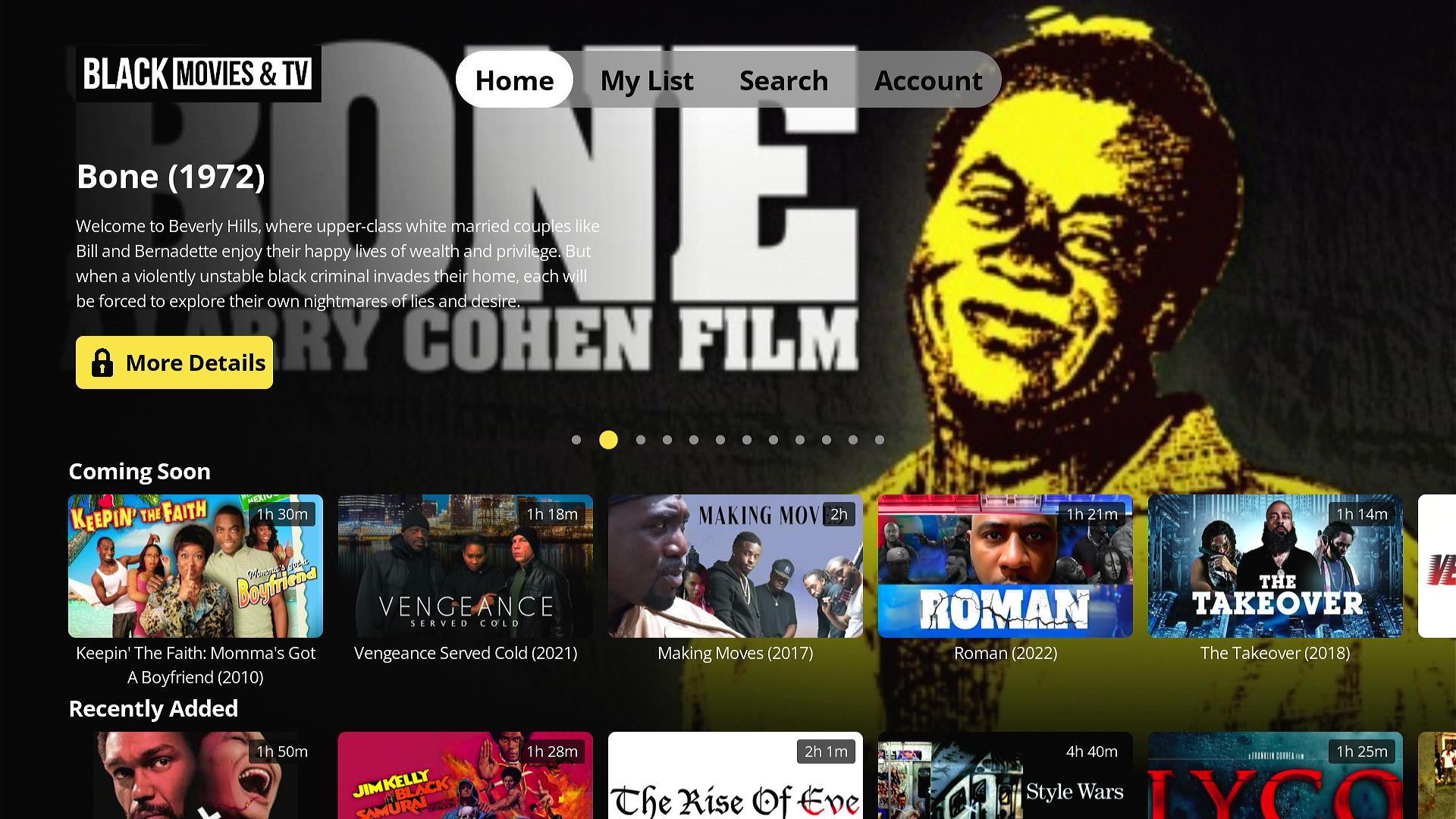
The home screen opens on a featured film, then rows of titles. Rows such as Coming Soon, Last Chance to Watch and Recently Added give viewers a reason to come back.
On the TV, a top menu with Home, My List, Search and Account suits a remote. We design every TV screen for a D-pad: focus moves in a predictable line, and the focused poster is clearly marked.
We build rows like these so the content team sets them, not code. They can change the home screen without a new app release, which matters for a catalogue that keeps growing.
- 02
Shelves that match how viewers browse
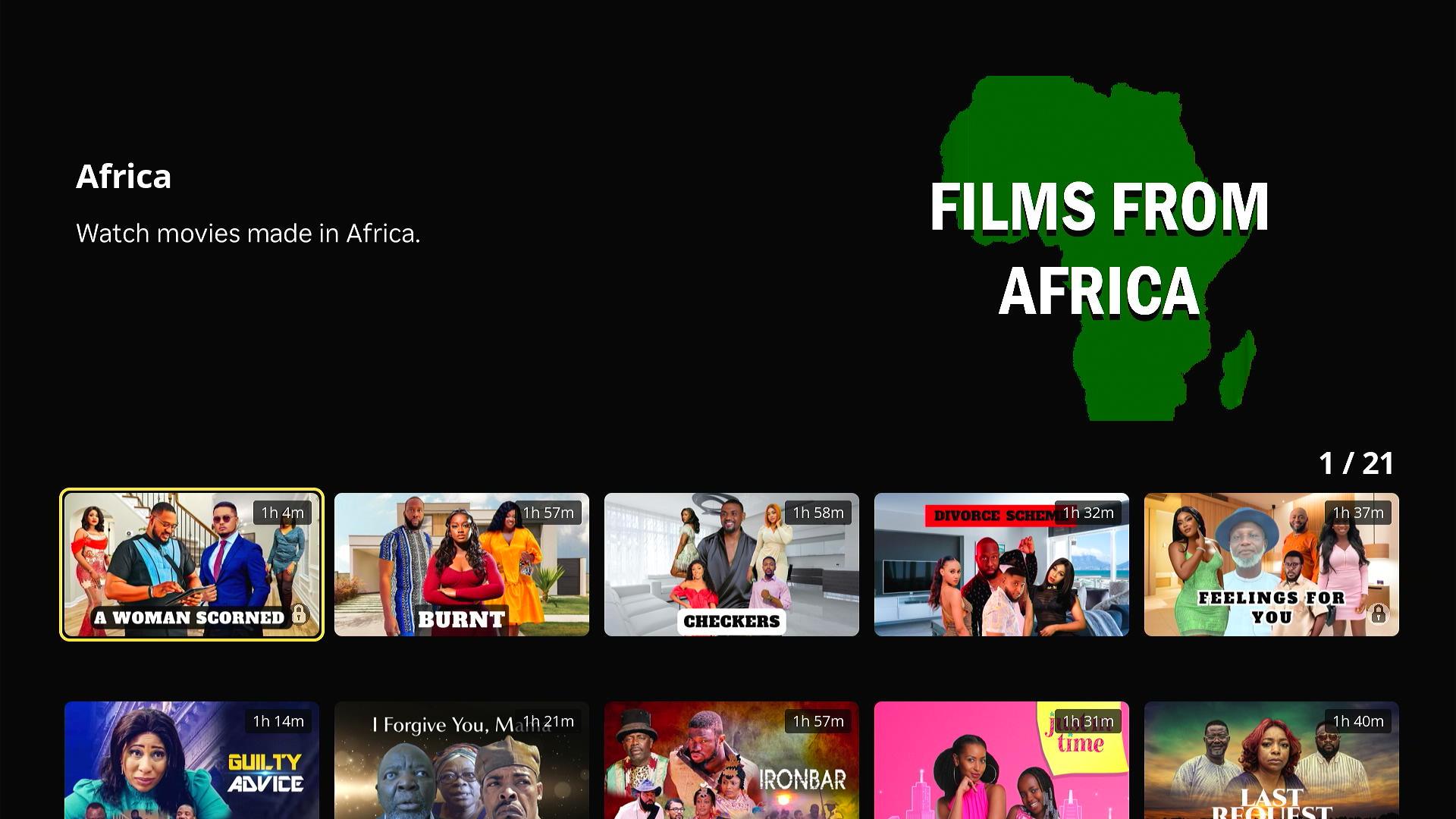
Viewers browse by mood and by era. So the catalogue is sorted into shelves: drama, action and comedy, films by decade, films made in Africa, films by star rating, series and more.
We build each shelf as a saved query on the catalogue, not a hard-coded list. A new film tagged with a decade and a region then appears on the right shelves the day it goes live.
- 03
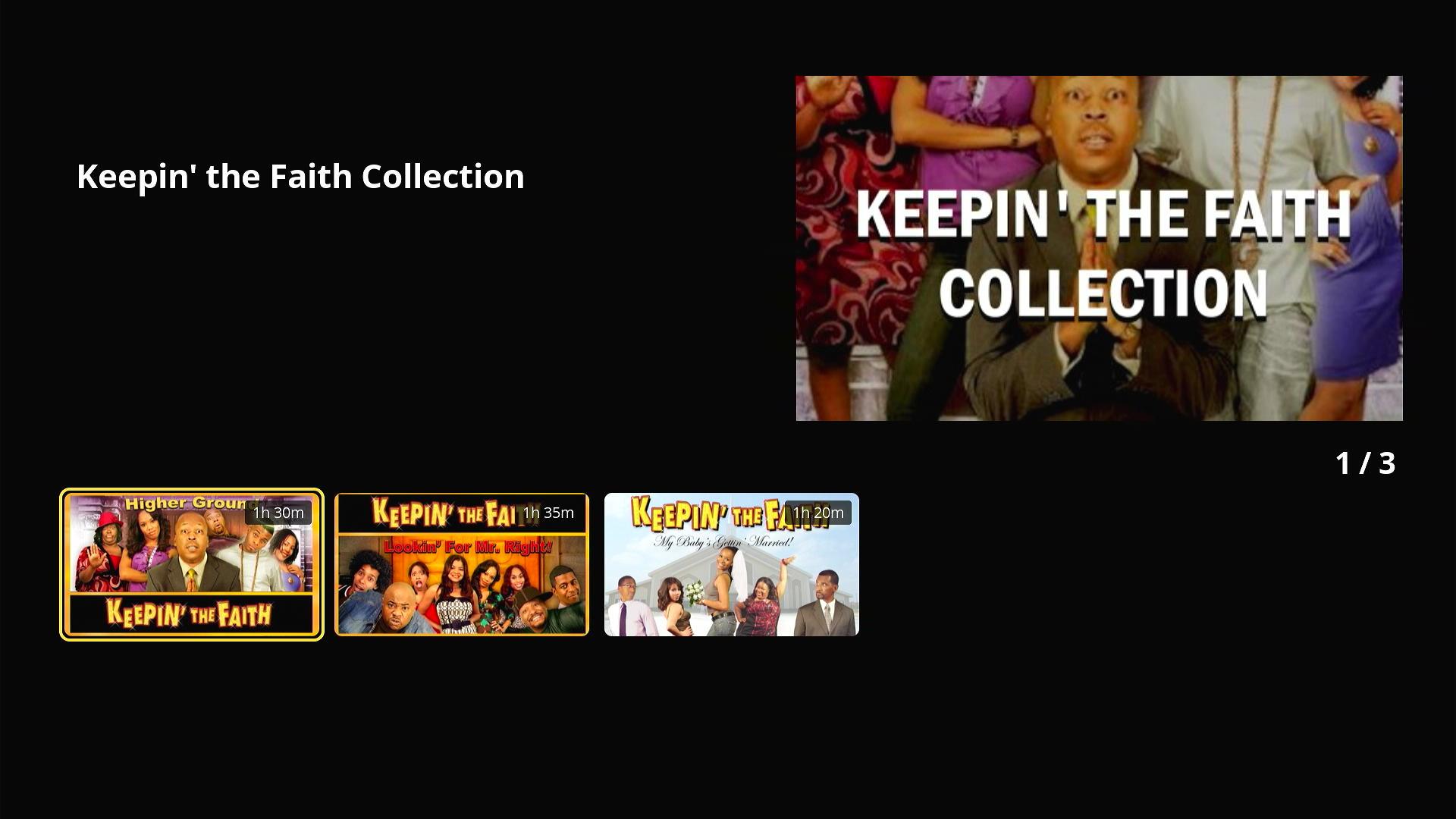
Hand-picked collections
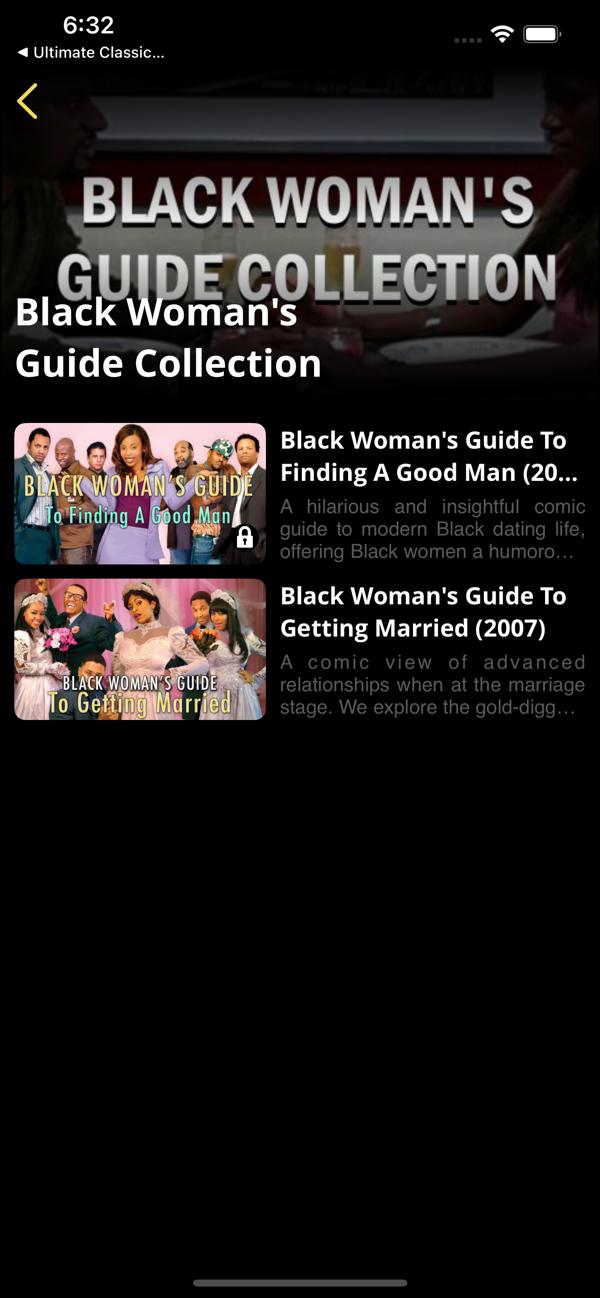
Curators group related titles into themed collections, such as a film series and its sequels. Each title in a collection shows its poster, year and a short description.
A small lock marks titles that need a plan or a rental. Viewers can see what is free before they tap.
- 04
Search across films, collections and series
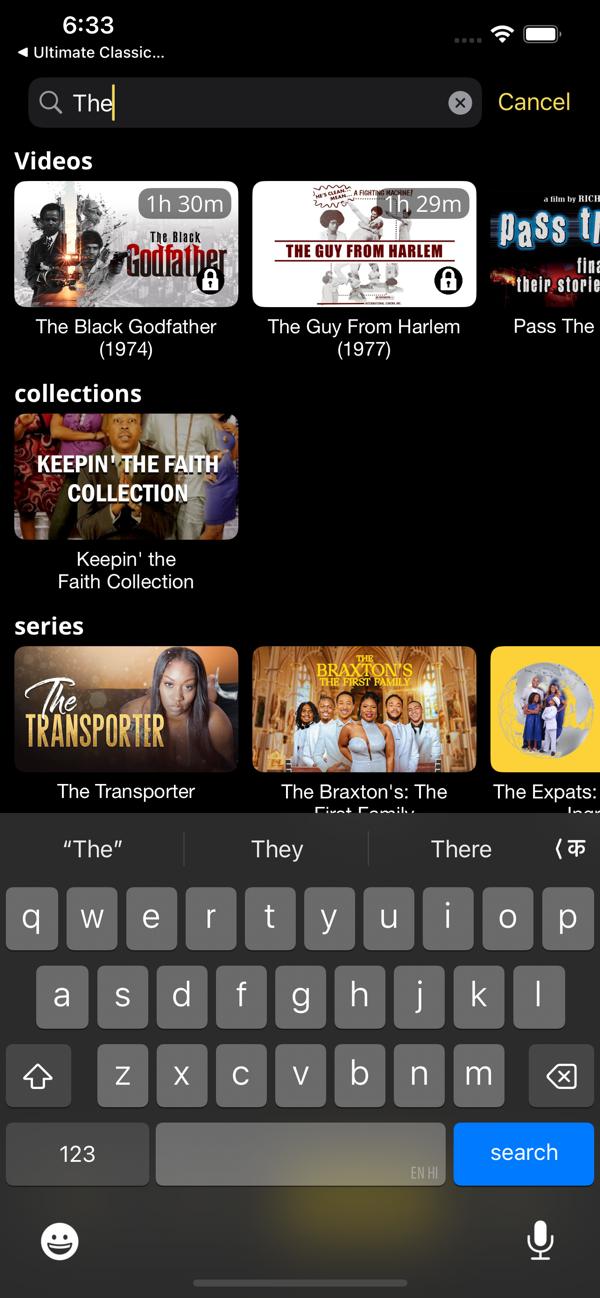
Search returns results as you type. They are grouped into videos, collections and series, so a viewer can jump straight to a whole set.
On a TV, typing with a remote is slow. So the TV app leans on browsing shelves, and search is one item in the top menu.
- 05
A page for every title
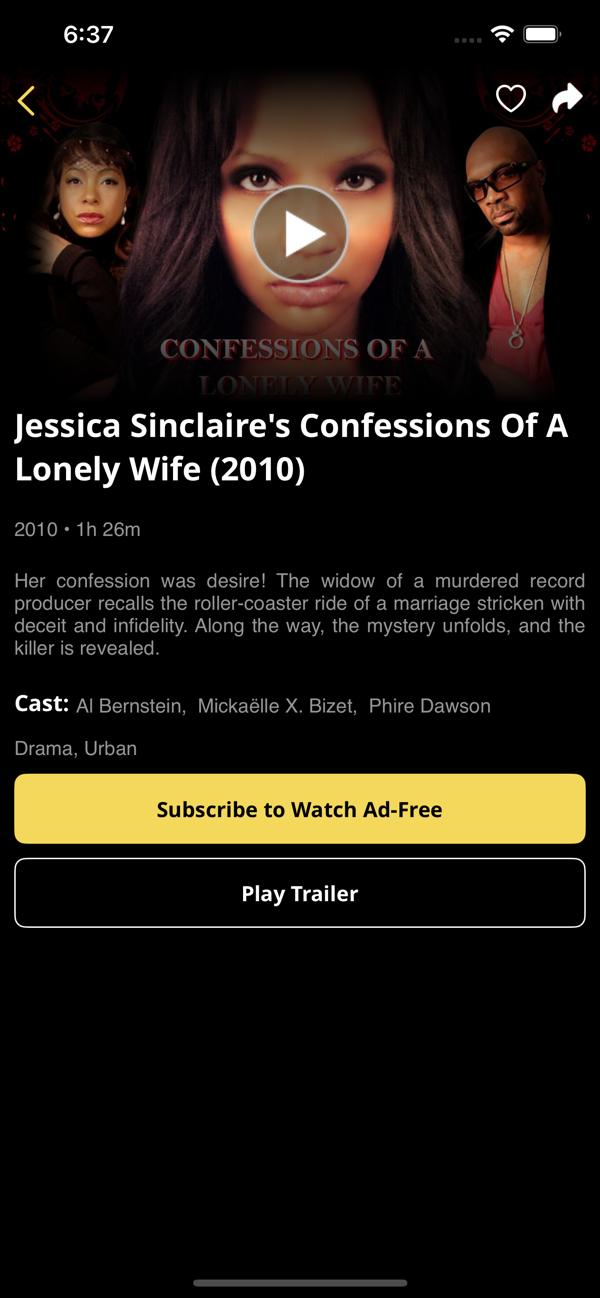
Each film page shows the trailer, the year and running time, a short synopsis, the cast and the genres. Viewers can save a title or share it from the top of the page.
The buttons change with the viewer’s access. A free viewer sees an offer to subscribe and watch without ads.
- 06
Free, subscription or rental on every title
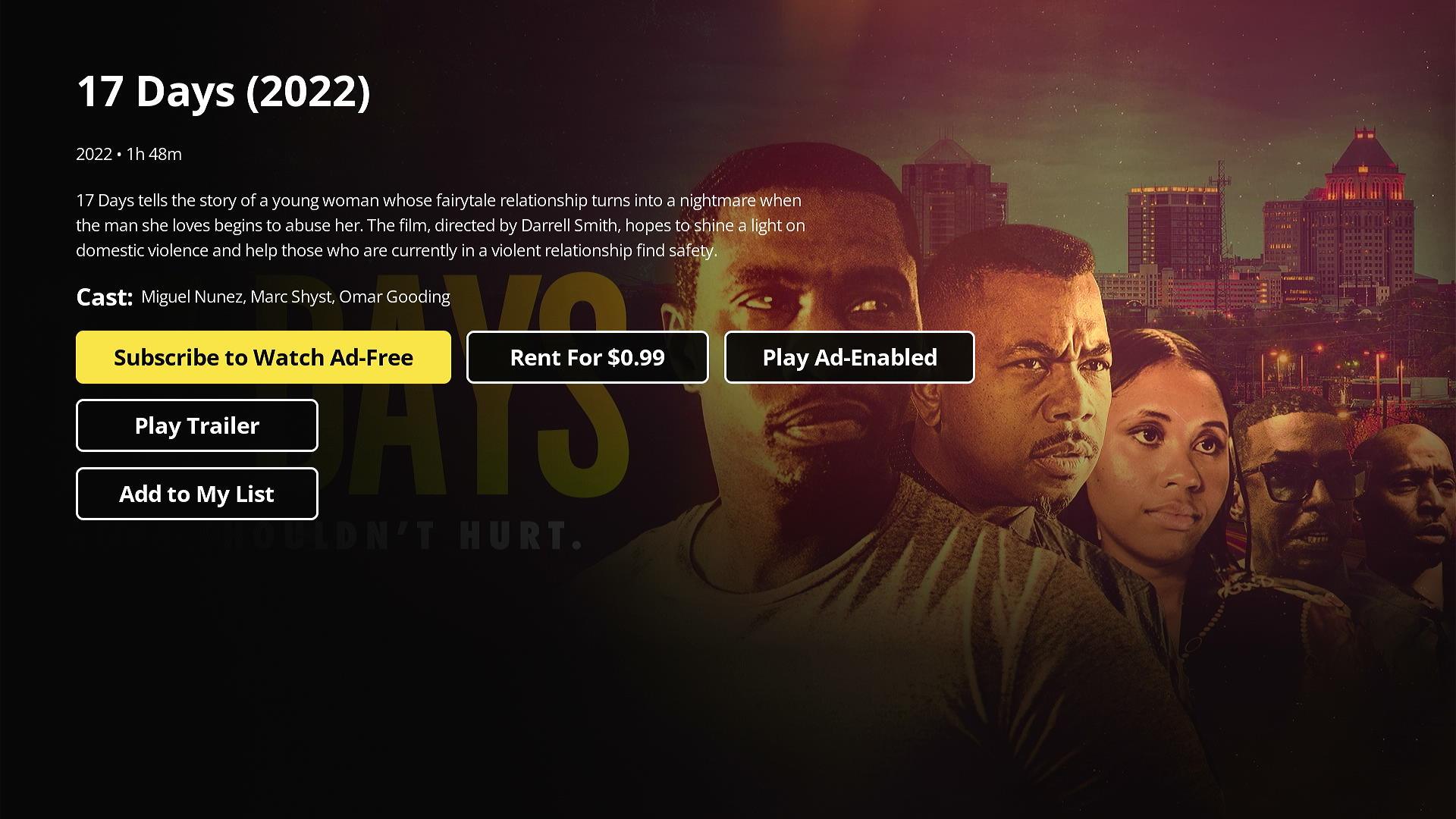
On the TV, one film page holds all three choices: subscribe to watch ad-free, rent this one film, or play it with ads. Trailer and My List sit underneath.
Ads fund free viewing. Plans renew monthly or yearly. A rental unlocks one film. Apple and Google take the payment, so card details never reach our servers.
- 07
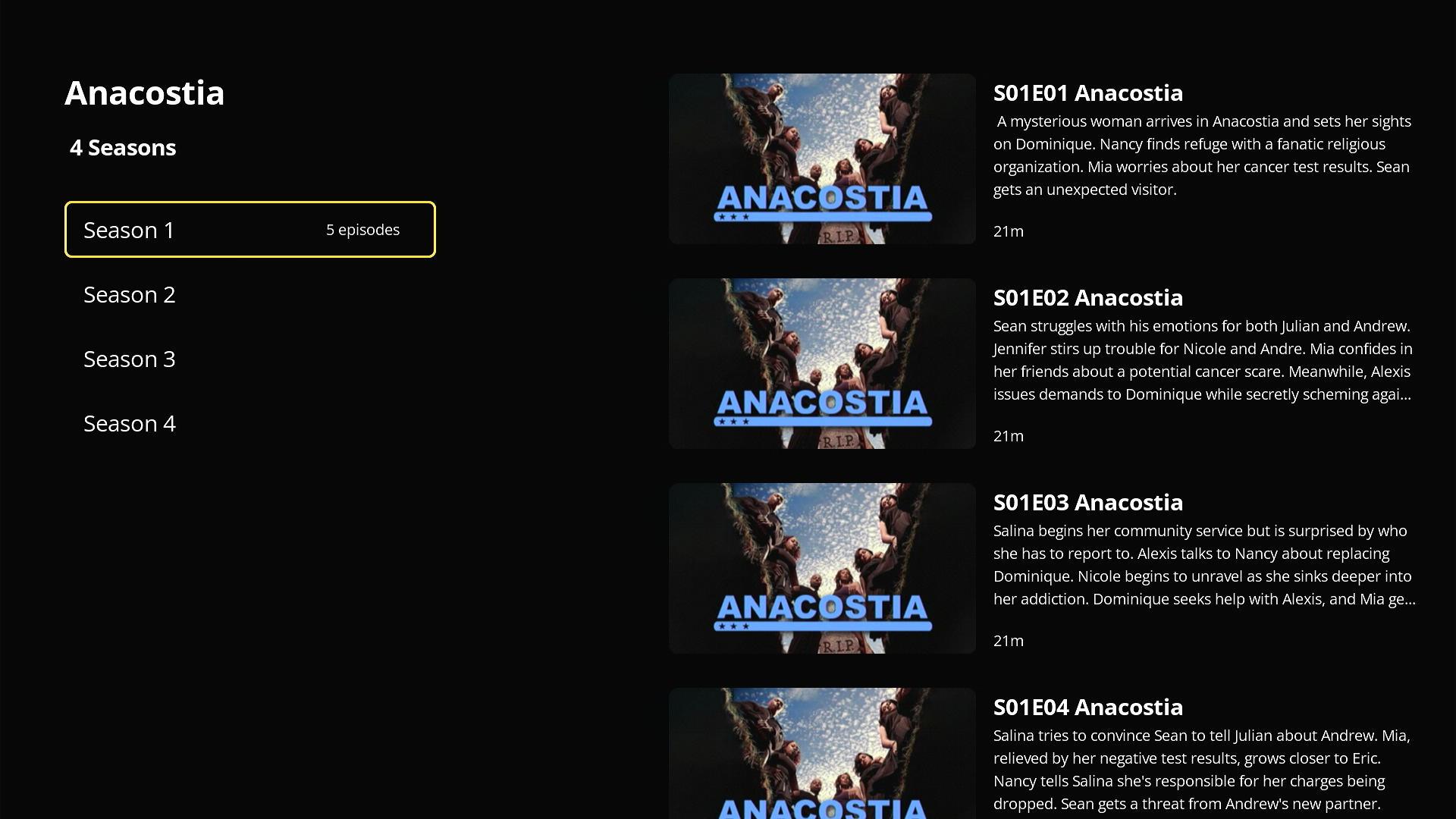
Series with seasons and episodes
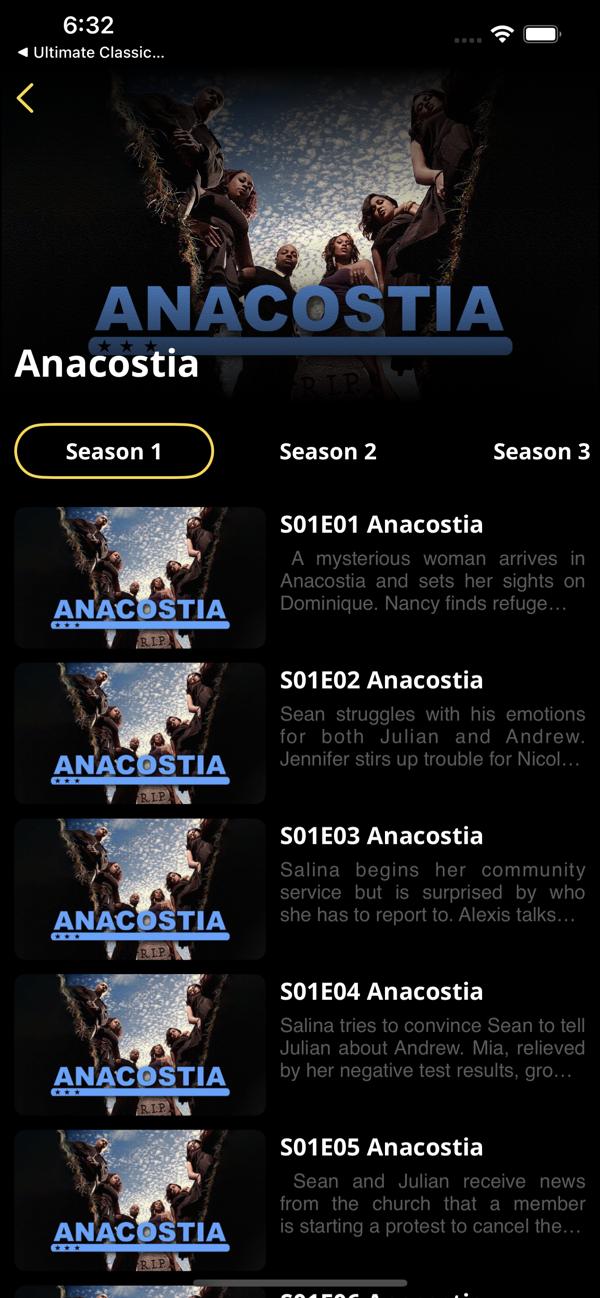
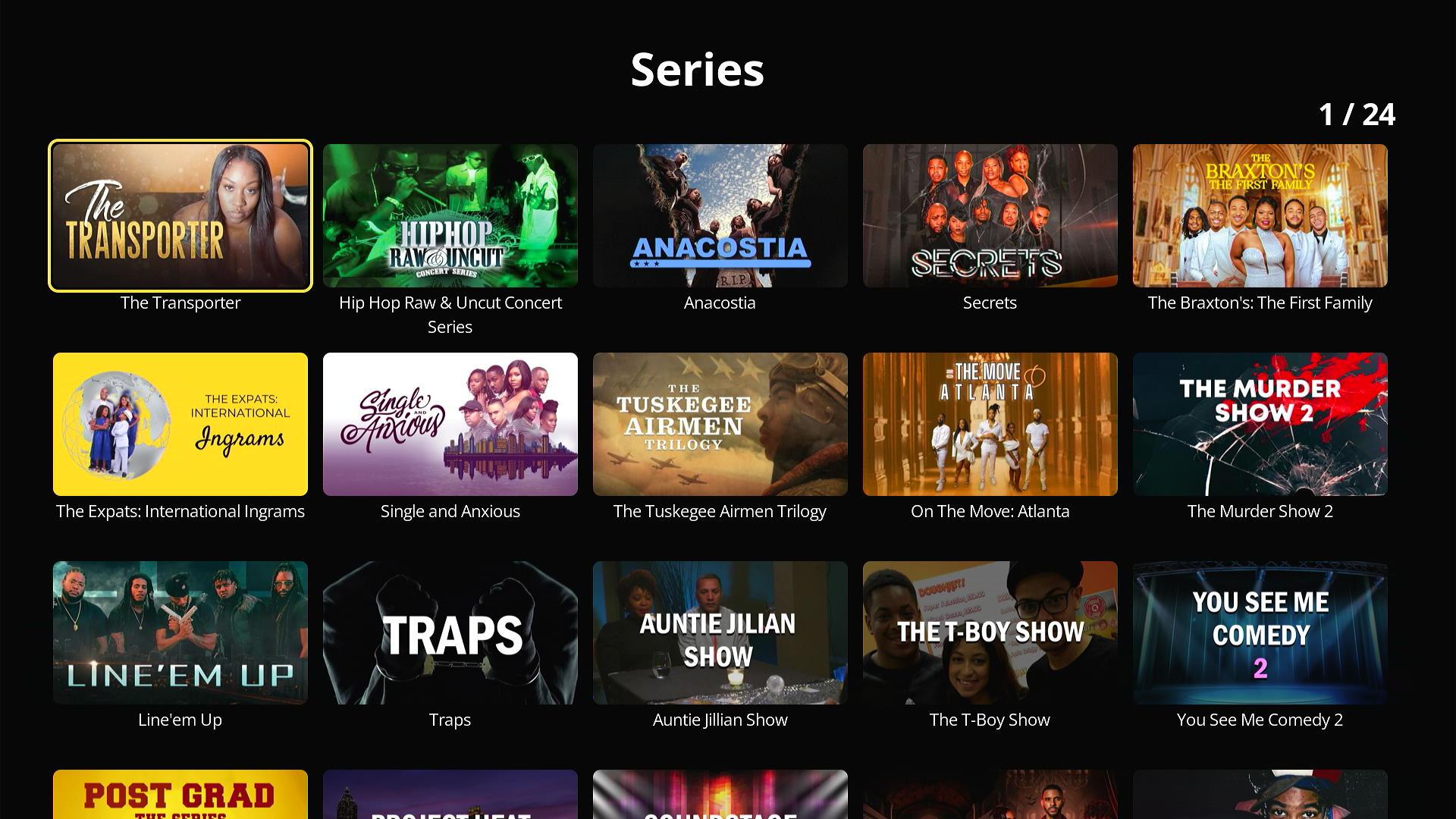
The catalogue is not only films. Series have their own pages, with a tab for each season and a description for every episode.
One account works on every phone, tablet and TV. We save resume points per episode and per account, so a viewer can stop on the phone and carry on from the same minute on the TV.
More screens from the TV app
Planning something like this? Talk it through with the team that built it, in a free 30-minute call.
Book a free 30-minute callHow it works
A streaming service is two systems side by side. One moves video to screens. The other decides who may watch what. This is how we build both for a service like Black Movies & TV.
The architecture
Video goes through the CDN. Everything else goes through the API. The apps never decide on their own whether a viewer has paid.
People and devices
Play
 Phone and tablet appOne Flutter codebase for iPhone, iPad and Android
 Android TV appRemote-first screens, the same accounts
 Apple TV apptvOS screens, the same accounts
Our system
Encode
- EncodingEach film is encoded at several qualities and cut into short segments
Store
- Origin storageHLS playlists, segments, posters and captions
Deliver
- CDNCopies segments to servers near viewers and serves them
Access path
 REST API in JavaOne entry point for every app, over HTTPS
- Catalogue and shelvesFilms, series, collections and home rows
- Accounts and resume pointsSign-in, My List and where you stopped
- EntitlementsChecks every purchase with Apple or Google before access opens
Data
 PostgreSQLAccounts, catalogue, purchases and access records
 RedisFast reads: sessions, resume points, cached shelves
Outside services

 App Store and Google PlayTake payments and send purchase updates
- Ad serverAnswers ad requests with a VAST response
- Encoding to Origin storage: Renditions
- Origin storage to CDN: Segments pulled
- CDN to Play: HLS segments
- Ad server to Play: VAST responses: which ad, and when
- Play to Access path: Sign-in, catalogue, purchases and resume points
- App Store and Google Play to Entitlements: Purchase checks and updates
- Access path to Data: Access records
What happens when a viewer presses play
Seven steps run before the film starts. The order matters: access is checked before any video URL leaves the server.
-
01Ask to playApp to APIThe app sends the title and the viewer’s session to the API.
-
02Check accessAPI to DataThe API reads the viewer’s access record, from Redis first, then PostgreSQL.
-
03Confirm purchaseAPI to StoreFor a new rental or plan, the API checks the purchase with Apple or Google before saving it.
-
04Return a playback linkAPI to AppThe API sends a short-lived link to the HLS playlist, and an ad request for free viewers.
-
05Fetch adsApp to AdsFor a free viewer, the player asks the ad server what to show and when.
-
06Stream the filmApp to CDNThe player reads the playlist, then fetches segments from the CDN at the quality the network allows.
-
07Save the placeApp to APIEvery few seconds the app saves the resume point, so another device can carry on.
Encoding and adaptive streaming
Adaptive streaming is why the films keep playing on a weak connection. Each film is encoded several times, from small and light to full HD. Each version is cut into short segments. A playlist lists them all.
The player watches how fast segments arrive. When the network slows, it switches to a lighter version at the next segment. The viewer sees a softer picture for a moment, not a spinning wheel.
We follow Apple’s HLS authoring specification for the details. It recommends six-second segments and a key frame every two seconds. It also says each video segment must start with a key frame, which is what makes clean switching possible.
For codecs, the specification allows H.264, HEVC, Dolby Vision and AV1. It asks for some H.264 versions for compatibility, so older devices still play. We encode H.264 first and add HEVC where it saves bandwidth on newer devices.
The ladder of qualities does not have to be the same for every film. A dark, grainy 1970s horror film needs more data than a flat cartoon. Netflix described this in its per-title encoding work. Cloud encoders such as AWS Elemental MediaConvert can now build the ladder per film automatically.
Delivering video through a CDN
Video files are large, and many people watch at the same time in the evening. A content delivery network keeps copies of the segments on servers near viewers. The origin serves each segment to the CDN’s caches, and the CDN serves it many times.
Paid films need protection on the CDN as well. We issue short-lived signed URLs or signed cookies, a feature that CDNs such as Amazon CloudFront document for private content. A shared link stops working once it expires.
Apple’s specification also says media requests must not use HTTP redirects, except for ad content. So we point the apps straight at the CDN, with no redirect hop in between.
The players on each device
On phones, Flutter’s official video_player plugin wraps the native players. On Android the backing player is ExoPlayer, and on iOS it is AVPlayer. That gives native HLS playback with one Flutter codebase.
Flutter’s list of supported platforms has no tvOS. So for Apple TV we build natively, with Swift and AVKit. Android TV runs Android, so the Android code can reach it. It still needs TV-specific screens, and Compose for TV with the Media3 ExoPlayer is Google’s current route for them.
Android TV has its own rules. A TV app must declare a launcher activity with the LEANBACK_LAUNCHER category, or Google Play will not list it for TVs. Google’s TV quality guidelines also require the whole app to work with a five-way D-pad, ads included.
Ads for free viewers
Free viewing depends on ads, so the ad path has to be solid. There are two ways to put ads into a stream.
In client-side ad insertion, the player switches between the film and separate ad files. The ad server describes the ads in a VAST response, the IAB Tech Lab’s standard XML format for video ads. Google publishes IMA SDKs for Android, iOS and tvOS, and Media3 works with the IMA library on Android.
In server-side ad insertion, ads are stitched into the stream itself before it reaches the player. Google calls its version Dynamic Ad Insertion, and describes the result as a seamless, broadcast-like viewing experience.
For a catalogue of on-demand films, we start with client-side ads through the IMA SDK. The ad tag tells the player where the breaks fall. If a service later moves its ads into the stream as HLS interstitials, Apple’s specification says to mark those boundaries in the playlist with the EXT-X-DATERANGE tag.
Subscriptions, rentals and store rules
Apple’s App Store rules say that unlocking premium content inside an app must use in-app purchase. Google Play’s payments policy says the same for digital content in Play-distributed apps. So rentals and plans go through Apple In-App Purchase and Google Play Billing.
The app never decides access on its own. After a purchase, it sends the purchase token or signed transaction to our API. The API checks it with Apple or Google, then writes an access record. Google’s billing security guide recommends this server-side check to stop tampering.
Google Play has a strict timer. A purchase must be acknowledged within three days, or Google refunds it automatically and removes the access. We have our API acknowledge each purchase as soon as access is saved.
Renewals, refunds and cancellations happen when the app is closed. Apple sends App Store Server Notifications and Google sends real-time developer notifications through Cloud Pub/Sub. We have our API listen to both and update access records the moment something changes.
Restoring purchases on a new phone
Apple’s guidelines say apps should offer a way to restore purchases that can be restored. StoreKit gives a list of the transactions that currently entitle a viewer, and a sync call that refreshes it from the App Store.
Apple notes that consumable purchases do not appear in that list. So on a new phone, plans come back from StoreKit’s list, and rentals come back from the access record on our server once the viewer signs in. Rentals that have expired stay expired.
Content management and protection
The content team needs to add films, write descriptions, set prices and build home rows without a developer. A web admin writes to the same catalogue tables the API reads. Changes appear in the apps on the next refresh.
For premium films, studios often ask for digital rights management. On Apple devices that means FairPlay Streaming. On Android, Widevine is the DRM that Media3 supports for HLS in fragmented MP4 segments. We set DRM per title, so free films stay simple and cheap to serve.
Privacy and analytics
Ads and analytics touch personal data. On iPhone, the App Tracking Transparency framework asks the viewer before an app tracks them across other companies’ apps. On Android, every app must complete the Google Play Data safety form before release.
We keep the analytics simple. We record what was played, on which device, for how long, and whether it was free, rented or part of a plan. That is enough to see viewing hours by device and by way of paying.
The stack and why we chose each part
| Layer | Technology | Why we chose it |
|---|---|---|
| Phone and tablet app | Flutter | One codebase for iPhone, iPad and Android, with native players underneath for smooth video. |
| TV apps | Android TV, Apple TV | Built for a remote and a big screen, sharing the same accounts and API as the phone app. |
| Video streaming | HLS adaptive streaming | Plays natively on Apple devices and through ExoPlayer on Android, and adjusts quality to the network. |
| Content delivery | CDN video distribution | Serves busy evening viewing from servers near viewers, with signed links for paid films. |
| Backend | Java, REST APIs | A mature, typed language for the rules that decide who may watch what. |
| Database | PostgreSQL, Redis | PostgreSQL holds the records that must never be wrong. Redis answers the fast, frequent reads. |
| Payments | Apple In-App Purchase, Google Play Billing | Required by both stores for digital content, and our servers never see card details. |
| Advertising | Integrated ad SDK | Plays standard video ad formats for free viewers on phones and TVs. |
| Security | Secure communication, access management | Encrypted traffic everywhere, and access decided on the server, never in the app. |
The build plan
This is how we would plan a service like Black Movies & TV today, phase by phase. The weeks assume one team working on phones, TVs and the backend in parallel.
- DiscoveryWeeks 1 to 2
- Agree the three ways to pay and the price points
- Map the catalogue: films, series, collections, tags
- Pick the CDN, encoder and ad server
- Clickable prototype of the phone and TV home screens
- Video pipeline and APIWeeks 3 to 8
- Encoding ladder and HLS packaging
- Origin storage, CDN and signed links
- Catalogue, accounts and resume-point APIs
- Web admin for films and home rows
- Phone appsWeeks 5 to 14
- Flutter home, title pages, collections and search
- Native players through video_player
- Sign-in and sync across devices
- Client-side ads for free viewers
- Payments and accessWeeks 9 to 16
- Apple In-App Purchase and Google Play Billing
- Server-side purchase checks and acknowledgement
- Store notifications for renewals and refunds
- Restore purchases on a new device
- TV appsWeeks 11 to 22
- Android TV screens with a TV launcher entry and Media3
- Apple TV app with AVKit
- D-pad focus on every screen, ads included
- Same accounts, purchases and resume points
- Testing and launchWeeks 20 to 26
- Playback tests on weak and changing networks
- Purchase tests in each store’s sandbox
- Store reviews for phones and TVs
- Monitoring and a 3-month fix period after launch
- 01Weeks 1 to 2
Discovery
- Agree the three ways to pay and the price points
- Map the catalogue: films, series, collections, tags
- Pick the CDN, encoder and ad server
- Clickable prototype of the phone and TV home screens
- 02Weeks 3 to 8
Video pipeline and API
- Encoding ladder and HLS packaging
- Origin storage, CDN and signed links
- Catalogue, accounts and resume-point APIs
- Web admin for films and home rows
- 03Weeks 5 to 14
Phone apps
- Flutter home, title pages, collections and search
- Native players through video_player
- Sign-in and sync across devices
- Client-side ads for free viewers
- 04Weeks 9 to 16
Payments and access
- Apple In-App Purchase and Google Play Billing
- Server-side purchase checks and acknowledgement
- Store notifications for renewals and refunds
- Restore purchases on a new device
- 05Weeks 11 to 22
TV apps
- Android TV screens with a TV launcher entry and Media3
- Apple TV app with AVKit
- D-pad focus on every screen, ads included
- Same accounts, purchases and resume points
- 06Weeks 20 to 26
Testing and launch
- Playback tests on weak and changing networks
- Purchase tests in each store’s sandbox
- Store reviews for phones and TVs
- Monitoring and a 3-month fix period after launch
Testing and release
Streaming apps fail in ways a normal app does not. A screen can look perfect while the video stutters, or a renewal can fail days after launch. So we test the paths that cost viewers and money.
Playback under real networks
We throttle the network on test devices and watch the player switch qualities. The film should drop to a lighter version, not pause. We also cut the connection mid-film and check that playback resumes at the right second.
Purchases in the store sandboxes
Apple and Google both offer test accounts that buy without real money. We run every path: rent, subscribe, renew, cancel, refund and restore. Then we check that the access record on the server matches what the store says.
TVs with a remote in hand
Every TV screen is tested with only a remote. If focus gets lost or an ad cannot be operated with the D-pad, the build fails. Google’s TV quality checklist is our list of minimum standards.
Store review
Phones and TVs go through store review separately. We prepare the review notes, a test account and screenshots for each platform. We check the payment flows against the current store rules before we submit.
Results
Black Movies & TV gave its owners one home for their catalogue of Black film and television, and gave viewers a flexible way to watch. These are the figures the public store listings show today.
- 50,000+downloads of the Android app on Google Play
- 4platforms listed: iPhone, iPad, Android and Apple TV
- 3ways to watch: free with ads, a monthly or yearly plan, or a single rental
Free viewing with ads, subscriptions and rentals work together in one app, so a viewer can start for free and pay only when they want more.
Shelves by genre, decade, region and rating, plus collections and search, help viewers find the right film fast, so independent titles get seen alongside the well-known ones.
What the client says
-
“We wanted one streaming service that felt the same on phone, tablet and TV, whether people watch free with adverts, subscribe or rent a film. AppAgentix built the apps for iPhone, iPad, Android and Apple TV and the service behind them. They got the hard parts right: playback that starts quickly, a home screen that works with a TV remote, and billing that stays correct. The Android app has passed 50,000 downloads.”
Michael S.CEO and Co-Founder, Play Now Media
Since launch
A streaming service keeps changing after launch. These are the improvements a service like this receives in its first six months.
- 01Store billing kept current
Google Play Billing Library and StoreKit updated as each store moves to a newer version.
- 02Access updated from store notifications
Renewals, refunds and cancellations update access on the server from App Store Server Notifications and Google real-time developer notifications.
- 03Failed renewals handled gently
Subscribers in a billing grace period keep watching and see a message to fix their payment.
- 04More titles with captions
WebVTT captions added to more of the catalogue, with captions switched on from the TV player.
- 05Playback and crash monitoring
Start-up time, stalls and crashes tracked by device, and fixes shipped for the devices that fail most.
- 06Search that forgives typos
Search matches close spellings and finds films by cast and director as well as title.
- 07New OS releases supported
Each new iOS, Android, tvOS and Android TV release tested and supported before it reaches viewers.
Want a result like this for your own product? Get a written view of scope, time and price within two working days.
- 95%+ delivered on or before the agreed date
- 60% of clients come back for a second project
- 3 months of fixes after launch in the build price
What this would cost to build today
These are our published prices, in pounds, excluding VAT, as of November 2026. A service at the scope of Black Movies & TV, with phone and tablet apps, a TV app and three ways to pay, sits in the full app range.
- Discovery£3,000 to £6,0002 weeks
Scope, clickable prototype and a fixed quote. It comes off the build price if you continue.
- First version£15,000 to £40,0008 to 14 weeks
Phone apps from one Flutter codebase, HLS streaming through a CDN and one way to pay, such as free with ads.
- This caseFull service like Black Movies & TV£40,000 to £90,0004 to 8 months
Phone and tablet apps, TV apps, ads, subscriptions and rentals, purchase checks and restore, and a web admin.
- Support and runningfrom £750 a monthMonthly
Updates for new OS and store releases, fixes and monitoring. Minimum 3 months, then 30 days’ notice.
- Fixes after launch are included in the build price for 3 months.
- Video running costs are separate: encoding, storage and CDN delivery are billed by your providers and grow with viewing hours.
- Store fees and ad revenue shares are set by Apple, Google and your ad partner, not by us.
Questions about building a streaming app
How much does it cost to create a streaming app?
With us, a first version on phones costs £15,000 to £40,000 and takes 8 to 14 weeks. A full service with TV apps and three ways to pay costs £40,000 to £90,000 over 4 to 8 months. Prices exclude VAT. Video delivery is billed separately by your CDN and grows with viewing.
How can I develop a video streaming app?
Start with the video path: encode each film at several qualities, package it as HLS and serve it through a CDN. Then build the apps and an API that decides who may watch what. Payments for digital content go through Apple and Google’s own billing.
Can I create my own streaming platform?
Yes. You need a content library you hold the rights to, an encoding and CDN setup, apps for the screens your viewers use, and a way to earn money. Black Movies & TV is one example: free viewing with ads, subscriptions and rentals in one app.
How do free streaming apps make money?
Mostly from ads. The player requests ads from an ad server, which replies in the VAST format, and plays them at set breaks. On Black Movies & TV, free viewing with ads sits alongside subscriptions and rentals in the same app.
Can I build my own Netflix service?
You can build the same kind of system on a smaller scale: adaptive streaming, a CDN, apps for phones and TVs, and subscriptions. What makes a service work is a catalogue people cannot find elsewhere. Black Movies & TV focuses on films and documentaries from Black creators and featuring Black cast.
Do I need separate apps for TVs?
You need TV screens, at least. Flutter’s supported platforms do not include tvOS, so an Apple TV app is built natively. Android TV runs Android, but it needs a TV launcher entry and screens that work with a D-pad, which Google requires.
Planning a streaming app?
Tell us about your catalogue and your viewers. A developer reads your brief. We reply within 30 minutes.