A clinic records system for doctors, patients and staff
We built this clinic records system, an electronic medical records system for doctors, staff and patients. It joins patient records, consultation notes, the appointment diary, billing and a link to the laboratory in one place, with a portal for patients.
- Web app for clinic staff
- Patient portal
- 8modules, from registration to billing
- 3user groups: doctors, patients and clinic staff
- 2health data standards: HL7 and FHIR
- 6security controls built in from the start
The brief: one system for the whole clinic day
A clinic day touches many records. A patient registers, books, is seen, has blood taken, gets results, and pays. In many clinics each of those steps lives in a different tool, a spreadsheet or a paper file.
The clinic team wanted one system for all of it. Doctors needed the full picture of a patient before they walked into the room. Staff needed one diary and one billing screen. Patients needed a way in of their own.
Results from the laboratory had to arrive in the record without anyone retyping them. And because this is health data, every step had to be secure and recorded.
Who the system is for
- The doctor
Sees the day’s list, reads the record, writes notes, orders tests and reviews results.
- The patient
Books, checks appointments, reads released results and pays invoices through the portal.
- Clinic staff
Register patients, run the diary and handle billing.
- The laboratory
Receives test orders and sends results back to the clinic’s system.
Six problems and what we did about each
- 01The problem
Patient details sit in several places, and nobody is sure which copy is current.
What we builtPatient management with one profile per person, created at registration and checked for duplicates.
- 02The problem
Paper notes and scattered files make a patient’s history slow to read before a visit.
What we builtAn electronic record holding history, allergies, medicines and every past consultation in one timeline.
- 03The problem
Consultation notes are written in different ways, and some are never finished.
What we builtStructured clinical notes that each doctor signs, with unsigned notes flagged on the dashboard.
- 04The problem
Booking by phone and diary leads to clashes and gaps in each doctor’s day.
What we builtAppointment scheduling built on each clinician’s availability, with booking for staff and patients.
- 05The problem
Billing is done apart from the visit, so items are missed or charged twice.
What we builtBilling management that raises each invoice from the appointment and the tests it led to.
- 06The problem
Lab results arrive by email or post and are typed in again by hand.
What we builtLaboratory integration, plus HL7 and FHIR exchange with compatible systems, so results land in the record.
What we built
Eight modules carry the system, and the patient portal has two views below. The screens are our designs, with fictional patients, clinicians and results.
- 01
A dashboard for the doctor’s day
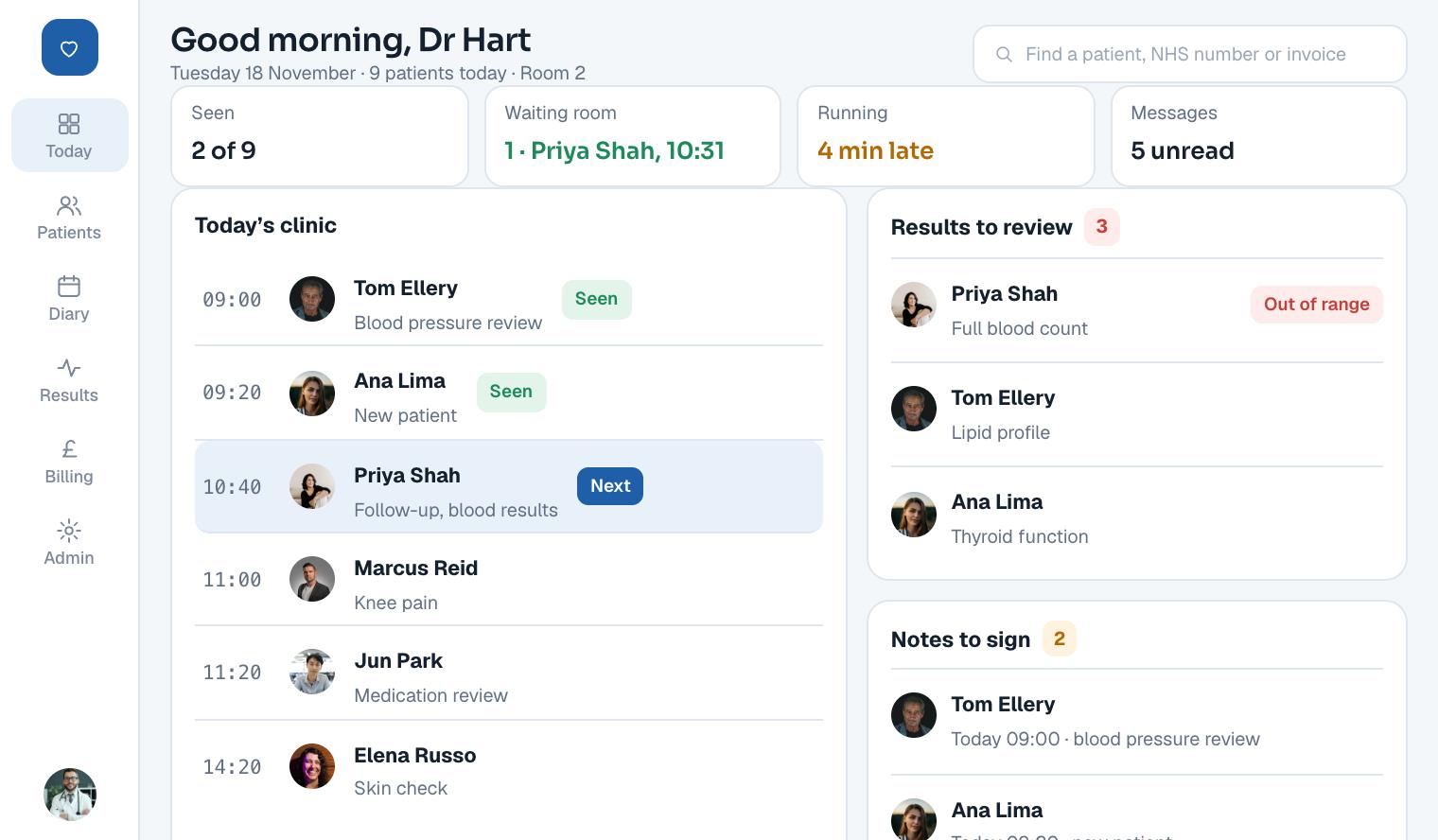
The doctor dashboard opens on today’s clinic list, with each patient’s time and reason for the visit. One click opens the full record.
Beside the list sit the jobs that need the doctor: lab results waiting for review and notes not yet signed. Nothing waits silently in an inbox.
- 02
Registration and one record per patient
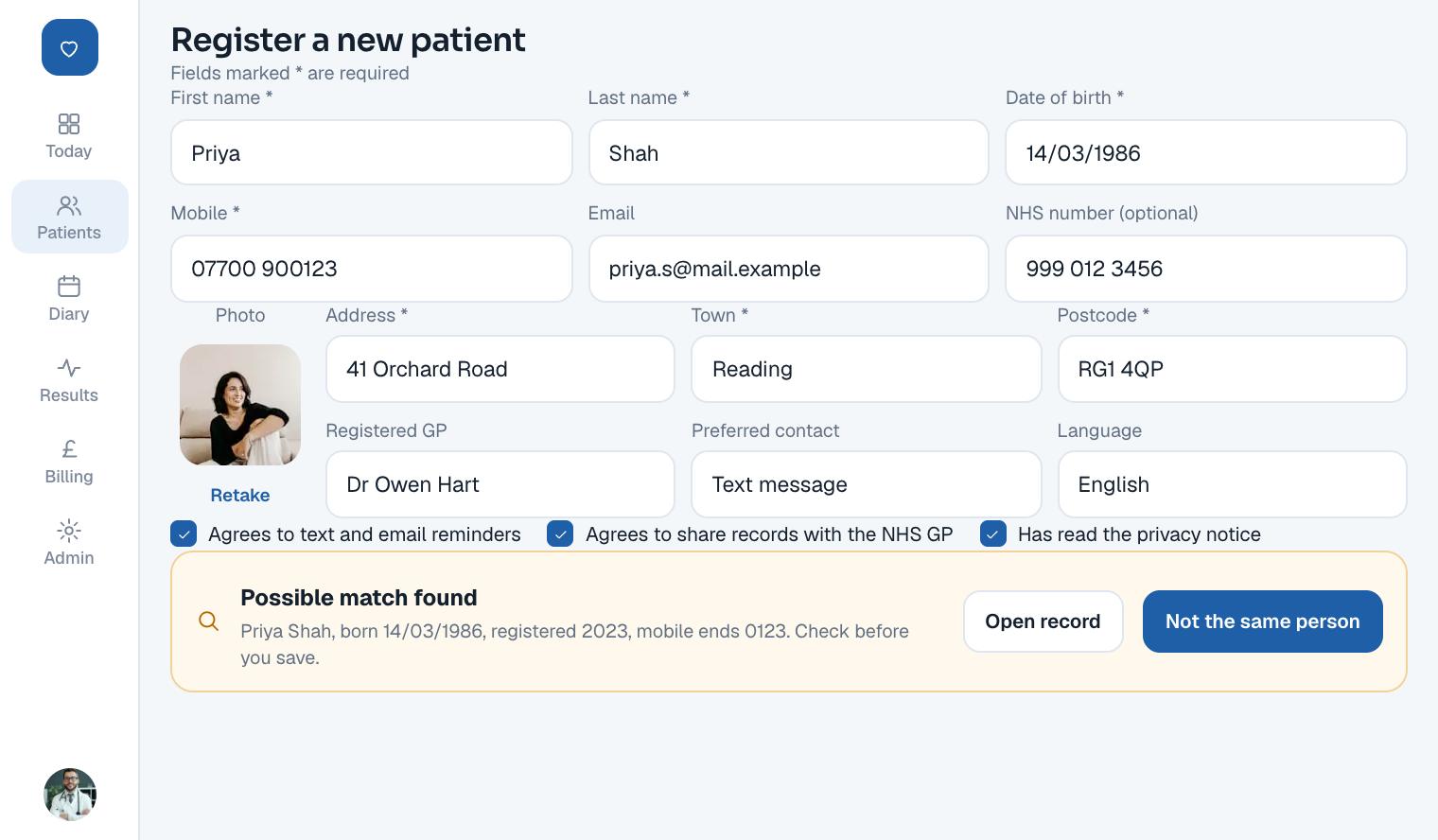
Staff register a new patient with their name, date of birth and contact details. An NHS number can be added where the patient has one.
Before saving, the system looks for records that might be the same person. A near match is shown to the member of staff, who decides. Two records for one patient is one of the most common faults in any records system.
- 03
The medical record and history
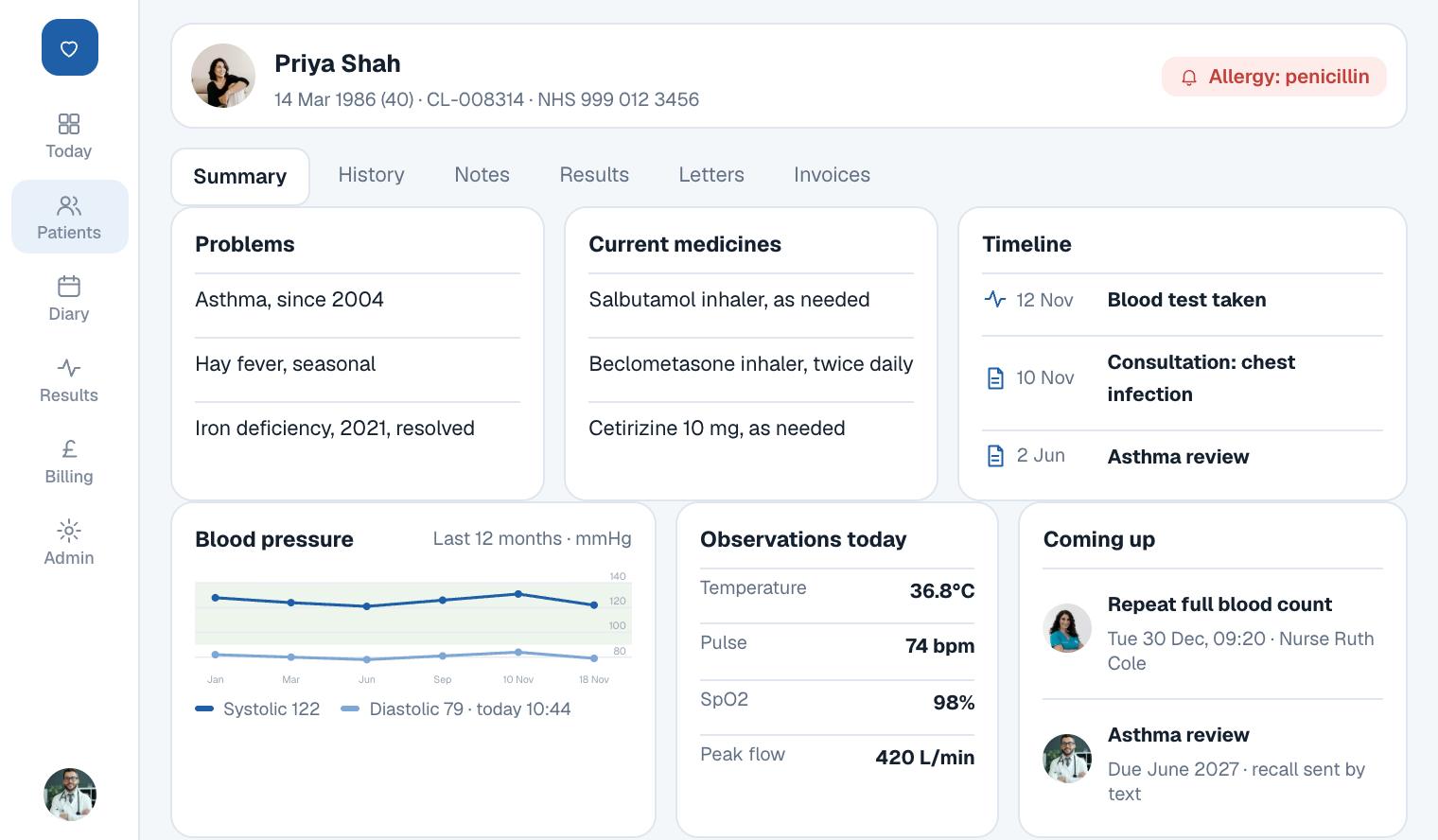
Each record holds the medical history, allergies, current medicines, problems and every past visit. The newest visit sits at the top of a single timeline.
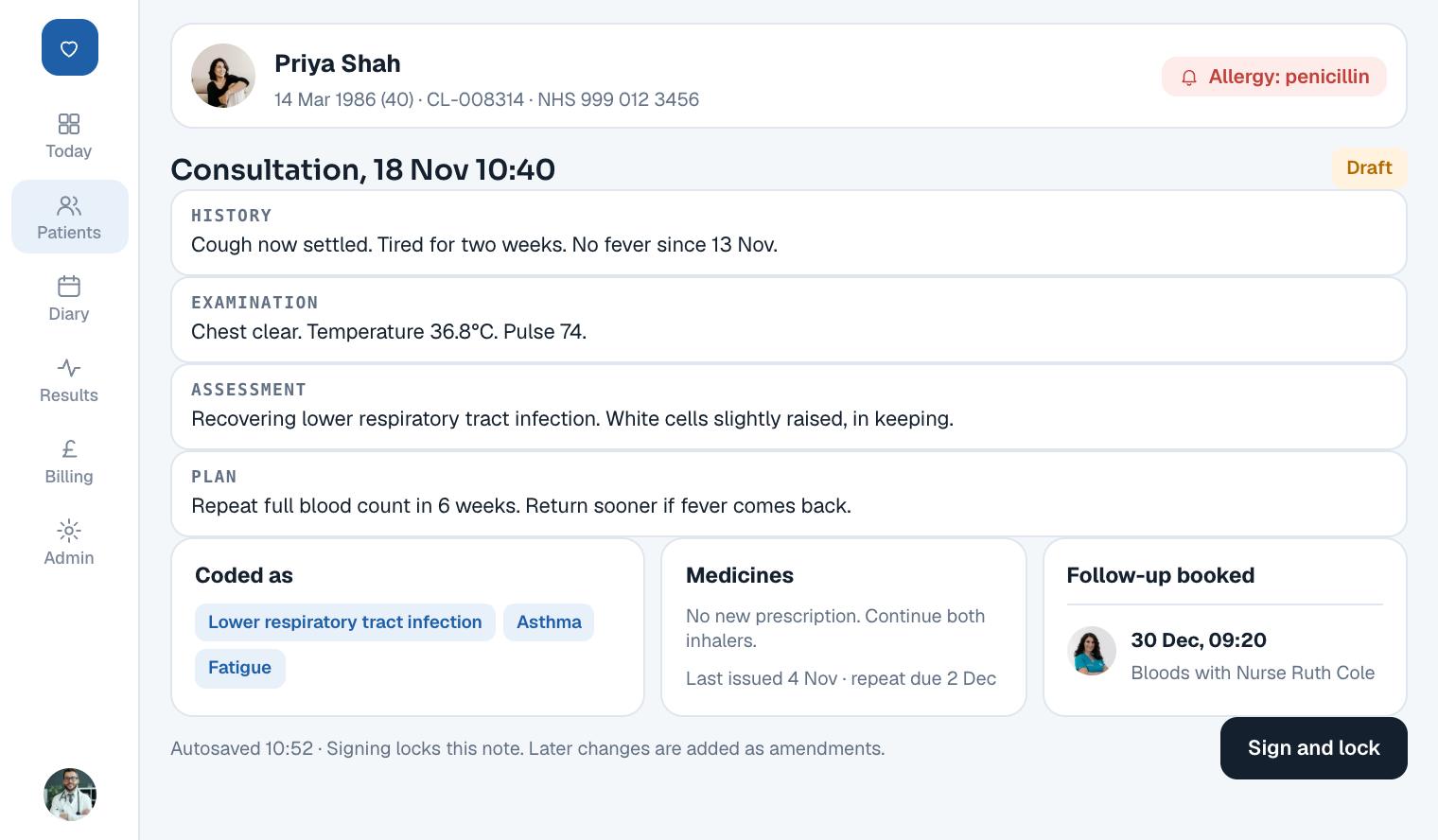
Allergies sit in a banner across the top of every screen for that patient. A doctor never has to scroll to find them.
- 04
Clinical notes that are signed and kept
Notes follow four headings: history, examination, assessment and plan. Diagnoses and treatment details sit in their own fields, so they can be searched and reported on.
When the doctor signs, the note locks. A later change is added as a new version beside the original, so the record shows what was known at the time.
- 05
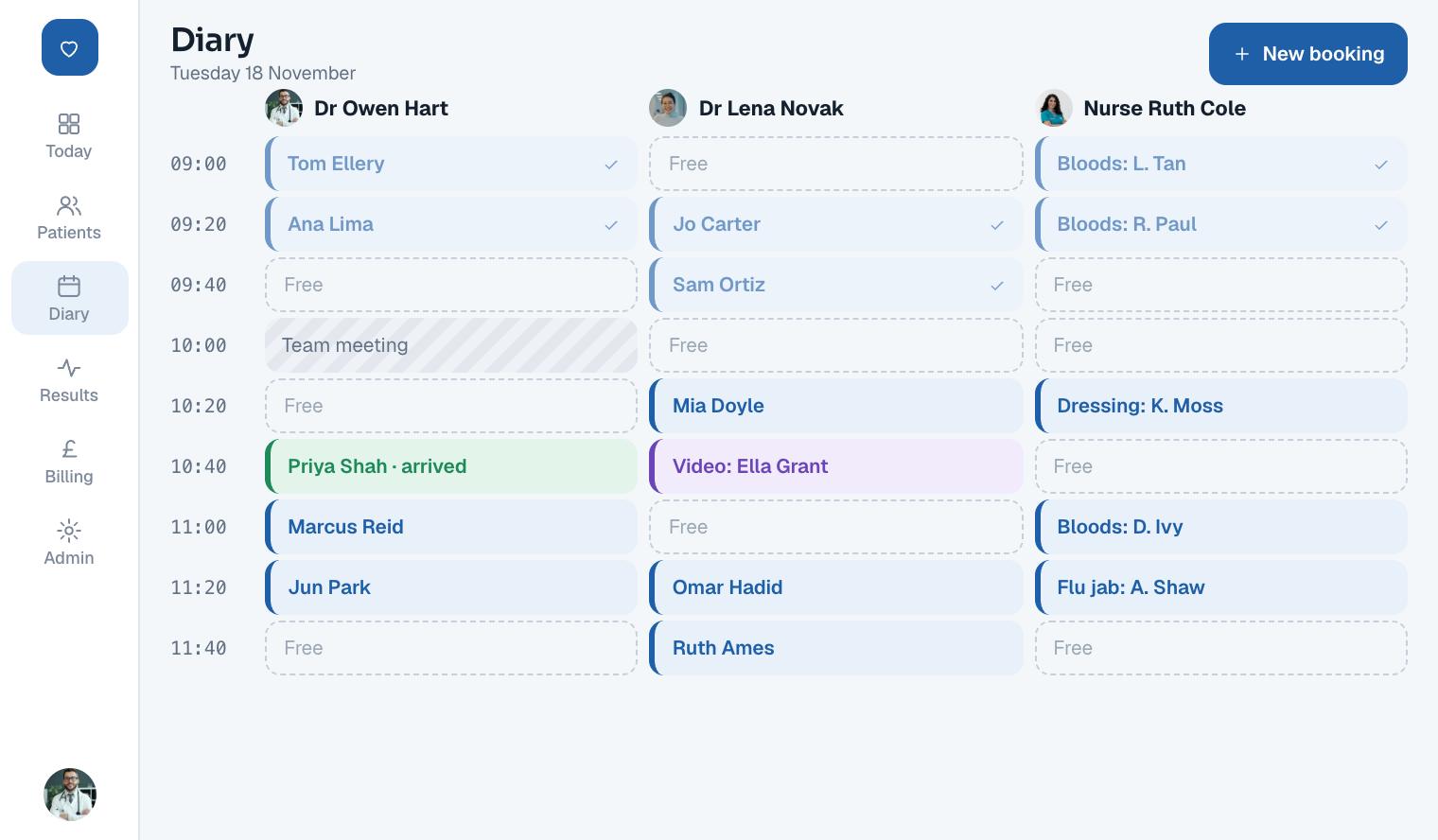
One diary for the whole clinic
Each clinician has a schedule of working hours, made of bookable slots. Staff see every clinician side by side and book into free slots.
Slots can be blocked for meetings, leave or theatre time. The system refuses a second booking in a slot that is already taken, even when two people click at once.
- 06
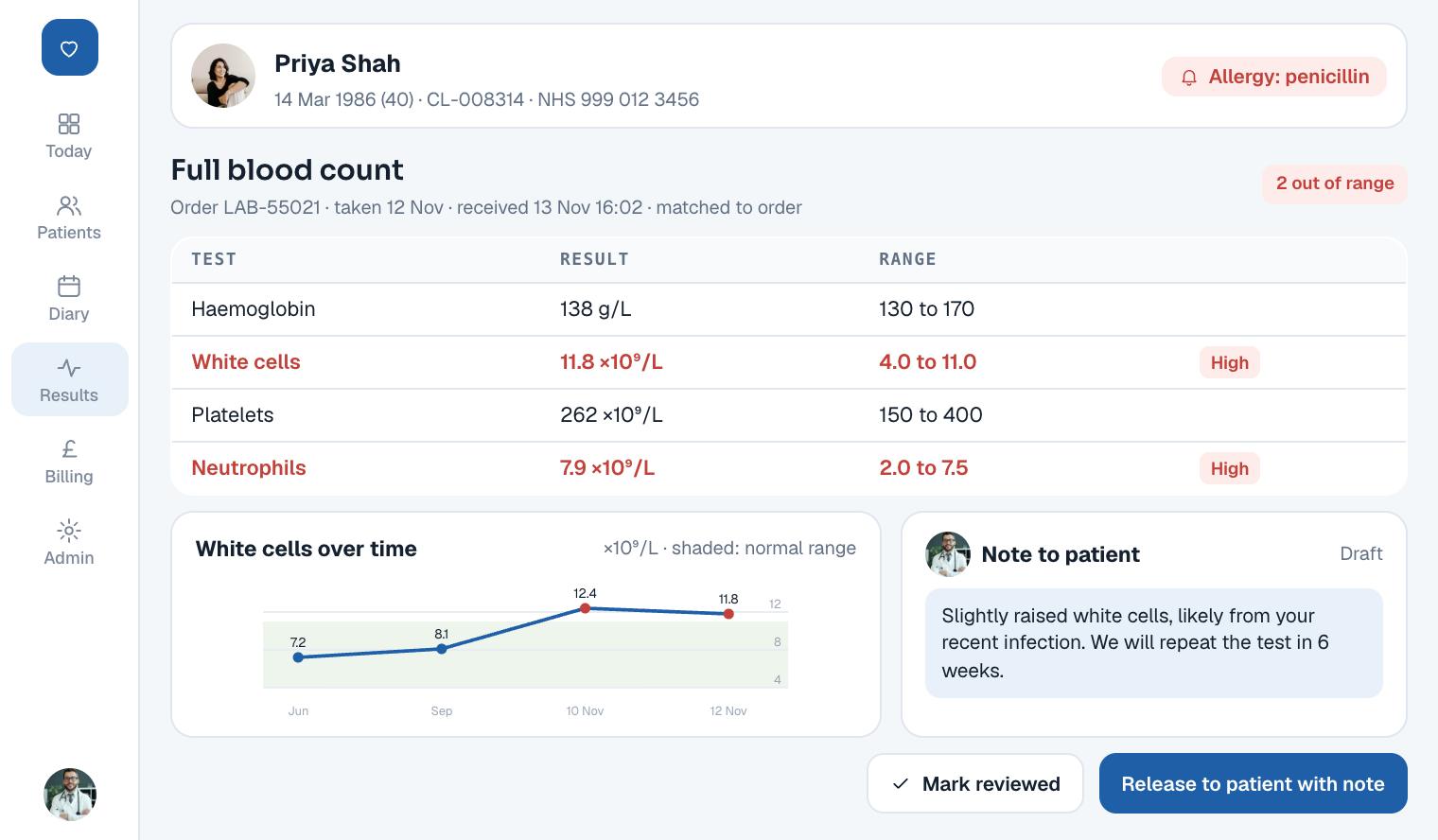
Lab orders and results in the record
Doctors order tests from the record. The order goes to the laboratory system, and the result comes back into the same record, matched to its order.
Values outside the normal range are flagged. The doctor marks each result as reviewed, and decides when the patient can see it.
- 07
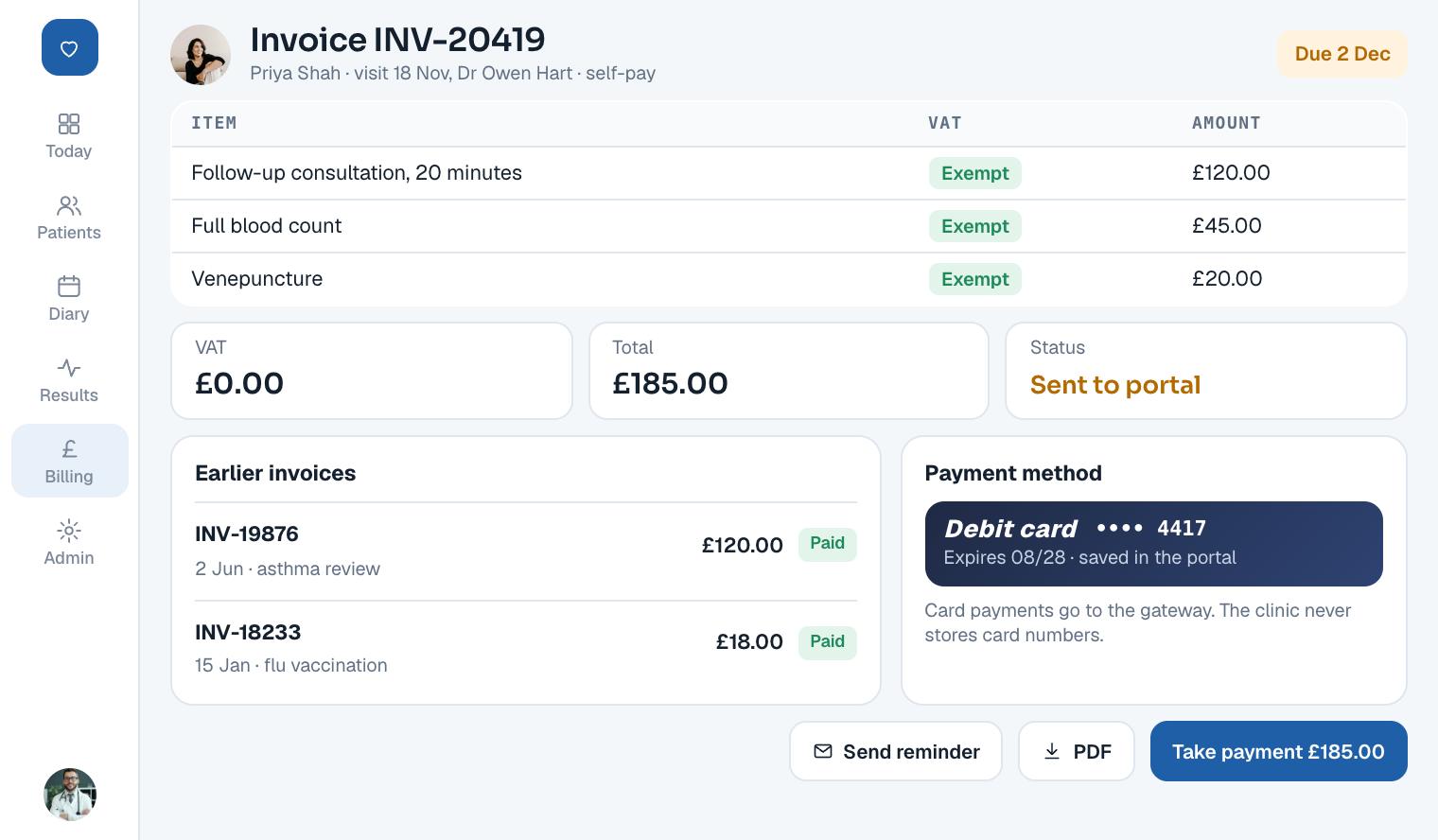
Billing from the visit itself
An invoice is raised from the appointment and any tests ordered during it. Staff do not rebuild the bill from memory.
Each line carries its VAT treatment, and the invoice tracks payment. Patients can see and pay their invoices in the portal.
- 08
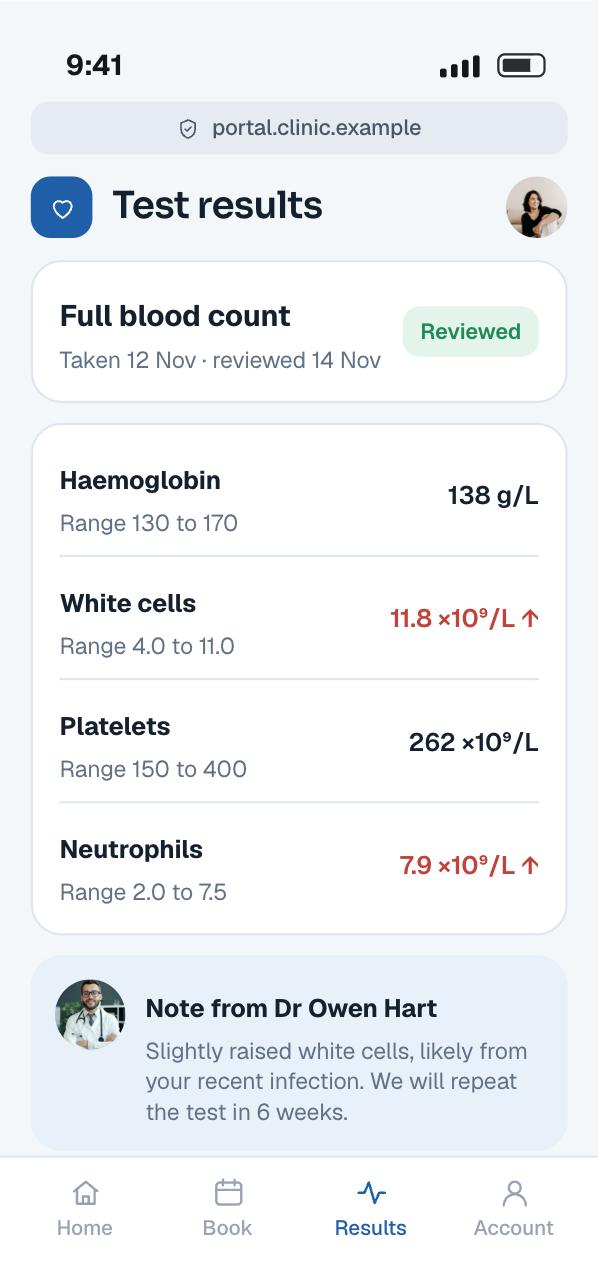
A patient portal
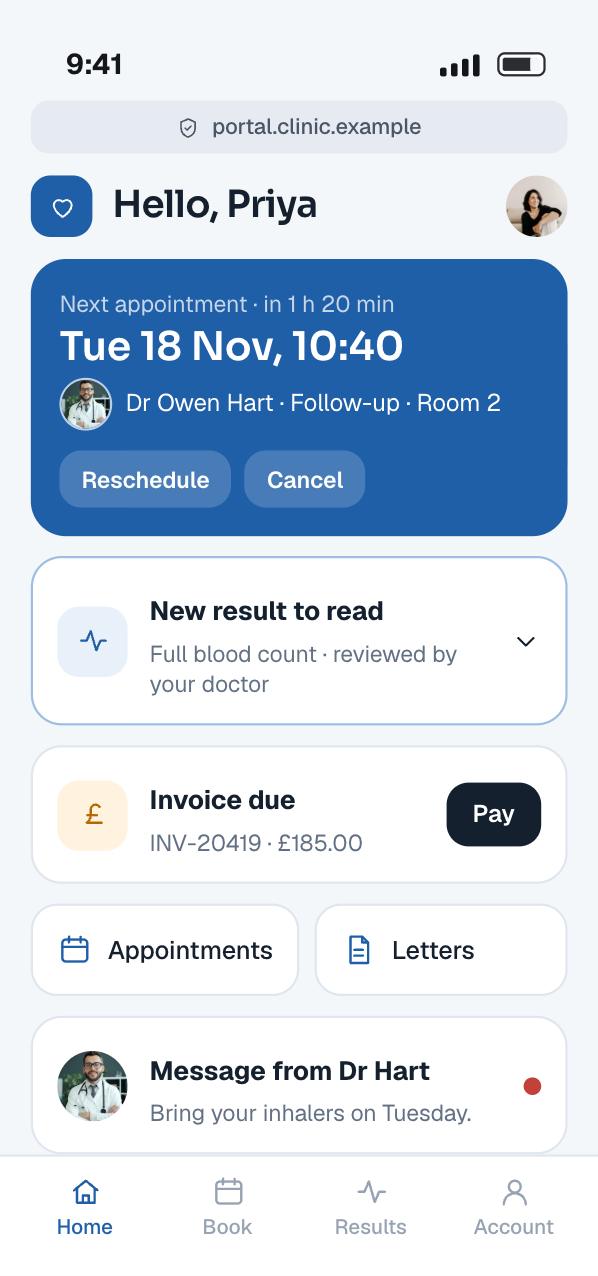
Patients sign in to see their next appointment, released results, invoices and parts of their record. The portal works in a phone’s browser, so there is nothing to install.
A result appears only after the doctor has reviewed it, with any note the doctor adds. A patient only ever sees their own record.
- 09
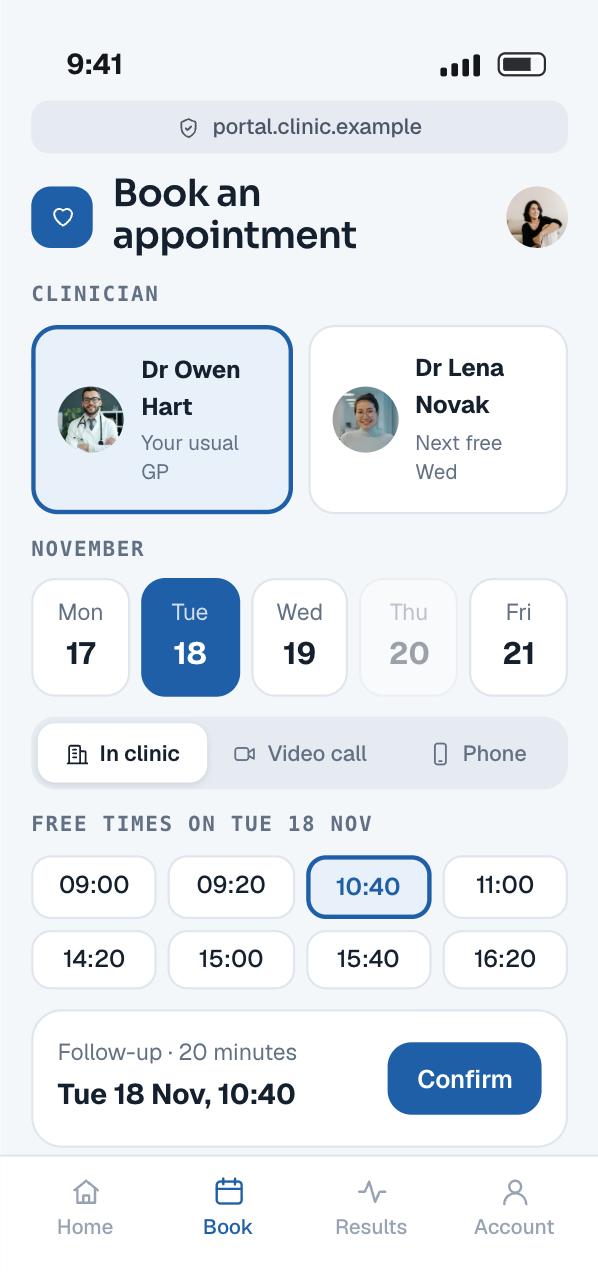
Booking from a phone
Patients pick a clinician, a day and a free time, then confirm. The portal books into the same slots the staff use, so the diary never goes out of step.
The clinic decides which appointment types patients may book themselves, and which still need a call.
Planning something like this? Talk it through with the team that built it, in a free 30-minute call.
Book a free 30-minute callHow it works
A clinic records system is a database that many people trust with their health. The hard parts are keeping one true record per patient, letting the right people in, and swapping data with laboratories in their own formats. This is how we build that today, on the stack this system runs on, to UK rules.
The architecture
Every screen talks to one Java API, and every read and write of a record is checked and logged there. Lab messages come in through their own interface service, never straight into the database.
People and devices
Screens
 Staff web appReact: dashboard, records, notes, diary and billing
- Patient portalReact, in any phone or desktop browser
Our system
Clinic system
 REST API in JavaOne entry point for both apps, over HTTPS
- Patients and recordsRegistration, history, notes and orders
- SchedulingClinicians, schedules, slots and bookings
- Billing and auditInvoices, payments and the access log
HL7 version 2
- Interface serviceReads and writes HL7 version 2 messages
FHIR
 FHIR APIStandard resources for compatible systems
Data
 SQL database (PostgreSQL)Patients, records, bookings and invoices, encrypted at rest
- Audit logEvery view and change, kept apart from the record
Outside services
Laboratory
- Laboratory systemReceives orders and sends results
Other systems
- Compatible health systemsExchange data over FHIR
- Screens and Clinic system: Sign-in, records, bookings and invoices over HTTPS
- Clinic system to Data: Each read and write, with an audit entry
- Clinic system and Interface service: Test orders out, results matched back
- Interface service and Laboratory system: HL7 order and result messages
- Clinic system to FHIR API: Records as FHIR resources
- Compatible health systems and FHIR API: FHIR requests
What happens when a doctor orders a blood test
Seven steps run between the order and the patient reading the result. A result never reaches the patient before the doctor has reviewed it.
-
01Place the orderDoctor to APIThe doctor picks the tests in the record. The API checks this doctor may order for this patient.
-
02Save the orderAPI to DataThe order is stored against the patient with a unique order number, and the action is written to the audit log.
-
03Send it outAPI to InterfaceThe interface service turns the order into the message format the laboratory expects and sends it.
-
04Return the resultLab to InterfaceThe laboratory sends the result back, quoting the order number and the patient’s identifiers.
-
05Match and fileInterface to APIThe result is matched to its order and patient. A result that does not match goes to a queue for staff, never to a guess.
-
06Flag for reviewAPI to DoctorThe result appears on the doctor’s dashboard, with values outside the range flagged.
-
07ReleaseDoctor to PortalOnce the doctor marks it reviewed and releases it, the patient can read it in the portal.
One true record per patient
Everything hangs off the patient, so the patient record must be right. Registration checks name, date of birth and contact details against existing records before it saves. Possible matches go to a person to decide, because a wrong merge is worse than a duplicate.
In the UK, the NHS number is the identifier that follows a patient between services. FHIR UK Core is the UK’s set of constraints and extensions on the international FHIR resources. Its Patient profile carries the NHS number as an identifier with the system https://fhir.nhs.uk/Id/nhs-number.
Many private patients will not give an NHS number. UK Core allows for that: its Patient profile has an extension for the reason a patient has no NHS number. So the number is optional in our data model, and the clinic’s own patient number is always present.
When two records do turn out to be one person, staff merge them. The merge keeps both histories and records who merged them and when. It can be undone if it was a mistake.
Records, history and notes
A record is more than a long text box. Allergies, medicines, problems and past history are stored as separate items with dates. That lets the system show allergies on every screen and list current medicines at a glance.
Consultation notes are written under fixed headings, with diagnoses and treatment in their own fields. Free text still has room, because doctors think in sentences, but the key facts can be searched.
A signed note is final. A correction is stored as a new version that points to the original, with who changed it and why. Nobody, including an administrator, can quietly rewrite what a doctor recorded.
Every view and change on record
Health records need an audit trail of reads as well as writes. A doctor opening a record they had no reason to open is a breach, even if nothing changes.
So every request that touches a patient writes an audit entry: who, which patient, what action, when and from where. We model these entries on the FHIR AuditEvent resource, which is based on the IHE-ATNA audit record definitions. Each event names its agents and the entities involved.
The audit log sits in its own store that the main application can add to but not change. The clinic’s data protection lead can search it by patient or by member of staff.
The diary
Scheduling follows the FHIR model. A Schedule belongs to one practitioner, location or service. It is divided into Slots, each one a span of free or busy time. An Appointment books one or more slots.
The FHIR specification gives an example: a week of eight one-hour appointments a day is one Schedule with 40 Slots. As bookings arrive, each slot is marked busy. That is exactly how the diary screen draws a clinician’s day.
Two people can click the same free slot at the same moment. The database decides who wins: a unique constraint on the slot lets one booking through and rejects the other. The loser sees the next free time instead of a silent double booking.
The patient portal books into the same slots through the same API. Staff can hold some slots back for urgent cases, and only release them to the portal on the day.
The laboratory link
Many laboratory systems exchange orders and results as HL7 version 2 messages. HL7 calls version 2 the workhorse of clinical data exchange, and arguably the most widely used healthcare standard in the world.
Our backend is Java, and HAPI is an open-source HL7 version 2 parser for Java. The interface service uses it to read and write messages, so we do not hand-parse pipes and carets.
Inside the system, we store the order and the result in FHIR shapes. A ServiceRequest records the order. The FHIR specification says such a request leads to a DiagnosticReport, which can reference individual Observations. A full blood count becomes one report with an observation for each value.
Matching is the risky step. A result must quote the order number and patient identifiers that we sent. If anything disagrees, the result goes to a queue for a person to resolve. It is never filed against the closest-looking patient.
Results come into the doctor’s list first. The patient sees a result only after the doctor has reviewed and released it, so nobody reads an abnormal value with no one to explain it.
A FHIR API for other systems
Other systems, such as a referral partner or another clinic tool, may want to read or send data in a modern format. For them we expose a FHIR API.
HAPI FHIR is a Java implementation of FHIR with a ready-made server, so it fits our Java backend. Our FHIR resources follow the UK Core profiles where one exists, so a UK system receives the shapes it expects.
Third-party apps that need access sign in through the SMART App Launch framework. It builds on OAuth 2.0 and uses scopes to limit which resources an app can read or write. A booking app can be given appointments without ever seeing clinical notes.
The patient portal
Patients sign in with their own account and two-step verification. They can see appointments, book or cancel within the clinic’s rules, read released results, download letters and pay invoices.
The portal uses the same API as the staff app, with a patient role. That role can only ever reach the signed-in patient’s own data, however a request is built.
Billing and VAT
Each invoice is built from the visit: the consultation, any procedures and the tests ordered. Staff can adjust it before it is issued, and every change is logged.
VAT is not one rule for a clinic. HMRC’s VAT Notice 701/57 covers services from registered health professionals. Medical care can be exempt when its main purpose is to protect, maintain or restore a person’s health.
The same notice says some services, such as certain reports and certificates, depend on their main purpose. So each billable item in our system carries its own VAT treatment, set by the clinic with its accountant, and the invoice adds it up line by line.
Access control in two layers
Every API call checks the user’s role and their link to the patient. A receptionist can see contact details and the diary, but not clinical notes. A doctor sees the notes of patients in their care.
We add a second layer in the database. PostgreSQL row-level security restricts which rows each user can read or change. When it is switched on for a table and no policy exists, the default is to deny. So a bug in the API cannot leak rows that the policies do not allow.
PostgreSQL notes that a table’s owner is normally not subject to these policies. So the application connects as a separate, limited database role, never as the owner.
For emergencies, a clinician can open a record outside their usual list by giving a reason. That access is allowed, flagged and reviewed afterwards.
Hosting, encryption and backups
The system runs on AWS. We use Amazon RDS for the SQL database. RDS encryption uses AES-256 and covers the storage, logs, automated backups, read replicas and snapshots, with keys held in AWS Key Management Service.
All traffic runs over TLS. Backups are restored to a test environment on a schedule, because a backup nobody has restored is only a hope.
UK data protection
Health data is special category data under UK GDPR. To process it, a clinic needs a lawful basis and a condition under Article 9. For care, that is usually Article 9(2)(h), backed in UK law by Schedule 1, condition 2, of the Data Protection Act 2018.
The ICO says that condition needs the data to be handled by, or under the responsibility of, someone bound by professional secrecy. It also says you must not hold more data than you need. So every field in the record has a reason to exist.
We start each build with a data protection impact assessment. The ICO says one is required where processing is likely to result in a high risk to people. A system holding a clinic’s health records is one we always treat that way.
NHS assurance where it applies
If the system is offered to the NHS, its maker must meet DCB0129, the clinical risk management standard for manufacturers. The clinic deploying it follows DCB0160. NHS guidance says DCB0129 needs a clinical risk management system and clinical risk analysis.
That guidance also says risk management starts at the earliest stage and continues through maintenance and decommissioning. So we keep a hazard log from discovery onwards, reviewed by a clinical safety officer.
NHS buyers also use the Digital Technology Assessment Criteria, known as DTAC. NHS England refreshed the form with a quarter fewer questions, and asked buyers to move fully to it by 6 April 2026.
Organisations with access to NHS patient data and systems must complete the Data Security and Protection Toolkit. It measures them against the National Data Guardian’s 10 data security standards. We build so a clinic can answer it.
Records software that stores and displays information is not usually a medical device. Before adding anything that calculates or advises on care, we check the MHRA guidance on when software becomes one.
The stack and why we chose each part
| Layer | Technology | Why we chose it |
|---|---|---|
| Front end | React | One component library for the staff app and the patient portal, with fast screens for busy clinic days. |
| Backend | Java | Typed and mature, with strong health libraries: HAPI for HL7 version 2 and HAPI FHIR for the FHIR API. |
| Database |  SQL (PostgreSQL on Amazon RDS) | Records, bookings and invoices need strict relations and transactions. Row-level security adds a second lock. |
| Health data exchange | HL7 / FHIR | HL7 version 2 for laboratories that use it, FHIR with UK Core profiles for modern systems. |
| Hosting |  AWS | Managed databases with encryption at rest, automated backups and key management. |
The build plan
This is how we would plan a system like this today. The weeks assume one team on the backend, the screens and the lab link in parallel, with clinical safety work running alongside from week one.
- Discovery and safetyWeeks 1 to 3
- Map the clinic day with doctors and staff
- Data protection impact assessment
- Hazard log and clinical safety plan
- Clickable prototype of record, diary and portal
- Core recordsWeeks 4 to 10
- Patients, matching and merge
- Record, history and signed notes
- Roles, row-level security and audit log
- Doctor dashboard
- Diary and portalWeeks 8 to 14
- Schedules, slots and bookings
- Patient portal sign-in and booking
- Two-step verification
- Released results and letters
- Lab link and FHIRWeeks 10 to 18
- HL7 version 2 orders and results
- Matching and the unmatched queue
- FHIR API with UK Core profiles
- Tests against the laboratory’s test system
- BillingWeeks 14 to 20
- Invoices from visits and tests
- VAT treatment per item
- Payments in the portal
- Billing reports
- Testing and go-liveWeeks 19 to 26
- Clinical safety case and hazard review
- Penetration test and restore test
- Data migration from old records
- Go-live support and 3 months of fixes
- 01Weeks 1 to 3
Discovery and safety
- Map the clinic day with doctors and staff
- Data protection impact assessment
- Hazard log and clinical safety plan
- Clickable prototype of record, diary and portal
- 02Weeks 4 to 10
Core records
- Patients, matching and merge
- Record, history and signed notes
- Roles, row-level security and audit log
- Doctor dashboard
- 03Weeks 8 to 14
Diary and portal
- Schedules, slots and bookings
- Patient portal sign-in and booking
- Two-step verification
- Released results and letters
- 04Weeks 10 to 18
Lab link and FHIR
- HL7 version 2 orders and results
- Matching and the unmatched queue
- FHIR API with UK Core profiles
- Tests against the laboratory’s test system
- 05Weeks 14 to 20
Billing
- Invoices from visits and tests
- VAT treatment per item
- Payments in the portal
- Billing reports
- 06Weeks 19 to 26
Testing and go-live
- Clinical safety case and hazard review
- Penetration test and restore test
- Data migration from old records
- Go-live support and 3 months of fixes
Testing and release
In a records system, a bug can put the wrong result in the wrong patient’s record. So we test the paths where harm could happen, with test data that never belongs to a real person.
Clinical safety testing
Each hazard in the log has a test that shows its control works. A mismatched result must land in the queue. An unreviewed result must stay hidden from the patient. An allergy must show on every screen.
A clinician walks through the main flows before each release and signs off the safety case.
Access and audit
We try to reach patients a role should not see, through the screens and straight at the API. Each attempt must be refused, and each must appear in the audit log.
A yearly penetration test by an outside firm covers the portal and the API.
The lab link
We run a library of sample HL7 messages through the interface service: normal results, abnormal values, corrections, cancelled orders and broken messages. Then we repeat the main cases against the laboratory’s own test system.
Data migration and go-live
Old records are moved in batches and checked count by count and patient by patient. Possible duplicates are listed for staff to resolve before go-live, not after.
Results
This is what the build delivered, counted from its recorded scope. Clinical and financial outcomes belong to the clinic, so they are not shown here.
- 8modules in one system: patients, records, history, notes, diary, dashboard, portal and billing
- 3user groups with their own views: doctors, patients and clinic staff
- 2data standards for exchange: HL7 for the laboratory and FHIR for compatible systems
- 6security controls: sign-in, roles, encryption, audit trails, backups and privacy rules
Doctors open one record and see the whole patient, from history to the latest result. Staff run the diary and billing from the same screens, and patients book and pay without a phone call.
Lab results arrive in the record instead of the inbox, matched to the order that asked for them.
Since launch
A records system grows with the clinic that uses it. These are the improvements a system like this receives in its first six months.
- 01Appointment reminders
Email and text reminders before each booking, with a link to cancel or move it.
- 02Note templates
Templates for common visit types, so frequent notes start half written.
- 03More lab tests mapped
Further tests and their reference ranges added to the lab link as the clinic orders them.
- 04Faster patient search
Search by name, date of birth, phone or NHS number from any screen.
- 05Audit reports
Ready-made reports for the data protection lead, by patient and by member of staff.
- 06Portal messages
Secure messages between patients and the clinic, kept in the record.
Want a result like this for your own product? Get a written view of scope, time and price within two working days.
- 95%+ delivered on or before the agreed date
- 60% of clients come back for a second project
- 3 months of fixes after launch in the build price
What this would cost to build today
These are our published prices, in pounds, excluding VAT, as of November 2026. A system at this scope, with records, notes, a diary, billing, a patient portal and a lab link, sits in the full build range.
- Discovery£3,000 to £6,0002 weeks
Clinic workflow map, scope, a first look at data protection and clinical safety, a clickable prototype and a fixed quote. It comes off the build price if you continue.
- First version£15,000 to £40,0008 to 14 weeks
Patients, records and signed notes, the diary and a doctor dashboard, with roles and an audit log.
- This caseFull system like this one£40,000 to £90,0004 to 8 months
Everything above, plus the patient portal, billing, the HL7 lab link and a FHIR API.
- Support and runningfrom £750 a monthMonthly
Security updates, fixes, monitoring and restore tests. Minimum 3 months, then 30 days’ notice.
- Fixes after launch are included in the build price for 3 months.
- Hosting is billed by AWS and grows with the clinic’s records and users.
- Laboratory connection fees and any outside penetration test are priced separately.
Estimate your healthcare app in a minute with our calculator
Questions about building a clinic records system
How much does it cost to build an EHR system?
With us, a first version with records, notes, a diary and a doctor dashboard costs £15,000 to £40,000 over 8 to 14 weeks. A full system with a patient portal, billing and a lab link costs £40,000 to £90,000 over 4 to 8 months. Prices exclude VAT. Hosting is billed separately.
Can you build your own EMR?
Yes. A clinic can have a records system built around its own day, rather than bending to an off-the-shelf one. The work is a reliable patient record, strict access control, an audit trail and a lab link. It must also meet UK data protection and, where relevant, NHS clinical safety rules.
How to make your own EMR?
Start by mapping the clinic day with the doctors and staff who will use it. Then build the patient record and access control first, because everything depends on them. Add the diary, the portal, billing and the lab link on top, and keep a clinical hazard log from the first week.
What is UK core?
FHIR UK Core is the UK’s set of constraints and extensions on the international FHIR resources. For example, its Patient profile carries the NHS number with a set identifier system, and an extension for why a patient has no NHS number. Building to UK Core helps UK systems read each other’s data.
Are FHIR and HL7 the same thing?
No. HL7 is the standards body, and also its older version 2 messaging standard, still widely used for lab results. FHIR is HL7’s newer standard, built around resources such as Patient, Appointment and DiagnosticReport exchanged over a web API. A clinic system usually needs both.
What is FHIR and how does it work?
FHIR defines health data as resources, such as a Patient, an Appointment or a DiagnosticReport, each with set fields. Systems read and write them through a web API. Profiles such as UK Core add national rules, and SMART App Launch controls which resources an outside app may reach.
Planning a clinic records system?
Tell us about your clinic and the people who use it. A developer reads your brief. We reply within 30 minutes.