E-learning and admissions platform for a coding school
We built this e-learning and admissions platform for a career-focused coding school. It takes a person from browsing courses and booking a call, through admissions and every phase of study, to graduation and an introduction to an employer.
- Web
- iPhone
- Android
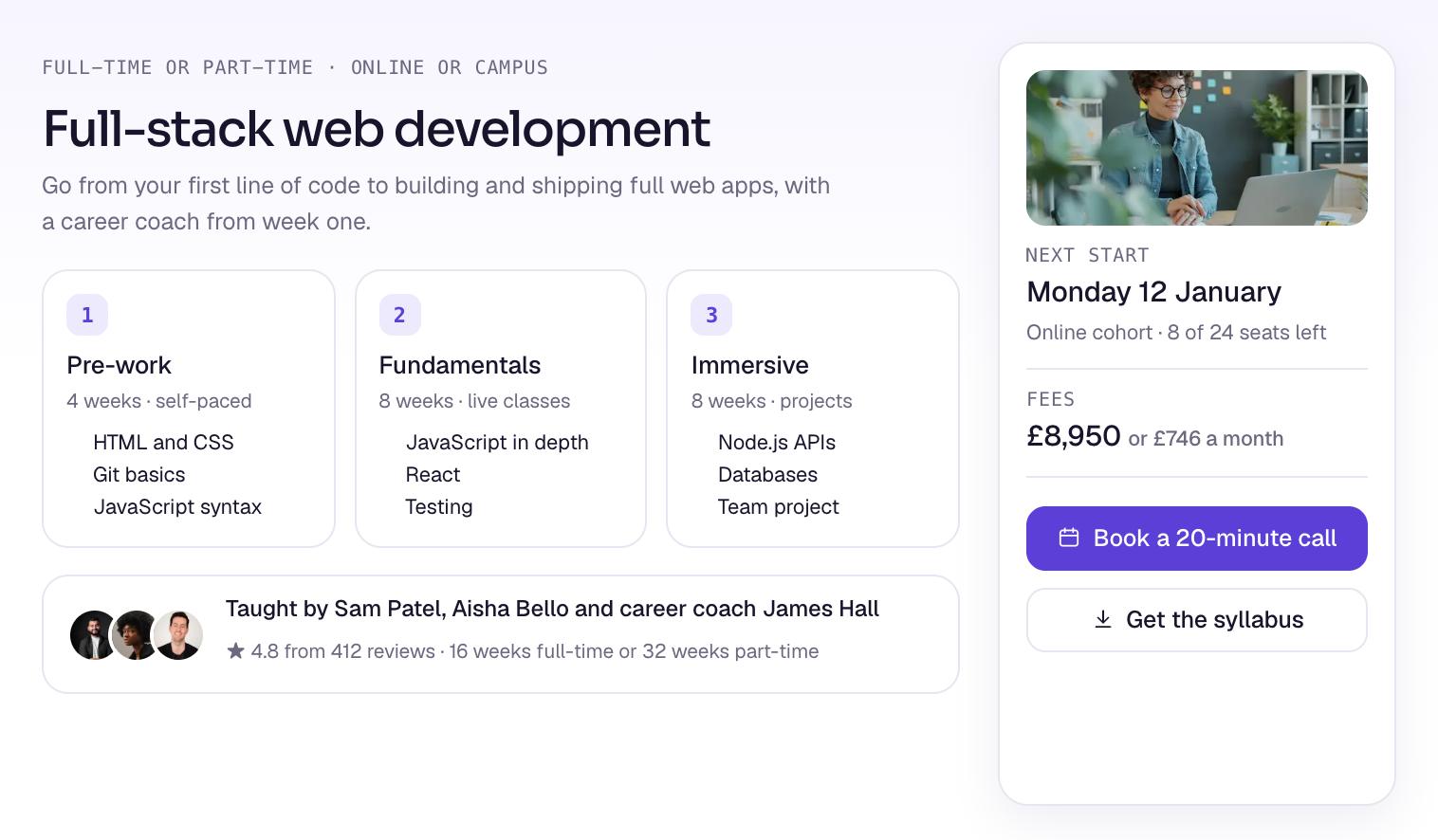
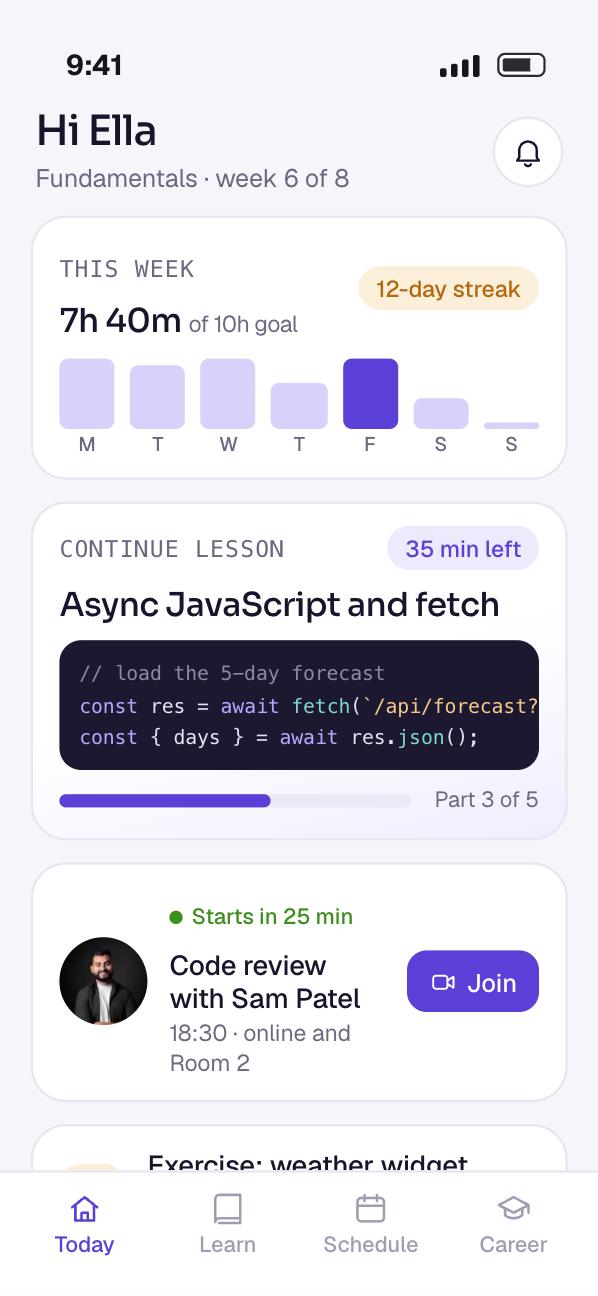
- 5,000+active learners on the platform
- 38%more information calls booked
- 45%faster from application to enrolment
- 92%course completion rate
The brief: one journey from first visit to first job
The school trains people for careers as software developers. Its old website made courses hard to understand, and its staff chased applicants by hand.
Once enrolled, learners juggled preparatory work, live online lessons and campus days in separate tools. After graduation, many drifted away, and employers found it hard to reach them.
We built a web platform and a React Native app that join all of it up. Six problems shaped the build.
Who the platform is for
- The applicant
Compares courses, books a call with an advisor and applies.
- The learner
Works through lessons and exercises, joins classes and tracks progress.
- School staff
Admissions, instructors and career coaches, each with their own tools.
- The graduate
Keeps access to course updates and shows their skills to employers.
- The hiring partner
Browses graduate profiles and asks for introductions.
Six problems and what we did about each
- 01The problem
People were unsure about coding courses, and a crowded website made it hard to explore or ask a question.
What we builtA clear path through the courses, with plain options, timelines and a quick way to book a call.
- 02The problem
Preparatory work, live online lessons and campus days each lived in a different tool.
What we builtOne learning hub for lessons, assignments and progress, through every phase of a course.
- 03The problem
Admissions staff spent hours following up by hand, and applicants waited for answers.
What we builtApplication tracking with automatic reminders, so staff reply sooner and nobody is forgotten.
- 04The problem
Fees and career outcomes were hard to check, so applicants held back.
What we builtFees, graduate outcomes and side-by-side comparisons, all easy to find.
- 05The problem
Start dates, enrolment deadlines and class times changed, and keeping them right in several places was slow.
What we builtOne cohort schedule for online and campus courses. Staff change a date once and every page shows it.
- 06The problem
Graduates lost touch, while employers struggled to find people with the right skills.
What we builtPortals for alumni and for employers, where graduates show their work and hiring partners make contact.
What we built
Eight features cover the journey, on the web and in the app. The screens are our designs of each one, with fictional courses, people and dates.
- 01
Course pages that explain themselves
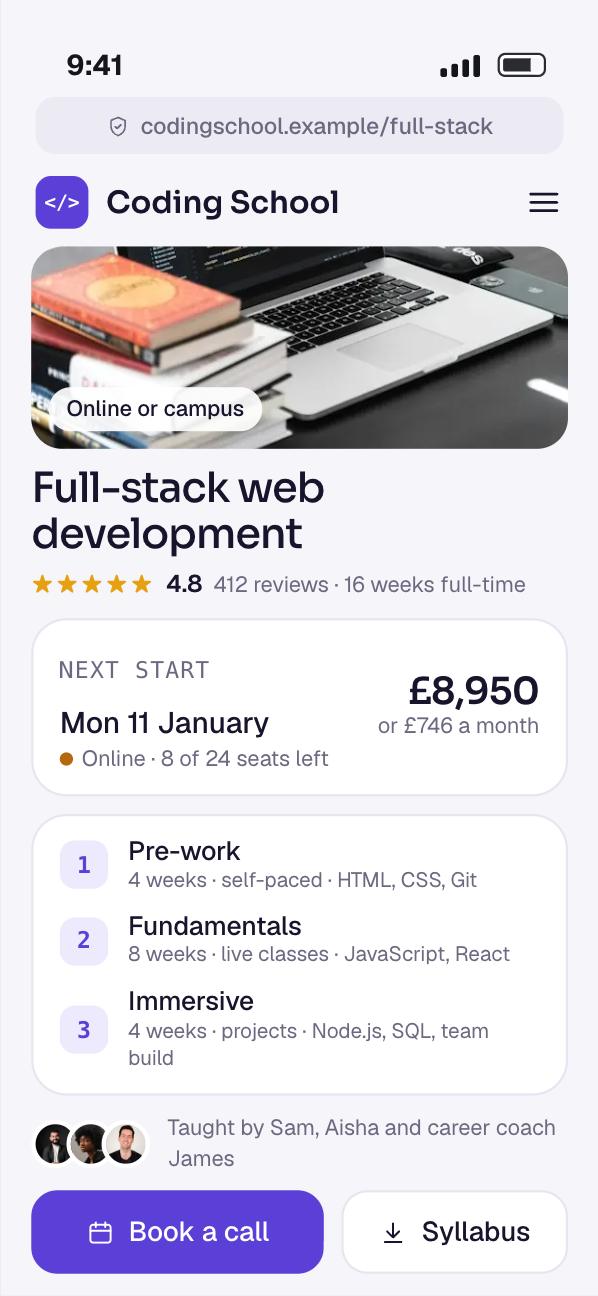
Each course page sets out the phases, units and timeline, from pre-work through fundamentals into the immersive phase. Applicants see what each week holds before they speak to anyone.
Fees and the next start date sit on the same page. A visitor can request the syllabus or book a call from there.
These pages are the front door, so they are built to load fast and to be found in search.
- 02
Booking an information call
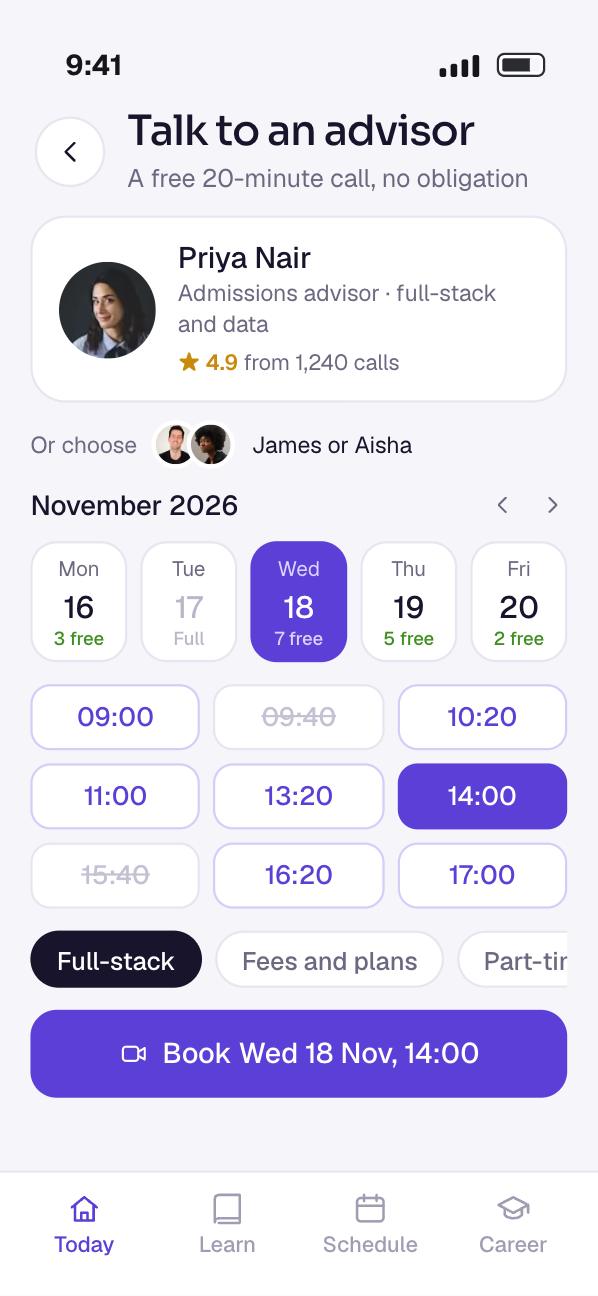
Visitors pick an advisor and a free time, and the call is booked. There is no chain of emails to agree a slot.
The booking flow is short on purpose. Information calls booked rose by 38% once it was in place.
- 03
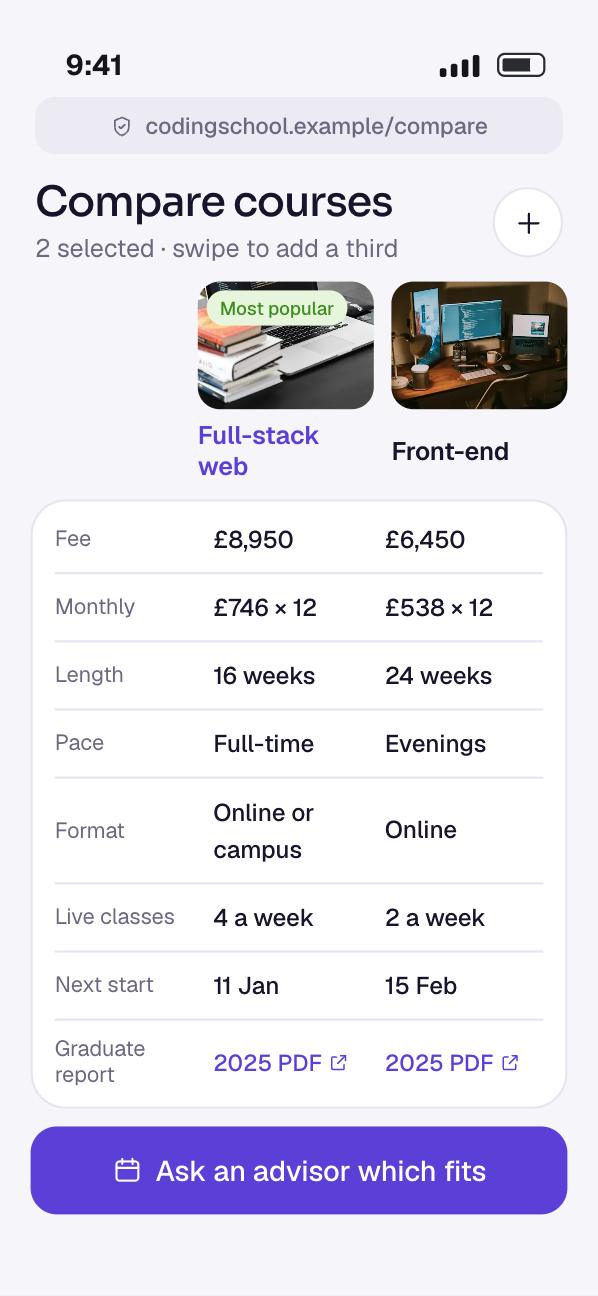
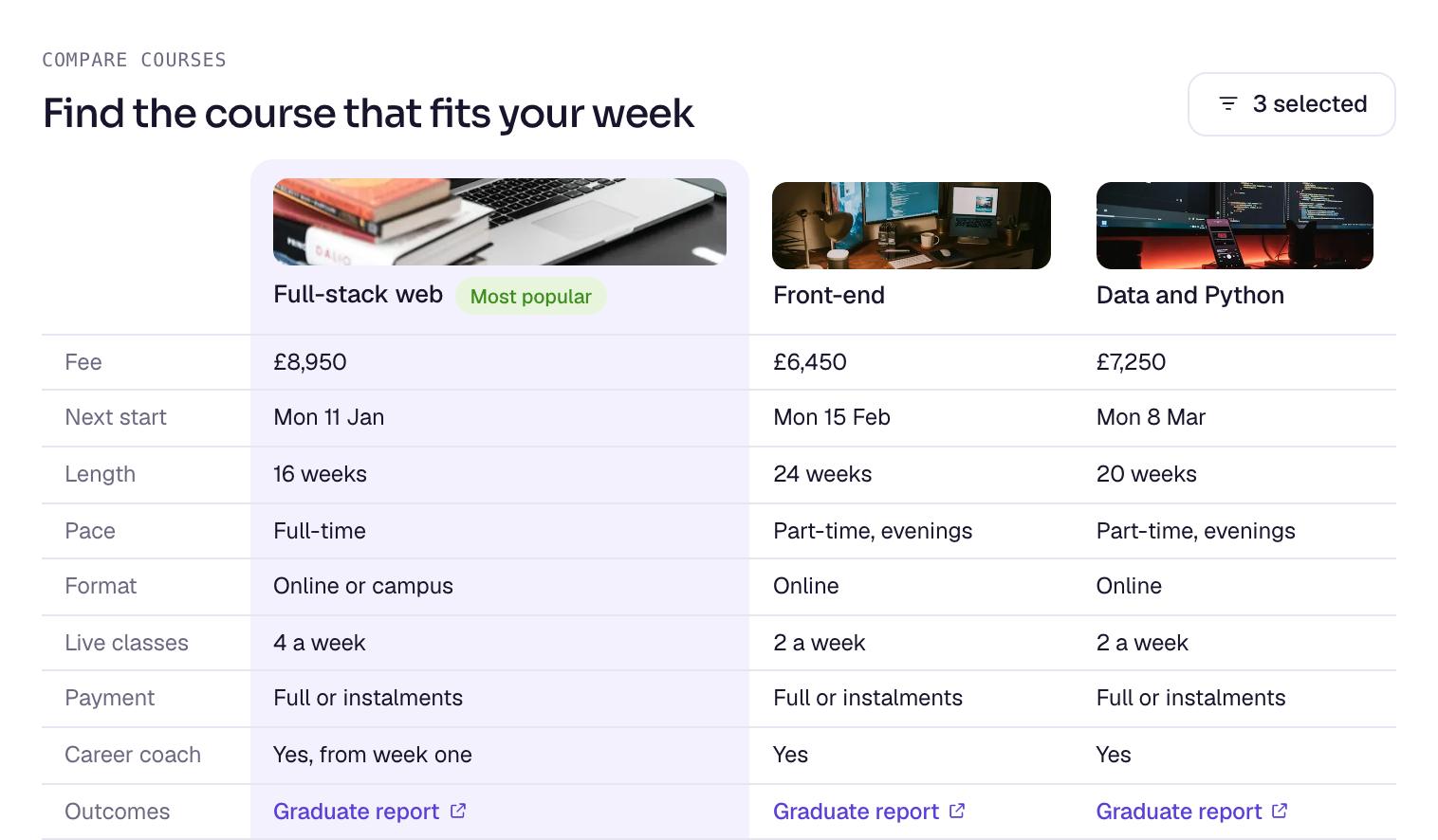
Comparing courses side by side
Applicants put courses next to each other and compare length, format, fees and graduate outcomes.
Seeing costs and results laid out plainly answers the questions that made people hesitate before.
- 04
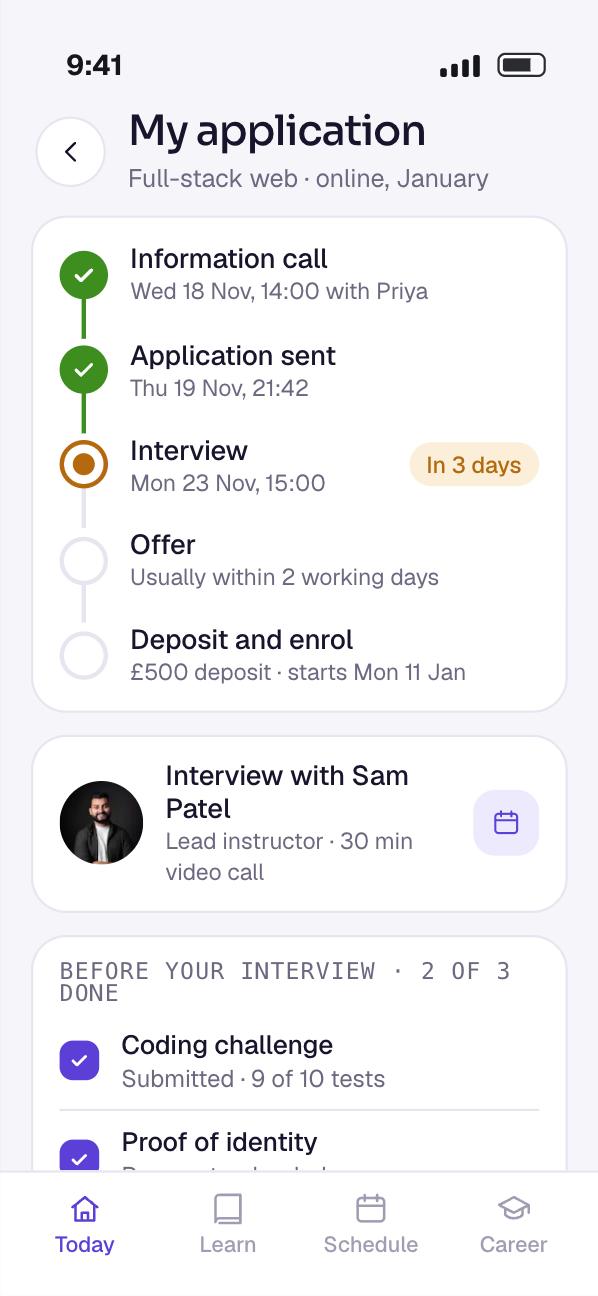
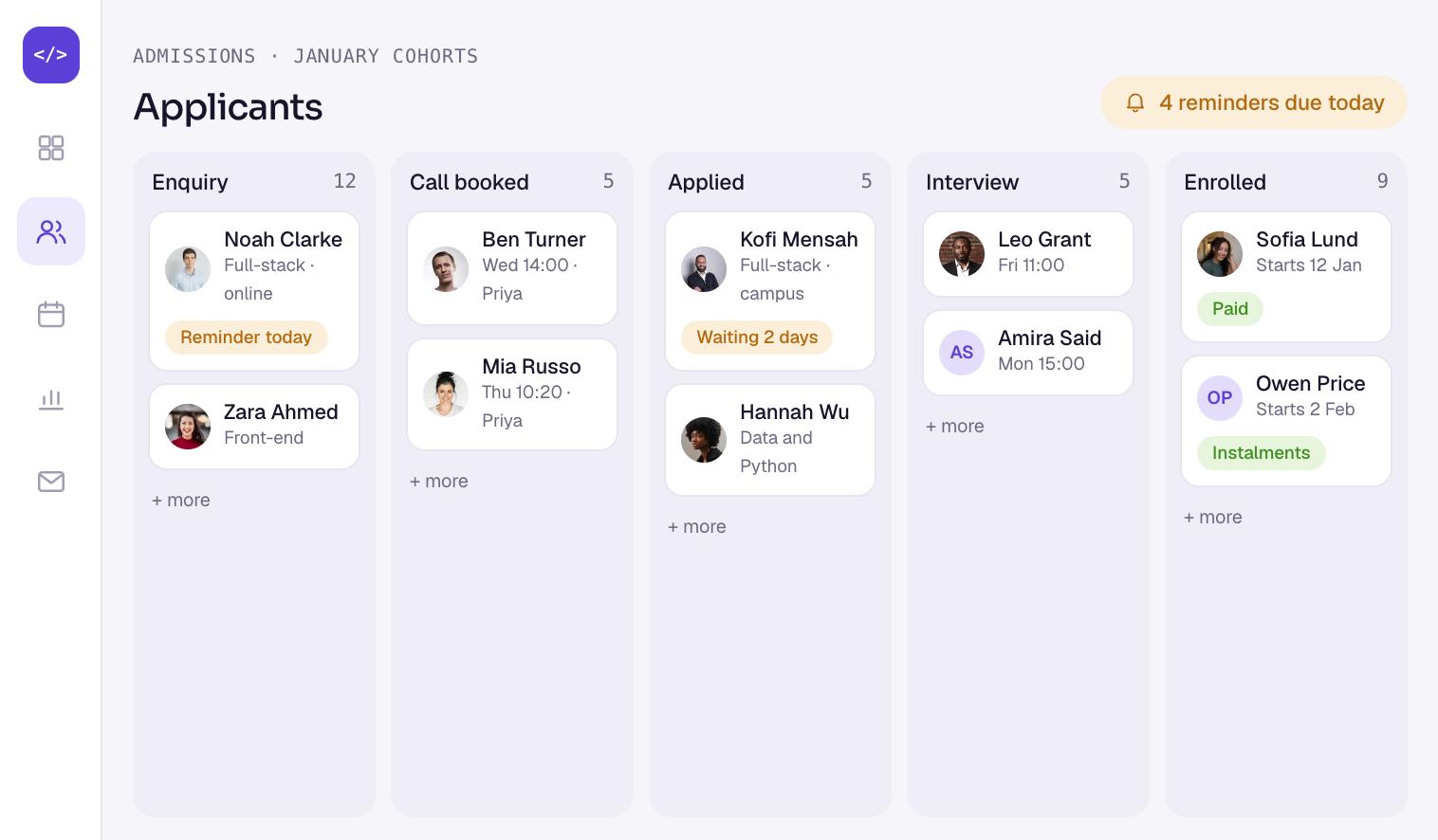
Admissions that follow up on their own
Every application moves along a board, from enquiry to enrolled. Staff see who is waiting and for how long.
Reminders go out by themselves, to applicants who have stalled and to staff who owe a reply. The time from application to enrolment fell by 45%.
- 05
One learning hub for every phase
Lessons, coding exercises and assignments sit together. Learners move through set stages, from pre-work to the immersive phase, without changing tools.
Live classes are in the hub too. Learners on campus and online use the same login, so nobody keeps two sets of notes.
- 06
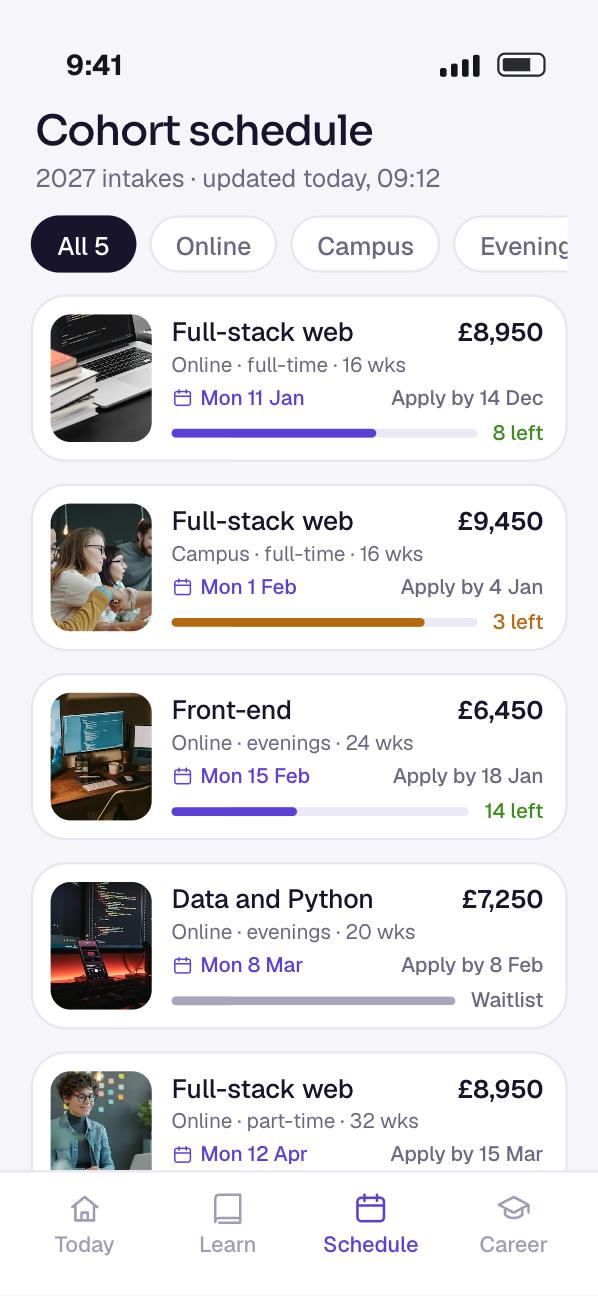
Cohort schedules in one place
Start dates, enrolment deadlines and class times for online and in-person cohorts live in a single schedule.
When staff change a date, every page and every learner sees the change. Nobody works from an old timetable.
- 07
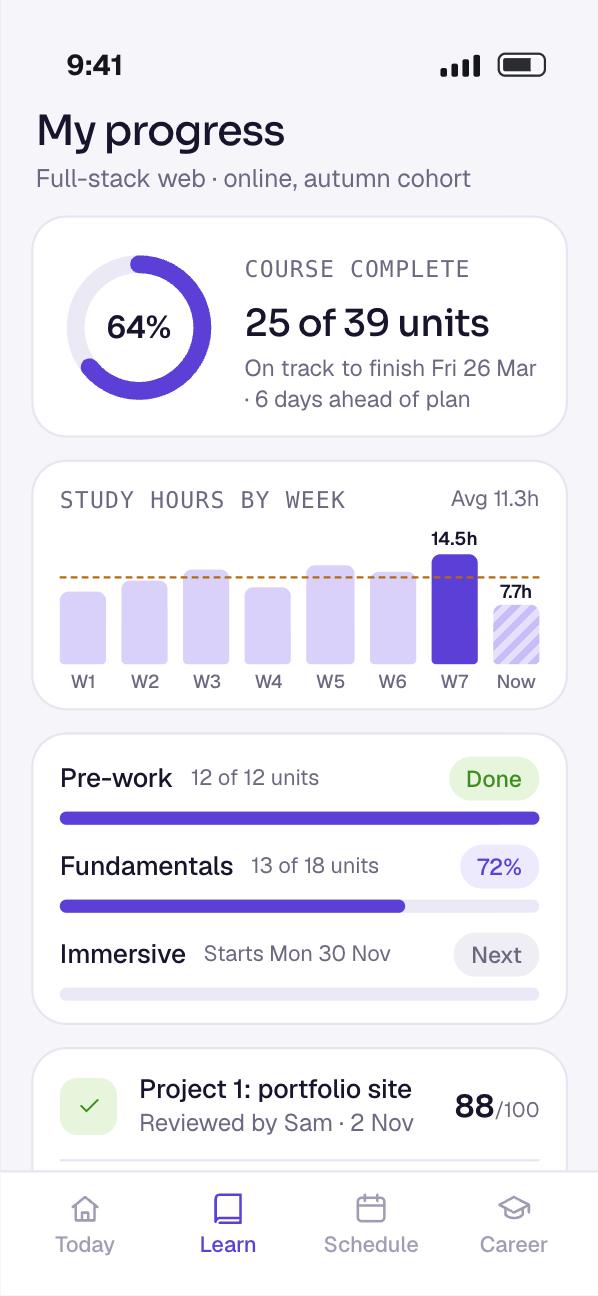
Progress that keeps people going
Dashboards show learners and instructors which units are complete and which milestones are next.
Instructors spot who has stalled before it becomes a dropout. The course completion rate stands at 92%, and 70% of learners are active every week.
- 08
Career support, alumni and employers
Graduates get interview practice, job preparation guides and success stories. They also keep access for life to the latest course content through the account they already have.
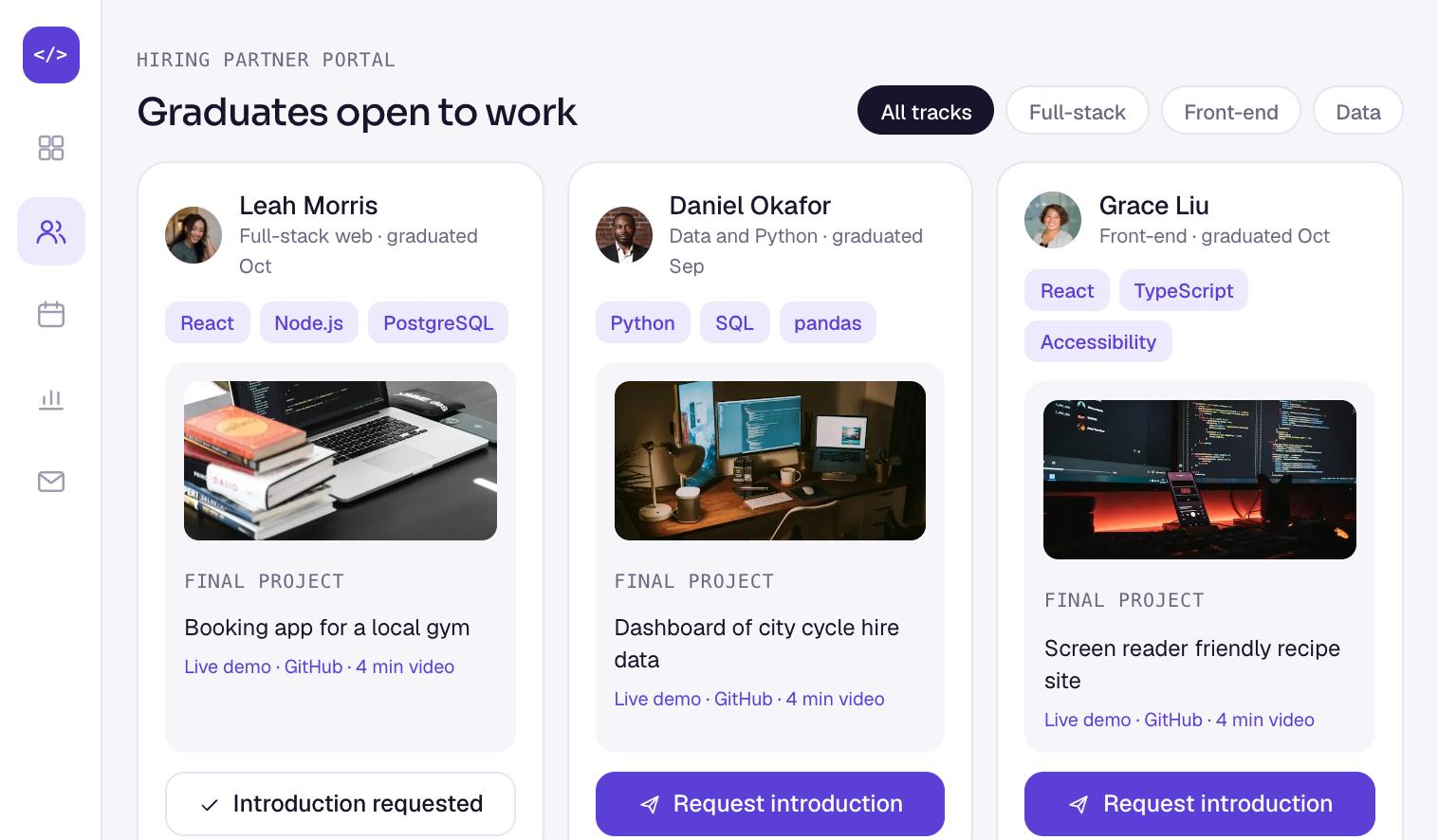
In the alumni portal, graduates show their skills and projects. Hiring partners browse those profiles in their own portal and request introductions. More than 60 hiring partners are connected.
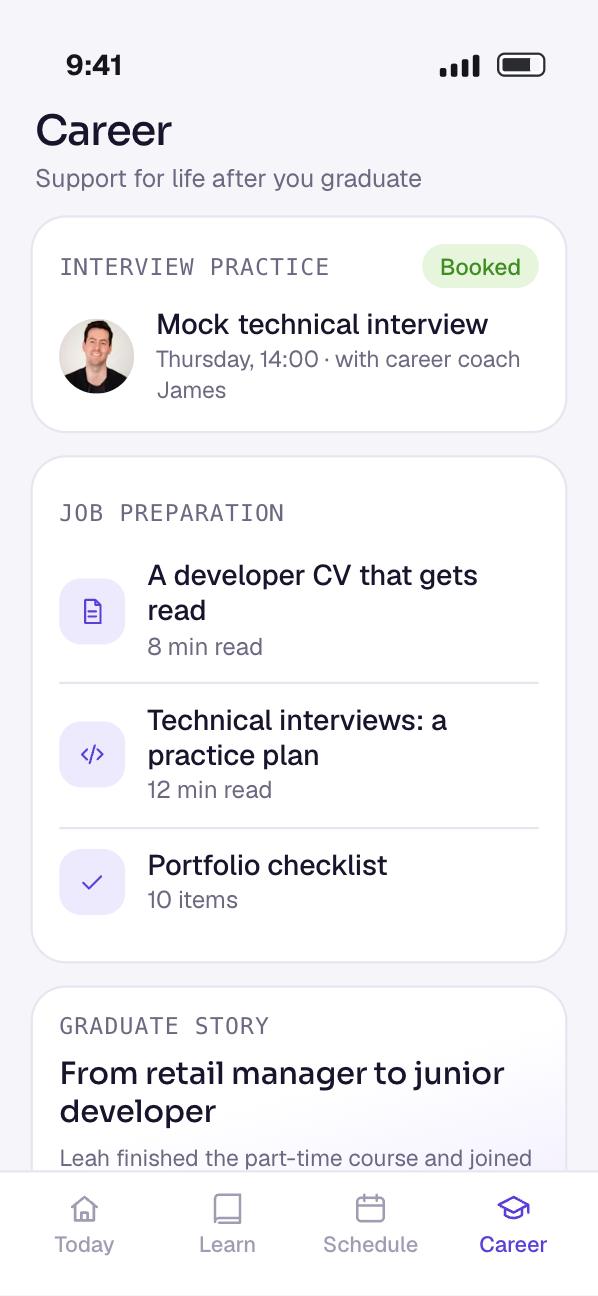
The web platform in a browser
Planning something like this? Talk it through with the team that built it, in a free 30-minute call.
Book a free 30-minute callHow it works
A coding school platform is three products sharing one database: a fast public website, an admissions system and a learning platform. This is how we build that today, on the stack this platform uses.
The architecture
The website and the app talk to one Node.js API. Video for live classes runs on its own path, and slow jobs such as reminders run in the background.
People and devices
Learners
 Next.js websiteCourse pages, comparison, booking and applications
 React Native appLearning hub, schedule, progress and career support
Instructors and staff
- Staff and partner portalsAdmissions, instructors, alumni and employers
Our system
- Recorded lessonsVideo files served through a CDN behind signed links
 Amazon IVSLive classes on a real-time stage
Booking and records path
- Course enginePhases, units, assignments and progress
- Admissions serviceApplications, stages and reminders
- Career serviceAlumni profiles and introductions
 REST API in Node.jsSign-in, two-factor checks and roles
Data
 PostgreSQLPeople, courses, cohorts and progress
 RedisSessions, caching and job queues
Outside services
- Payment gatewayTuition and instalments on its own page
- Advisors’ calendarsFree and busy times for information calls
- Learners and Amazon IVS: Learner audio, video and shared screens
- Instructors and staff and Amazon IVS: Instructor audio and video
- Recorded lessons to Learners: Recorded lessons
- Course engine to Amazon IVS: Stage and join tokens
- Learners to Booking and records path: Applications, bookings and progress over HTTPS
- Instructors and staff to Booking and records path: Cohorts, admissions and introductions
- Booking and records path to Data: People, cohorts and progress
- Admissions service to Advisors’ calendars: Free times
- REST API in Node.js to Payment gateway: Tuition payment session
What happens when a visitor books a call and applies
Eight steps run from a first visit to a place on a cohort. Reminders do the chasing, so staff only step in where a person is needed.
-
01Ask for timesWebsite to APIThe visitor picks an advisor. The API asks for that advisor’s free times this week.
-
02Check the calendarAPI to CalendarThe calendar returns busy periods, and the API offers the gaps between them as call slots.
-
03Book the callWebsite to APIThe visitor picks a time. The API holds it and creates the enquiry in admissions.
-
04Store the enquiryAPI to DatabaseThe enquiry is saved at its first stage, with the course and cohort the visitor is interested in.
-
05Queue remindersAPI to Job queueDelayed jobs are queued: a call reminder for the visitor, and a follow-up for the advisor.
-
06ApplyWebsite to APIAfter the call, the applicant applies. The stage moves on, and a new follow-up replaces the old one.
-
07Nudge staffJob queue to StaffIf nobody replies within the agreed time, the job fires and the right person gets a reminder.
-
08EnrolStaff to DatabaseStaff offer a place, the applicant pays, and the record moves to enrolled with a seat on the cohort.
A public website that is fast and findable
Course pages are read far more often than they change. So we render them on the server with Next.js and serve them from a cache.
Next.js calls this incremental static regeneration. A page can refresh on a timer, or on demand when content changes, through functions such as revalidatePath and revalidateTag.
When staff change a fee or a start date, the API asks Next.js to rebuild that page. Visitors get a fast cached page that is never out of date.
Next.js also generates each page’s title, description and social image from the course data, so every course page is ready for search and sharing.
Server and client components
Most of a course page is text that never needs JavaScript in the browser. In the Next.js App Router, those parts are server components, so the browser downloads less.
Only the interactive parts are client components: the comparison picker, the call booking widget and the application form. That split keeps the pages quick on a phone.
Booking a call from real calendars
Advisors keep their own calendars. Rather than copy them, the admissions service asks the calendar for busy times. Google Calendar has a freeBusy query for exactly this.
The free gaps become call slots of a fixed length. When a visitor books, the slot is held for a short time and written into the advisor’s calendar, so it cannot be booked twice.
Admissions that chase for you
Each application is a row with a stage: enquiry, call booked, applied, interview, offer, enrolled. Every move between stages is logged with who made it and when.
Reminders run as delayed jobs on a Redis-backed queue. BullMQ, for example, holds delayed jobs in a separate set and processes them as normal jobs once the delay has passed.
When an applicant moves on, the waiting reminder is removed and a new one is set for the next stage. Repeating jobs handle daily summaries for each admissions officer.
This is how the time from application to enrolment fell. Nobody has to remember who to chase.
The course engine
The course, assignment and progress engine is our own. A course is a list of phases, a phase is a list of units, and a unit holds lessons, exercises and assignments.
A cohort is one run of a course with its own dates, online or on campus. Learners belong to a cohort, so schedules and deadlines come from one place.
Progress is recorded as events: started, submitted, reviewed, completed. Dashboards count those events, so a learner and an instructor see the same numbers.
Graduates keep their account. When a course is updated, they see the new content, which is how lifetime access works without a separate system.
Live classes and recorded lessons
Live classes need low delay so learners can ask questions. Amazon IVS real-time streaming quotes latency that can be under 300 milliseconds from host to viewer.
A real-time stage takes up to 12 hosts by default, with audiences beyond 25,000 viewers. So an instructor can bring a learner on stage to share their screen.
Recorded lessons are ordinary video files, packaged for streaming and served through a content delivery network. The app only plays them for signed-in learners on that course.
One login, two factors, clear roles
Everyone signs in to one account, whether they use the website, the app or a portal. Staff and partners must use a second factor.
We use time-based one-time passwords. The standard behind them, RFC 6238, uses a 30-second time step by default. The NCSC lists FIDO2 credentials, such as passkeys and security keys, among its recommended types because they resist phishing. Staff can use those too.
Roles decide access. A learner sees their own work. An instructor sees their cohorts. An employer sees only the profiles graduates choose to share. PostgreSQL row-level security enforces the same rules inside the database.
Tuition, instalments and card data
Tuition is paid through a payment gateway on its own hosted page, so card details never reach our servers. That keeps the PCI DSS burden on the provider, where it belongs.
Instalment plans are a schedule of payments set up once. Stripe, for example, models this as subscription schedules made of phases that change automatically when each one ends.
The gateway tells our server when each payment succeeds or fails. Webhooks are checked and processed once, so a retry never marks a payment twice.
Accessible for every learner
We build to WCAG 2.2 at level AA. That means full keyboard navigation, screen reader labels and readable layouts, as the platform already set out to provide.
WCAG 2.2 adds checks we test for directly. One example is Focus Not Obscured: an item with keyboard focus must not be entirely hidden, for example behind a sticky banner.
Learner data under UK GDPR
Applications, grades and payment records are personal data. We keep only what each step needs, and set how long each kind of record is kept.
When a learner asks for a copy of their data, the answer is quick. Progress and admissions are stored as events, so a complete history exports in one step.
The stack and why we chose each part
| Layer | Technology | Why we chose it |
|---|---|---|
| Website | React, Next.js | Server-rendered, cached course pages that load fast and rank, with interactive parts only where needed. |
| Mobile app | React Native | One codebase for Android and iOS that shares language and skills with the React website. |
| Backend | Node.js | The same language across the stack, well suited to an API that serves many small requests. |
| Database | PostgreSQL, Redis | PostgreSQL for people, courses and progress. Redis for sessions, caching and job queues. |
| Learning management | Custom engine for courses, assignments and progress | Phases, cohorts and career steps that fit how this school teaches, instead of bending an off-the-shelf system. |
| Live classes | Streaming with live sessions (Amazon IVS) | Low-delay live classes with learners on stage, and recorded lessons through a CDN. |
| Payments | Payment gateway | Tuition and instalments on a hosted page, so card numbers never reach our servers. |
| Cloud and security |  AWS, two-factor sign-in, encryption, roles | Managed database, cache and video in one place, with strong sign-in and access set by role. |
The build plan
This is how we would plan a platform like this today. The weeks assume one team working on the website, the backend and the app in parallel.
- DiscoveryWeeks 1 to 2
- Map the journey from visit to job
- Agree roles for learners, staff, alumni and employers
- Course, phase, unit and cohort model
- Clickable prototype of course pages and the hub
- Website and bookingWeeks 3 to 8
- Next.js course pages with on-demand refresh
- Course comparison
- Call booking from advisors’ calendars
- Applications and syllabus requests
- AdmissionsWeeks 5 to 10
- Application stages and history
- Delayed reminder jobs on Redis
- Admissions board for staff
- Offers, tuition and instalment plans
- Course engine and appWeeks 7 to 16
- Phases, units, assignments and progress events
- React Native learning hub and schedule
- Instructor dashboards
- Live classes and recorded lessons
- Career, alumni and employersWeeks 13 to 18
- Alumni profiles and lifetime access
- Employer portal and introduction requests
- Interview practice and job guides
- Two-factor sign-in for staff and partners
- Testing and launchWeeks 17 to 22
- Accessibility audit to WCAG 2.2 AA
- Load test for enrolment day
- Payment and webhook tests
- Store release and 3 months of fixes
- 01Weeks 1 to 2
Discovery
- Map the journey from visit to job
- Agree roles for learners, staff, alumni and employers
- Course, phase, unit and cohort model
- Clickable prototype of course pages and the hub
- 02Weeks 3 to 8
Website and booking
- Next.js course pages with on-demand refresh
- Course comparison
- Call booking from advisors’ calendars
- Applications and syllabus requests
- 03Weeks 5 to 10
Admissions
- Application stages and history
- Delayed reminder jobs on Redis
- Admissions board for staff
- Offers, tuition and instalment plans
- 04Weeks 7 to 16
Course engine and app
- Phases, units, assignments and progress events
- React Native learning hub and schedule
- Instructor dashboards
- Live classes and recorded lessons
- 05Weeks 13 to 18
Career, alumni and employers
- Alumni profiles and lifetime access
- Employer portal and introduction requests
- Interview practice and job guides
- Two-factor sign-in for staff and partners
- 06Weeks 17 to 22
Testing and launch
- Accessibility audit to WCAG 2.2 AA
- Load test for enrolment day
- Payment and webhook tests
- Store release and 3 months of fixes
Testing and release
A learning platform is judged on its busiest days: the morning a cohort opens and the hour before a deadline. Testing aims at those moments.
Enrolment day, rehearsed
We simulate a cohort opening, with many people reading course pages and applying at once. Cached pages must hold, and the database must not run out of connections.
Seat counts are tested under the same load. Two people can never take the last seat on a cohort.
Reminders that fire once
Each admissions stage is tested for its reminder. We move an applicant forward and check that the old reminder is gone and the new one is queued.
Jobs are tested for restarts too. If a worker stops mid-job, the reminder still goes out once and only once.
Accessibility by hand and by tool
Automated checks run on every change. They catch missing labels and low contrast, but not everything.
So every main journey is also done by hand with only a keyboard, and with a screen reader on the web, iOS and Android.
Payments and roles
Payment tests replay the gateway’s webhooks twice and out of order. A paid instalment must be recorded once, and a failed one must alert staff.
Role tests try reading another learner’s work, and an employer opening a profile that was not shared. Each must be refused.
Results
Early results show a smoother journey for applicants and learners, and a busier link to employers. These are the figures recorded for the platform.
- 5,000+active learners across online and campus cohorts
- 38%more information calls booked through a simpler flow
- 45%faster from application to enrolment with automatic tracking
- 92%of learners complete their course
- 70%of learners active on the platform every week
- 60+hiring partners connected through the employer portal
The 38% and the 45% come from the same idea: take the friction out of the first conversation and the waiting out of admissions. Both are about speed for the applicant.
The 92% and the 70% are about staying power. Learners who can see their progress, in one place, keep going.
What the client says
-
“We needed one platform for the whole journey: comparing courses, booking a call, applying, then learning. AppAgentix built the website, the learning hub and the mobile app. Admissions now move 45% faster and information calls are up 38%. More than 5,000 learners use it, and 92% complete their course. They understood how a school actually runs, not just how to write the code.”
Elias S.Project Delivery Head, Coding school
Since launch
A learning platform grows with every cohort. These are the improvements a platform like this receives in its first six months.
- 01Offline lessons in the app
Learners can save a lesson to read on the move without a connection.
- 02Instructor alerts
An instructor is told when a learner has not submitted work for several days.
- 03Calendar sync for learners
Classes and deadlines can be added to a learner’s own calendar.
- 04Faster course pages
Images and scripts trimmed after measuring real visits on mobile.
- 05Richer graduate profiles
Graduates can link project code and add a short video introduction.
- 06Admissions reports
Staff see where applicants stall, stage by stage.
- 07Accessibility fixes
Issues found in audits and by learners fixed and retested.
- 08Operating system updates
Each new Android and iOS version tested, with store requirements kept current.
Want a result like this for your own product? Get a written view of scope, time and price within two working days.
- 95%+ delivered on or before the agreed date
- 60% of clients come back for a second project
- 3 months of fixes after launch in the build price
What this would cost to build today
These are our published prices, in pounds, excluding VAT, as of November 2026. A platform at this scope, with a website, admissions, a course engine, an app and portals, sits in the full app range.
- Discovery£3,000 to £6,0002 weeks
Journey map, data model, prototype and a fixed quote. It comes off the build price if you continue.
- First version£15,000 to £40,0008 to 14 weeks
Course pages, call booking, applications and a web learning hub with progress tracking.
- This caseFull platform like this one£40,000 to £90,0004 to 8 months
Admissions automation, cohorts, live classes, React Native app, payments, alumni and employer portals.
- Support and runningfrom £750 a monthMonthly
Fixes, updates, monitoring and new course features. Minimum 3 months, then 30 days’ notice.
- Fixes after launch are included in the build price for 3 months.
- Cloud, video streaming and payment fees are billed by your providers and grow with learner numbers.
- Moving content from an old system is quoted after we have seen it.
Estimate your app in a minute with our React Native calculator
Questions about building an e-learning platform
How much does it cost to develop an online learning platform?
With us, a first version with course pages, booking, applications and a learning hub costs £15,000 to £40,000 over 8 to 14 weeks. A full platform with admissions automation, live classes, an app and portals costs £40,000 to £90,000 over 4 to 8 months. Prices exclude VAT.
Can I build my own LMS?
Yes. A custom engine makes sense when your courses have their own shape, such as phases, cohorts and career steps. If you only need to host videos and quizzes, an off-the-shelf system is cheaper. We help you decide in discovery.
How to develop an eLearning platform?
Start with the journey and the data model: courses, phases, units, cohorts and progress. Build the public pages and booking first, then admissions, then the learning hub. Add live classes, the app and portals once the core works.
How much does it cost to make a learning app?
A learning app on its own, alongside an existing website, usually fits our first version range of £15,000 to £40,000. Building the app with React Native lets it share skills and code patterns with a React website.
How do I track my admission status?
On a platform like this, applicants see their stage in their account, from call booked to enrolled. Behind it, staff work from a board and the system sends reminders, so a stage never sits still for long.
What is an enrollment management system?
It is the software that runs admissions: enquiries, calls, applications, offers and payment, up to a confirmed place. Here it is part of one platform, so an enrolled applicant becomes a learner without re-entering anything.
How do I create an online teaching platform?
Pick how you will teach live and recorded, then build around it. For live classes we use low-delay streaming that lets an instructor bring a learner on stage. Recorded lessons stream through a CDN to signed-in learners.
Services behind this build
Planning an e-learning platform?
Tell us about your courses and your learners. A developer reads your brief. We reply within 30 minutes.