MyUTHealth: a patient portal app on Epic MyChart
MyUTHealth puts a health provider’s patient portal on the phone, and we built it. Patients ask for visits, read test results, reorder medicines and message their care team in one place. It runs on Epic’s MyChart platform.
- Android
 Epic MyChart
 HL7 FHIR
- 50,000+downloads on Google Play
- 4.4 starsaverage rating from 750+ reviews
- Over 80%of patients can reach results, visits, reminders and check-ins in one app
- 7everyday tasks moved into a single app
The brief: one front door to the patient record
A health provider wanted its patient portal to work properly on a phone. Patients of its doctors’ clinics and of a psychiatric centre all needed the same app.
Before the app, booking a visit, reading a result and asking a doctor a question each lived in a different place. Patients rang the clinic for things a screen could answer. The old portal was not designed for small screens.
Health records are among the most private data there is. So every design choice had to keep patient data safe on the device, on the network and in the record itself.
Who the app is for
- The returning patient
Checks the next visit, reads results and reorders regular medicines without a phone call.
- The patient with a question
Wants to ask the care team something private, without voicemail or open email.
- The self-tracker
Shares steps, calories, blood pressure or glucose from fitness apps with the care team.
- The care team
Answers messages and requests inside the record system they already use every day.
Six problems and what we did about each
- 01The problem
Booking, results and contact with doctors were spread across several separate tools.
What we builtWe gathered those tasks into one app, so a patient finds every routine job behind a single sign-in.
- 02The problem
The existing portal felt dated and was never designed for a phone screen.
What we builtWe designed simple screens with plain menus, so the main tasks take only a few taps.
- 03The problem
Patients needed a private way to reach their doctor, without phone tag or ordinary email.
What we builtWe added secure messaging inside the app, so questions and answers stay within the patient record.
- 04The problem
Fitness and health readings sat in other apps, so daily tracking was awkward.
What we builtWe linked Google Fit, so steps, calories eaten, blood pressure and glucose can reach the portal account.
- 05The problem
Medical records are highly sensitive, and they need protecting at every stage.
What we builtWe encrypt every request in transit, and any patient may request deletion of their data.
- 06The problem
Patients of several clinics and a psychiatric centre each needed access.
What we builtWe delivered one shared app for the clinics and the psychiatric centre, on a single platform.
What we built
Seven tasks carry the app. The screens beside them come from the public Android app.
- 01
A home screen built around tasks
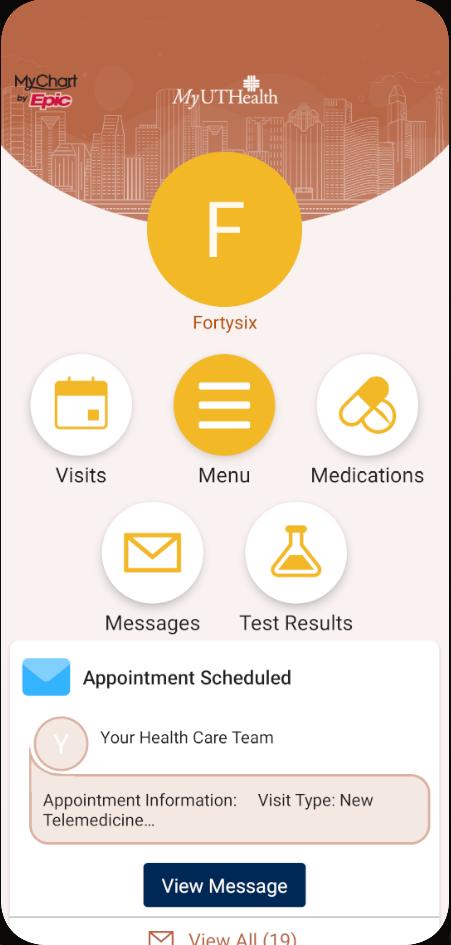
The home screen opens on five large shortcuts: visits, the menu, medications, messages and test results. Below them, the newest items appear as cards, such as a fresh result or an appointment message.
Large targets matter in a health app. Many users are older, unwell or anxious when they open it. So the busiest tasks sit one tap from the start, and nothing important hides in a sub-menu.
- 02
Visit requests and reminders
Patients ask for a visit inside the app instead of phoning the clinic. They get reminders before each appointment and can check in before they arrive.
In FHIR, the healthcare data standard the app speaks, a visit request is an Appointment with the status “proposed”. The clinic system then accepts or changes it. We show the patient each status in plain words, so a request never looks like a confirmed booking.
- 03
Test results without the wait
Lab and test results appear in the app, so patients no longer wait for a call. A new result shows on the home screen with a button to open it.
Results arrive as a DiagnosticReport that points to its separate Observations, one per measured value. We read the report and its values together, so each result shows with its units and reference range.
- 04
Secure messages with the care team
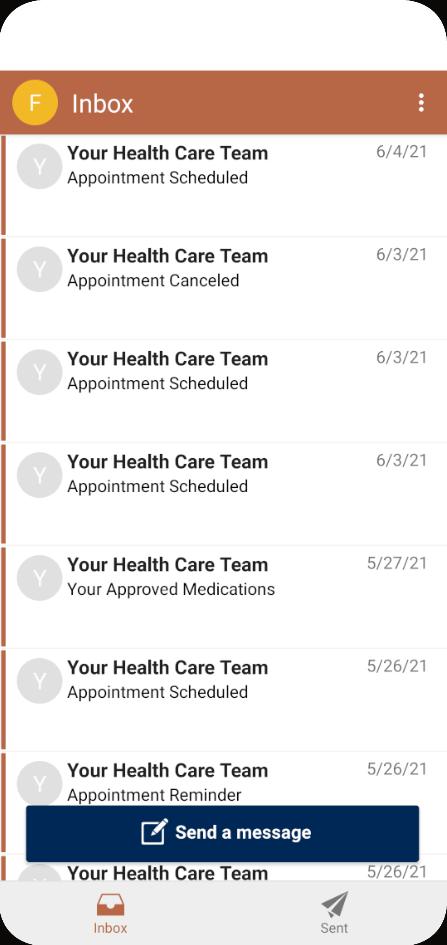
The inbox lists messages from the care team: appointment changes, reminders, approved medicines and replies. A send button sits at the foot of the list.
Messages stay inside the record system, not in email. That keeps them in the patient’s history, where the care team already works. The phone shows only a short alert, and the message itself opens after sign-in.
- 05
Repeat prescriptions in a few taps
Patients ask for a refill from the medications list instead of visiting the clinic. The list shows each medicine with its dose and how to take it.
Some medicines cannot be refilled through the app. The screen says so beside that medicine, so the patient knows to contact the clinic instead.
- 06
Clinic finder and fitness data
A location finder shows the nearest clinic and helps patients plan the journey. Directions open in the phone’s own maps app.
Patients can also link Google Fit. Steps, calories eaten, blood pressure and glucose readings then reach their portal account, where the care team can see them.
- 07
Sign-in that protects the record
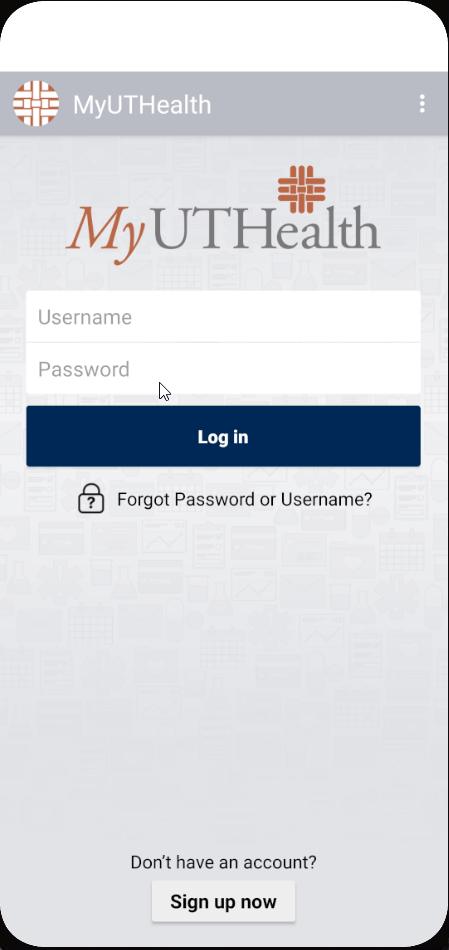
Patients sign in with their portal username and password, and new patients can sign up from the same screen. A forgotten details link sits under the button.
After the first sign-in, a fingerprint or face unlock can stand in for the password. The key that protects the session stays inside the phone’s secure hardware.
Planning something like this? Talk it through with the team that built it, in a free 30-minute call.
Book a free 30-minute callHow it works
A patient portal app is a careful window onto a record system it does not own. The record stays in the EHR, the electronic health record. The app signs the patient in, asks for exactly what it needs, and shows it clearly. This is how we build one today.
The architecture
Clinical data comes from the record system through FHIR. Fitness data comes from the phone through Health Connect. The app keeps no copy of the record.
People and devices
- Wearables and monitorsStep counters, blood pressure cuffs and glucose meters
- Companion appsEach device’s own app records the readings
- Health ConnectThe store on the phone where the patient grants each data type
Our system
Our app
 Android appKotlin screens for visits, results, refills and messages
- Secure sign-in tabThe portal login page opens in the phone’s browser tab, never inside the app
- Protected storageSession keys held in the Android Keystore
Outside services
 Firebase Cloud MessagingDelivers short alerts to the phone
- Maps appDirections to the nearest clinic
The standards
- FHIR APIStandard REST calls for the patient’s own record, over TLS
 SMART on FHIR sign-inOAuth 2.0 with PKCE issues short-lived tokens
Epic MyChart
- Visits and resultsAppointment, DiagnosticReport and Observation
- Medicines and messagesMedication requests and the secure inbox
- The patient recordThe EHR stays the single source of truth
- Access logWho read or changed what, and when
- Wearables and monitors to Companion apps: Readings
- Companion apps to Health Connect: Steps, blood pressure and glucose records
- Health Connect to Our app: Only the types the patient allows
- Secure sign-in tab and SMART on FHIR sign-in: Login, then a short-lived token
- Android app and FHIR API: FHIR requests with the token
- The standards and Epic MyChart: Appointment, Observation and MedicationRequest resources
- Outside services to Our app: Alerts with no clinical detail; directions on tap
What happens when a new test result arrives
Six steps run between the lab finishing and the patient reading the result. Nothing clinical travels in the alert itself.
-
01Alert arrivesPush to AppA push message says something new is waiting. It names no test and no value.
-
02Unlock and refreshApp to Sign-inThe patient unlocks the app with a fingerprint, face or passcode. The app then trades its stored refresh token for a new access token.
-
03New access tokenSign-in to AppThe sign-in service returns a token that lasts about an hour and covers only the granted scopes.
-
04Ask for the reportApp to FHIR APIThe app requests the patient’s new DiagnosticReport and the Observations it points to.
-
05Check and readFHIR API to RecordThe server checks that the token’s scope covers this request, then reads the record.
-
06Show the resultFHIR API to AppThe report comes back as FHIR JSON. The app shows each value with its unit and range, and stores none of it.
Speaking FHIR to the record system
FHIR, short for Fast Healthcare Interoperability Resources, is HL7’s standard for health data over REST. Each kind of record is a resource with a fixed shape. The app reads and writes JSON over HTTPS, much like any modern API.
Each feature maps to a resource. A visit is an Appointment. A lab report is a DiagnosticReport that points to Observations. A medicine order is a MedicationRequest. Choosing the right resource early saves weeks of rework later.
Visit requests follow the FHIR workflow. The app creates an Appointment with the status “proposed”, and the people involved start as “needs-action”. The clinic system then books it or turns it down. We show each state in plain words.
Vital signs have fixed codes in FHIR. Blood pressure, for example, uses the LOINC panel code 85354-9, with systolic and diastolic values as two components. Using the standard codes means the care team sees readings where they expect them.
Signing in with SMART on FHIR
SMART App Launch is the HL7 standard for how an app signs a user in to a FHIR server. It is built on OAuth 2.0. The app never sees a database login, only tokens.
The standard says every SMART app shall support PKCE, and that servers shall support the S256 method and shall not support the plain method. PKCE stops another app on the phone from stealing the sign-in code. Epic recommends PKCE for native mobile apps too.
The sign-in page opens in the phone’s browser tab, not inside the app. RFC 8252, the best practice for OAuth in native apps, requires an external browser for this. The open-source AppAuth library for Android follows it, using Custom Tabs.
Scopes keep access narrow. A scope such as patient/Observation.rs lets the app read and search observations for the signed-in patient only. The offline_access scope adds a refresh token, so patients do not type a password on every visit.
Fitness data: from Google Fit to Health Connect
The app links Google Fit, so readings from other apps reach the portal. That was the right choice when the app was built. Google has since changed course.
Google’s developer pages now say the Google Fit APIs, including the REST API, will be supported only until the end of 2026. Since 1 May 2024, new developers cannot sign up to use them. Google recommends Health Connect for step tracking and mobile-first Android apps.
Health Connect is a store on the phone that apps write to and read from, with the patient’s permission. From Android 14 it is part of the operating system. On Android 13 and below, the patient installs the Health Connect app from Google Play.
It covers every type this app uses: steps, blood pressure, blood glucose and nutrition, which carries the energy eaten. The patient grants each type separately, so the app asks only for what the care team needs.
Epic’s guidance fits this flow. For a patient-facing app where patients sign in to file readings, Epic recommends its Observation.Create API, authorised with the patient’s own credentials. The patient needs an active MyChart account for it.
Alerts that say nothing private
Firebase Cloud Messaging delivers alerts to Android phones. FCM has two kinds of message. Notification messages are shown by the system. Data messages carry key and value pairs that the app handles itself. Both are capped at 4,096 bytes.
We keep clinical detail out of every alert. A locked phone may show a notification to anyone nearby. So the alert says “You have a new message” or “A new result is ready”, and the detail loads only after sign-in.
Protecting data on the phone and on the wire
All traffic runs over HTTPS with TLS. Android’s Network Security Configuration lets an app say which certificate authorities it trusts, per domain. We set it so the app never accepts plain HTTP for any record call.
Session keys live in the Android Keystore. Google’s documentation says Keystore key material stays non-exportable and is harder to extract from the device. On phones with StrongBox, keys sit in a separate secure chip.
For quick unlock we use the BiometricPrompt API with BIOMETRIC_STRONG, which means a Class 3 biometric, or the device screen lock as a fallback. A stolen phone without the owner’s face, finger or passcode cannot open the session.
Any patient may request deletion of their data. The app asks only for what each feature needs. We apply secure coding, strict access control and audit logging, which together help with an ISO 27001 or SOC 2 audit.
Screens for people who may be unwell
People open a patient app at stressful moments. They may be in pain, short of sleep or reading on a small, cracked phone. So we design for the worst moment, not the best.
Text scales with the phone’s font setting, and no screen breaks at the largest size. Every button has a label a screen reader can speak. Colour never carries meaning alone, so an abnormal result also shows a word, not just a red number.
Records are often incomplete. A report may arrive before all its values are final, or a medicine may have no dose text. We design a clear state for each gap, such as “Result pending”, so a missing field never looks like an error or a normal value.
Signal drops in hospital corridors and car parks. When a request fails, the app keeps what is already on the screen and offers a retry. It never shows an empty list that could be read as “no results”.
Google Play rules for health apps
Google Play now asks every app on the store to complete a Health apps declaration in Play Console. It applies to testing tracks as well as production. We fill it in before the first test release, so review never blocks a launch.
The Data safety form must match what the app really does. It covers health information, whether traffic is encrypted, and whether users can ask for deletion. We draft it from the data map we build in discovery.
The stack and why we chose each part
| Layer | Technology | Why we chose it |
|---|---|---|
| Patient portal platform | Epic MyChart | The record system the care teams already use, so the app adds a door rather than a second database. |
| Mobile app | Android | Native Android gives full access to Health Connect, the Keystore and biometric unlock. |
| Healthcare integration | HL7 FHIR APIs | The standard way to read and write appointments, results, medicines and vital signs. |
| Health data |  Google Fit | Brought steps, calories, blood pressure and glucose into the portal. Health Connect now takes over this role. |
| API communication | REST APIs | FHIR runs over plain REST and JSON, which every Android HTTP client handles well. |
| Data security | HTTPS, TLS encryption | Every byte between phone and record is encrypted in transit. |
| Notifications | Firebase Cloud Messaging (FCM) | Reliable alerts for results, messages and reminders, kept free of clinical detail. |
| Testing and quality |   Android Studio, JUnit | Fast local unit tests for data mapping, plus device tests for the screens. |
The build plan
This is how we would plan an app like MyUTHealth today, phase by phase. Record-system access usually sets the pace, so we start that work in week one.
- Discovery and accessWeeks 1 to 3
- Agree the features and the patient journeys
- Register the app and request sandbox access
- Map each feature to a FHIR resource and scope
- Clickable prototype of the main screens
- Sign-in and recordsWeeks 3 to 8
- SMART on FHIR sign-in with PKCE through AppAuth
- Keystore storage and biometric unlock
- Read appointments, results and medicines
- Error states for missing or partial records
- Patient featuresWeeks 6 to 13
- Visit requests and check-in
- Refill requests from the medicines list
- Secure inbox and replies
- Clinic finder with directions
- Health data linkWeeks 10 to 15
- Health Connect permissions per data type
- Read steps, blood pressure, glucose and nutrition
- File readings to the record
- Clear consent and an easy way to unlink
- Alerts and accessibilityWeeks 12 to 16
- FCM alerts with no clinical detail
- Deep links from each alert to the right screen
- Large text and screen reader checks
- Health apps and Data safety declarations
- Testing and launchWeeks 15 to 20
- Tests against synthetic sandbox patients
- Security review of storage and traffic
- Staged rollout on Google Play
- Monitoring and a 3-month fix period after launch
- 01Weeks 1 to 3
Discovery and access
- Agree the features and the patient journeys
- Register the app and request sandbox access
- Map each feature to a FHIR resource and scope
- Clickable prototype of the main screens
- 02Weeks 3 to 8
Sign-in and records
- SMART on FHIR sign-in with PKCE through AppAuth
- Keystore storage and biometric unlock
- Read appointments, results and medicines
- Error states for missing or partial records
- 03Weeks 6 to 13
Patient features
- Visit requests and check-in
- Refill requests from the medicines list
- Secure inbox and replies
- Clinic finder with directions
- 04Weeks 10 to 15
Health data link
- Health Connect permissions per data type
- Read steps, blood pressure, glucose and nutrition
- File readings to the record
- Clear consent and an easy way to unlink
- 05Weeks 12 to 16
Alerts and accessibility
- FCM alerts with no clinical detail
- Deep links from each alert to the right screen
- Large text and screen reader checks
- Health apps and Data safety declarations
- 06Weeks 15 to 20
Testing and launch
- Tests against synthetic sandbox patients
- Security review of storage and traffic
- Staged rollout on Google Play
- Monitoring and a 3-month fix period after launch
Testing and release
A health app can look finished while it shows the wrong unit or leaks a result into an alert. So we test the data, the security and the people who will use it.
Synthetic patients only
Epic’s open sandbox simulates a record system for testing. Its terms say it must hold only sample or synthetic data, never identifiable patient information. We build every test against those synthetic patients and never copy real records into a test system.
Data mapping tests
Most bugs in health apps are mapping bugs. A value lands in the wrong unit, or a partial report breaks a screen. We write JUnit tests for every FHIR resource we read. Android’s guidance calls these local tests: they run on the development machine, quickly, with no phone needed.
Device and security tests
Instrumented tests run on real or emulated phones and drive the screens as a patient would. We test sign-in, token refresh, biometric unlock and sign-out on older and newer Android versions. We also check that a locked phone shows no clinical text in any alert.
Staged release
We release through Google Play’s testing tracks first, then roll out to a small share of patients. Crash rates and sign-in failures decide when the rollout widens.
Results
MyUTHealth gave patients one easy place to manage their care and stay in touch with their care teams.
- 50,000+downloads on the Google Play Store
- 4.4 starsaverage rating, from more than 750 reviews
- Over 80%of patients can reach results, visit details, reminders and check-ins in one app
- 1 appfor the doctors’ clinics and the psychiatric centre together
Secure messaging lets patients reach their care teams without juggling phone, email and letters. Simple navigation makes medicines, visits and personal health details easier to manage.
Because the app runs on Epic’s MyChart platform, the key services sit together in one portal. The care team works in the record system it already knows, and patients see the same record on their phone.
What the client says
-
“Our patients needed the portal in their pocket: requesting visits, reading test results, reordering medicines and messaging their care team. AppAgentix built the Android app on our Epic MyChart system, careful where it matters: secure sign-in, no clinical detail on the lock screen, and patients choose what fitness data they share. The app has passed 50,000 downloads with 4.4 stars from over 750 reviews, and every release was tested before it reached our patients.”
Tariq K.Associate Vice President, Epic Applications, UTHealth Houston
Since launch
A patient app keeps changing after launch, as phones, stores and record systems move on. These are the improvements an app like this receives in its first six months.
- 01Fitness data moved to Health Connect
The Google Fit link replaced by Health Connect, ahead of the end of Google Fit API support in 2026.
- 02Permission per data type
Patients choose steps, blood pressure, glucose or nutrition one by one, and can withdraw any of them.
- 03Faster unlock
Biometric unlock added on top of the password, with the session key held in the Android Keystore.
- 04Alerts that open the right screen
Each alert links straight to the new result, message or visit after sign-in.
- 05Accessibility pass
Screens checked with large text and the screen reader, with labels fixed where they were missing.
- 06Store declarations kept current
Health apps declaration and Data safety form reviewed against the app on each major release.
- 07New Android versions supported
Each new Android release tested and supported before it reaches patients.
Want a result like this for your own product? Get a written view of scope, time and price within two working days.
- 95%+ delivered on or before the agreed date
- 60% of clients come back for a second project
- 3 months of fixes after launch in the build price
What this would cost to build today
These are our published prices, in pounds, excluding VAT, as of November 2026. An app at MyUTHealth’s scope, on an existing record system, sits in the first version range for one platform.
- Discovery£3,000 to £6,0002 weeks
Feature map, FHIR resource and scope plan, clickable prototype and a fixed quote. It comes off the build price if you continue.
- First version£15,000 to £40,0008 to 14 weeks
An Android app on your record system: sign-in, visits, results, refills and secure messages.
- This caseFull app on iPhone and Android£40,000 to £90,0004 to 8 months
Both platforms, health data links, alerts, accessibility work and the store declarations.
- Support and runningfrom £750 a monthMonthly
Updates for new Android, iOS and record-system releases, fixes and monitoring. Minimum 3 months, then 30 days’ notice.
- Fixes after launch are included in the build price for 3 months.
- Access to your record system’s APIs, and any fees its vendor charges, sit outside our price.
- Hosting costs stay low, because the record system holds the data and the app keeps no copy.
Estimate your health app in a minute with our healthcare calculator
Questions about building a patient portal app
How much does it cost to make a health app?
With us, a first version on one platform costs £15,000 to £40,000 and takes 8 to 14 weeks. A full app on iPhone and Android costs £40,000 to £90,000 over 4 to 8 months. Prices exclude VAT. Record-system access fees are separate.
Is there an API for Epic?
Yes. Epic publishes FHIR APIs and documents them on its developer site, with a sandbox of synthetic test patients. Patient apps sign in with SMART on FHIR, which is OAuth 2.0 with PKCE. MyUTHealth runs on Epic’s MyChart platform.
What is FHIR APIs?
FHIR is HL7’s standard for exchanging health data over REST. Each record type is a resource, such as Appointment, Observation or MedicationRequest, sent as JSON over HTTPS. An app that speaks FHIR can work with any record system that supports it.
Is Health Connect replacing Google Fit?
For Android apps, yes. Google says the Google Fit APIs will be supported only until the end of 2026, and recommends Health Connect for mobile apps. Health Connect is built into Android 14 and later, and is a separate app on earlier versions.
What is my chart patient portal?
MyChart is Epic’s patient portal. Health providers that use Epic offer it under their own name, as MyUTHealth does. Patients use it to see visits, results and medicines, and to message their care team.
How to create an app for medical?
Start with the record system: confirm API access and map each feature to a FHIR resource. Then build secure sign-in, the patient screens and alerts that carry no clinical detail. Test only with synthetic patients, and complete the store health declarations before release.
Planning a patient app?
Tell us about your patients and the systems you run. A developer reads your brief. We reply within 30 minutes.