A streaming service app for phones and TVs
We built this streaming service app, where viewers watch films, series and live channels on their phones and TVs. They can watch free with ads, subscribe, pay for one title, or spend reward points they have earned.
- iPhone
- Android
- Android TV
- 4ways to watch: free with ads, a plan, a single purchase or points
- 2kinds of video: on demand and live channels
- 2ways to spend points: single titles or a time-limited pass
- 8core features, from discovery to parental controls
The brief: more ways to watch, and a reason to come back
The service has a library of films and series, plus live channels and special events. Its owners wanted their own streaming app, on the phone in a viewer’s pocket and on the TV in the living room.
Most streaming apps give a viewer one choice: pay every month or leave. Its owners wanted more doors in. A viewer could watch free with ads, take a plan, pay for one title, or unlock something with points earned by using the app.
That points scheme was the distinctive part. It turns watching, rating and returning into a balance a viewer can spend. It also made the build harder, because points behave like money and must never be lost or spent twice.
Who the service is for
- The free viewer
Watches with ads, earns points and may never pay at all.
- The subscriber
Pays monthly or yearly and expects no ads on any device.
- The family
Shares one account across several profiles, with a safe profile for children.
- The content team
Uploads titles, sets prices and points costs, and reads the numbers.
Six problems and what we did about each
- 01The problem
In a growing library, viewers scroll past good titles and give up before they find something to watch.
What we builtPicks for each profile, clear categories and hand-built collections, so the right titles surface early.
- 02The problem
A single monthly price turns away viewers who only want one film, or who will not pay at all.
What we builtFree viewing with ads, monthly and yearly plans, and one-off purchases of a single title.
- 03The problem
Viewers who use the app often get nothing extra for their time and loyalty.
What we builtA points scheme: points for eligible activity, spent on single titles or on a pass that unlocks premium viewing for a set time.
- 04The problem
Adding films and series by hand, with artwork, categories and rules, quickly turns into a mess.
What we builtOne admin dashboard for uploads, categories, featured rows, prices and points costs.
- 05The problem
People start a series on the phone and want to finish it on the TV without hunting for the episode.
What we builtWatch history and resume points stored per profile, so playback carries on from the same minute on another device.
- 06The problem
The owners could not see what people watched, what they redeemed or where they dropped off.
What we builtViewing reports and analytics on titles, plans, points spent and activity across the platform.
What we built
Eight features carry the service. The screens are our designs of each one, with fictional titles, channels and people.
- 01
A home screen that knows who is watching
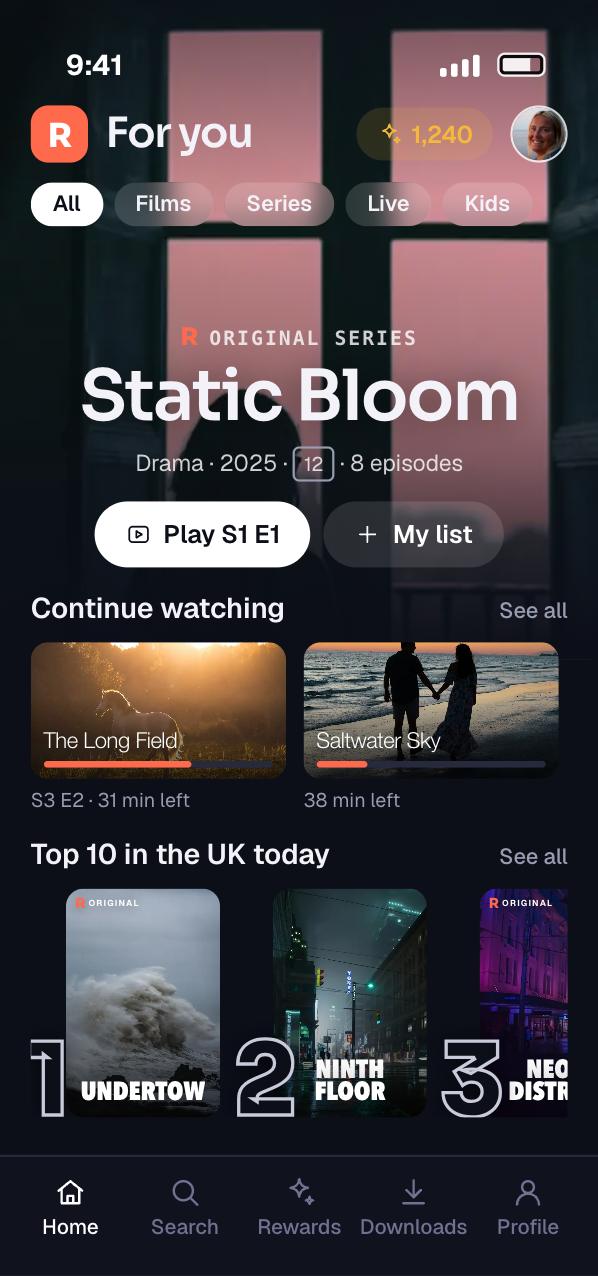
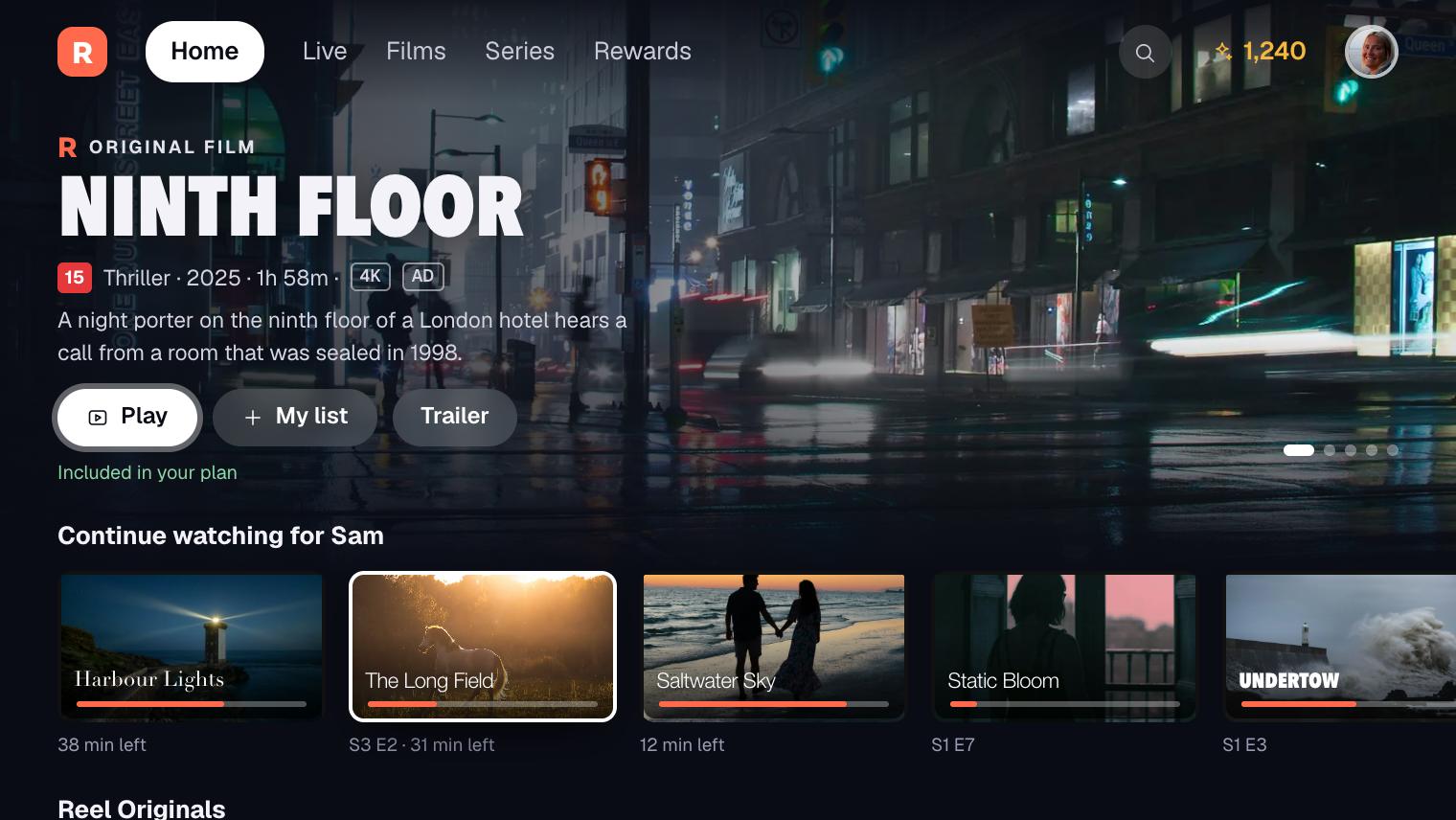
The home screen opens on a featured title, then rows. Continue Watching comes first, with a progress bar on every poster. Then come picks for this profile, trending titles and the categories the content team chooses.
Every row is data, not code. The content team builds a row in the admin dashboard and it appears on phones and TVs on the next refresh. No app release is needed to change the home screen.
Picks are per profile, not per account. A parent’s thrillers stay out of a child’s home screen, and the other way round.
- 02
A page for every title
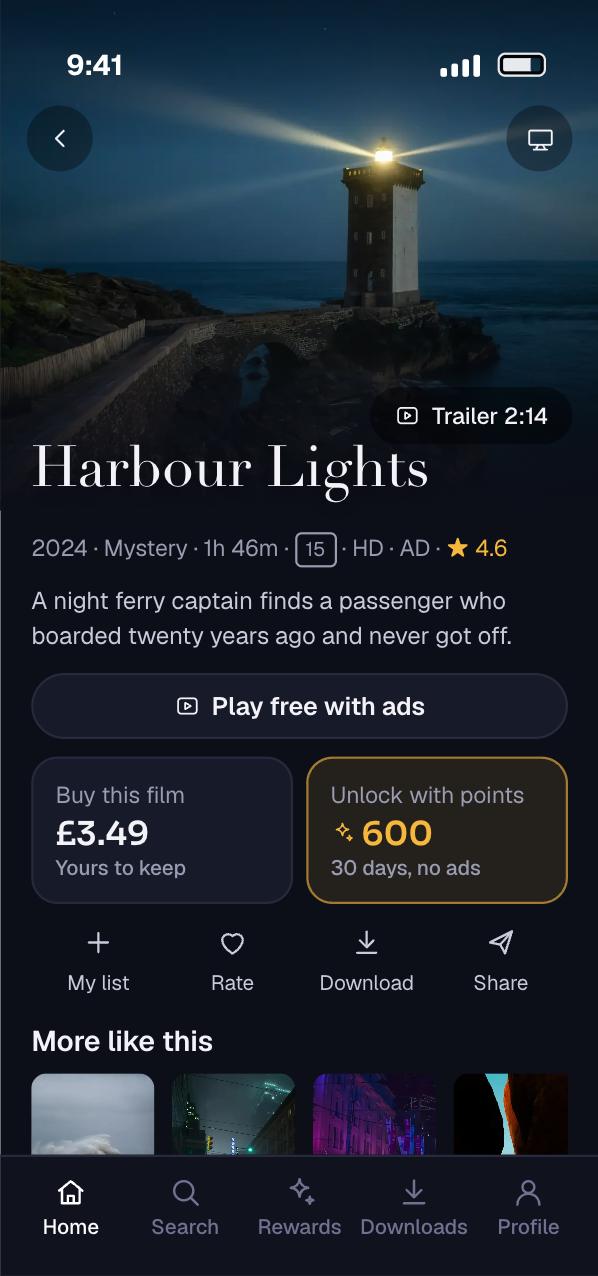
Each title page shows the trailer, the rating, the running time and a short description. Series pages add seasons and episodes. A viewer can save the title to a watchlist from the same page.
The buttons change with the viewer’s access. A subscriber sees Play. A free viewer sees Play with ads. A title that is not in any plan offers a single purchase or an unlock with points, priced in both.
- 03
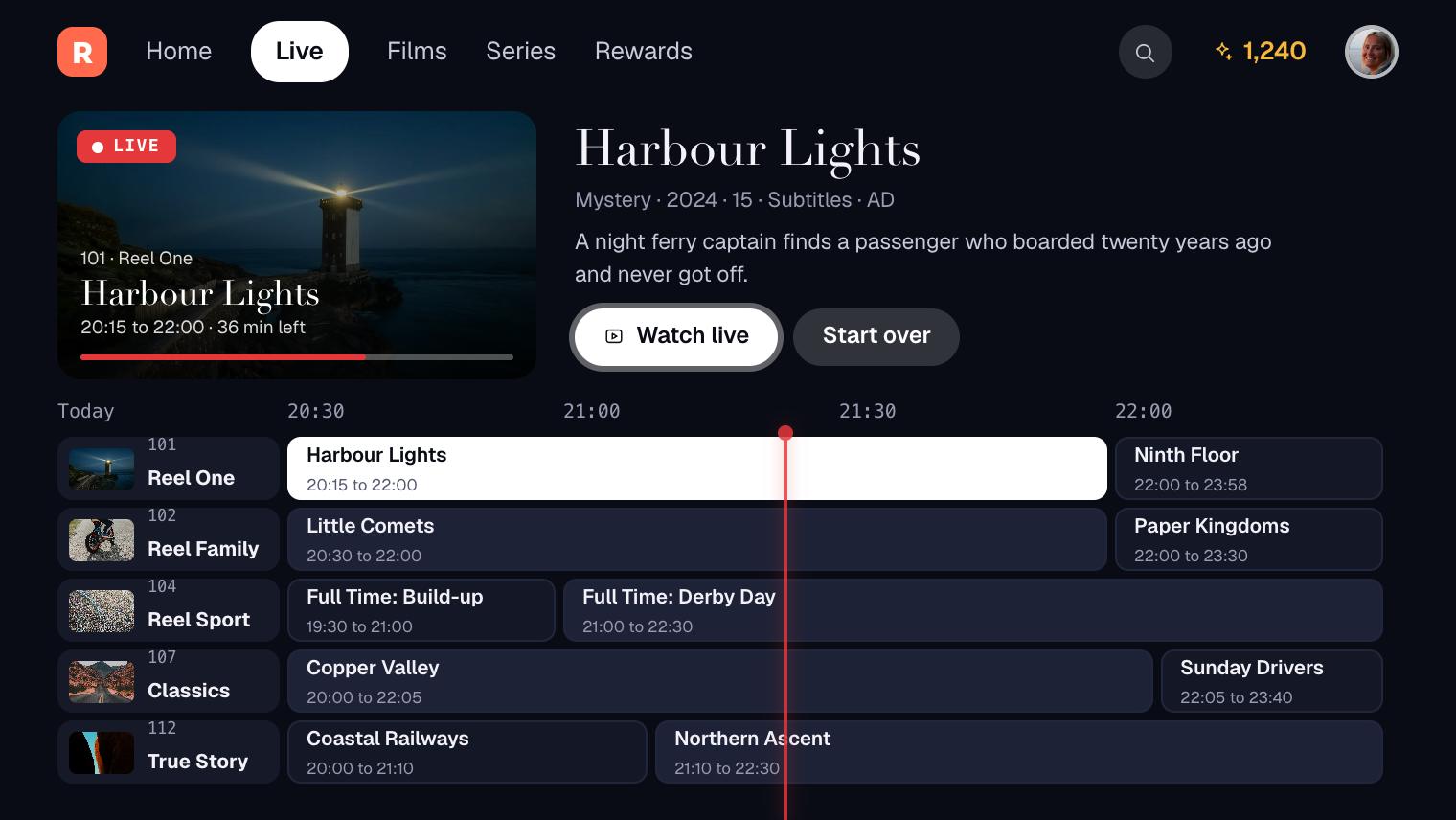
Live channels next to on-demand titles
The service carries live channels and special events as well as the library. The TV guide shows what is on now and next across channels, with the selected channel playing in a preview.
Live video uses the same player and the same access rules as films. A live event can sit inside a plan, cost a single purchase, or unlock with points like any other title.
- 04
A player built for the sofa
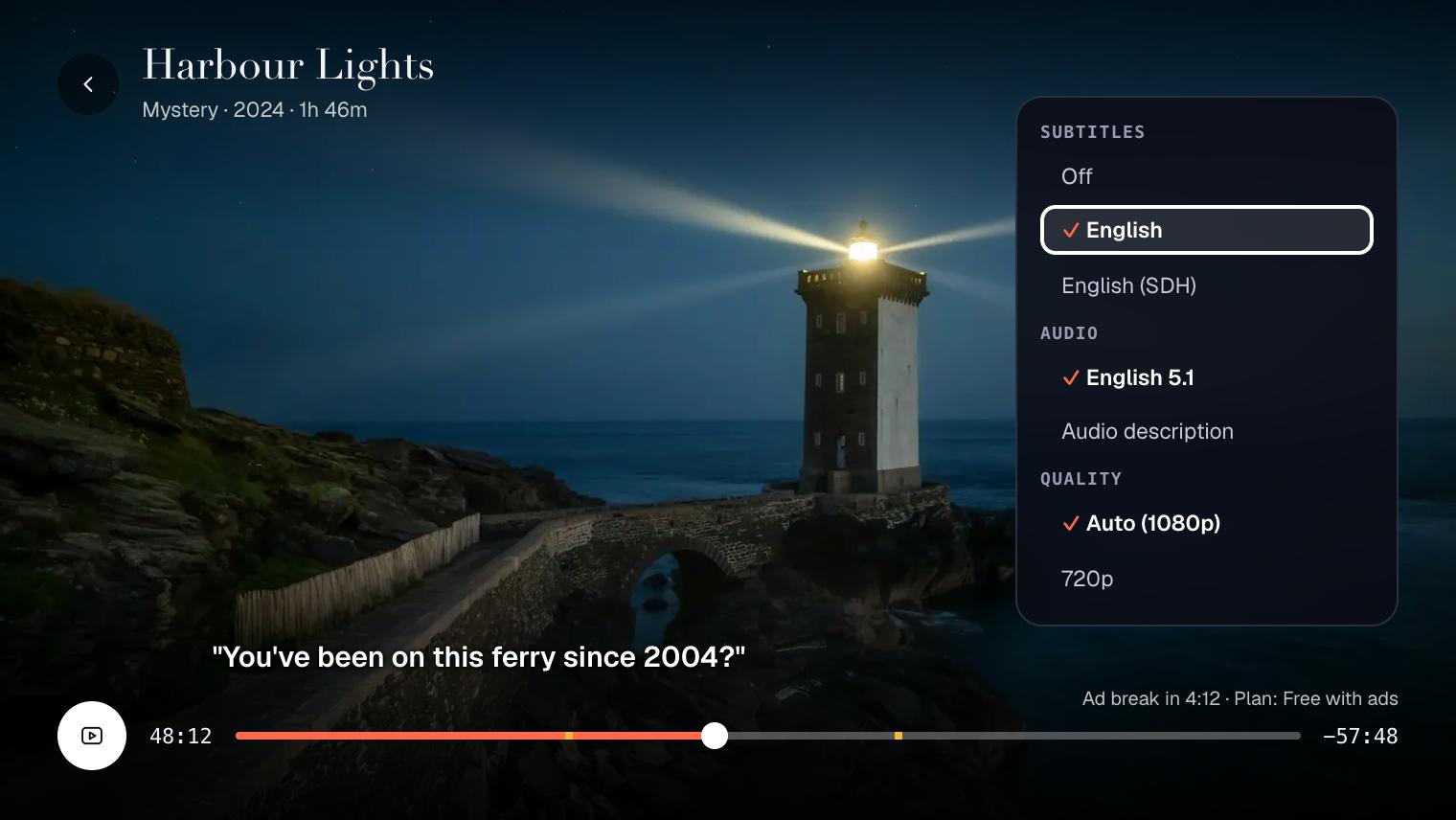
The player has the controls people expect: play, pause, skip, subtitles, audio tracks and a quality setting. On a TV, every control works from the remote’s arrow keys and select button.
Quality changes on its own with the network, so a weak connection gives a softer picture rather than a frozen one. Viewers can still pin a lower setting to save data on a phone.
- 05
A points wallet that adds up
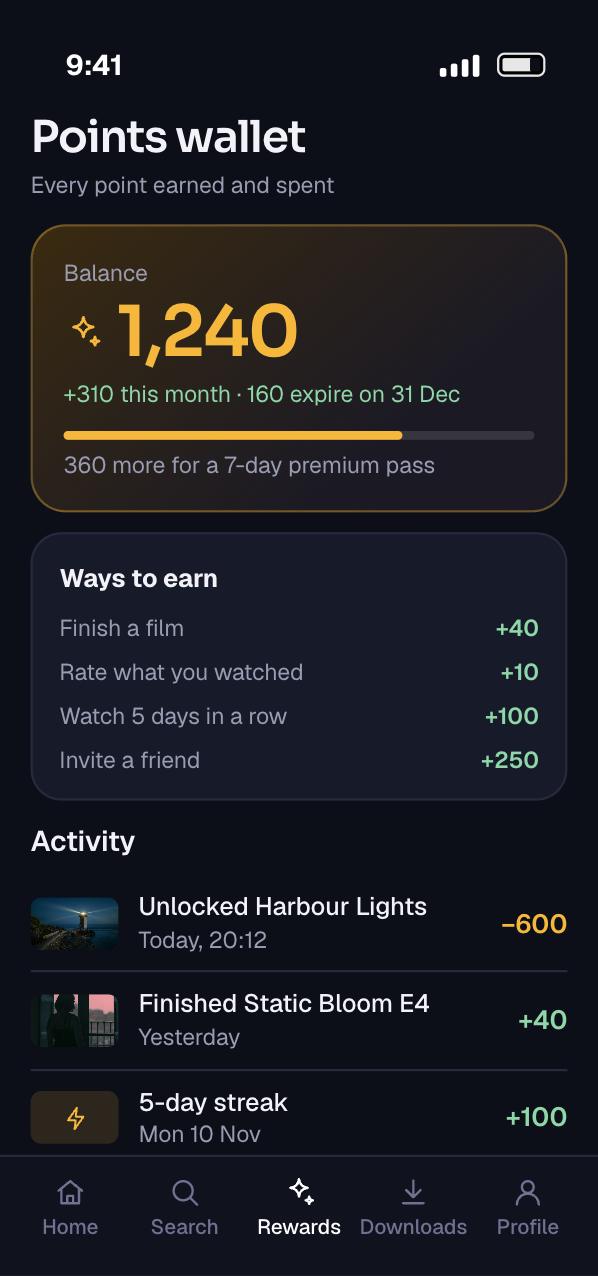
Viewers earn points for eligible activity in the app. The wallet shows the balance, what was earned this month and a line for every point earned or spent.
Every line is a permanent record. The balance is the sum of those lines, so a viewer can always see where each point came from and where it went.
- 06
A rewards store for films, series and passes
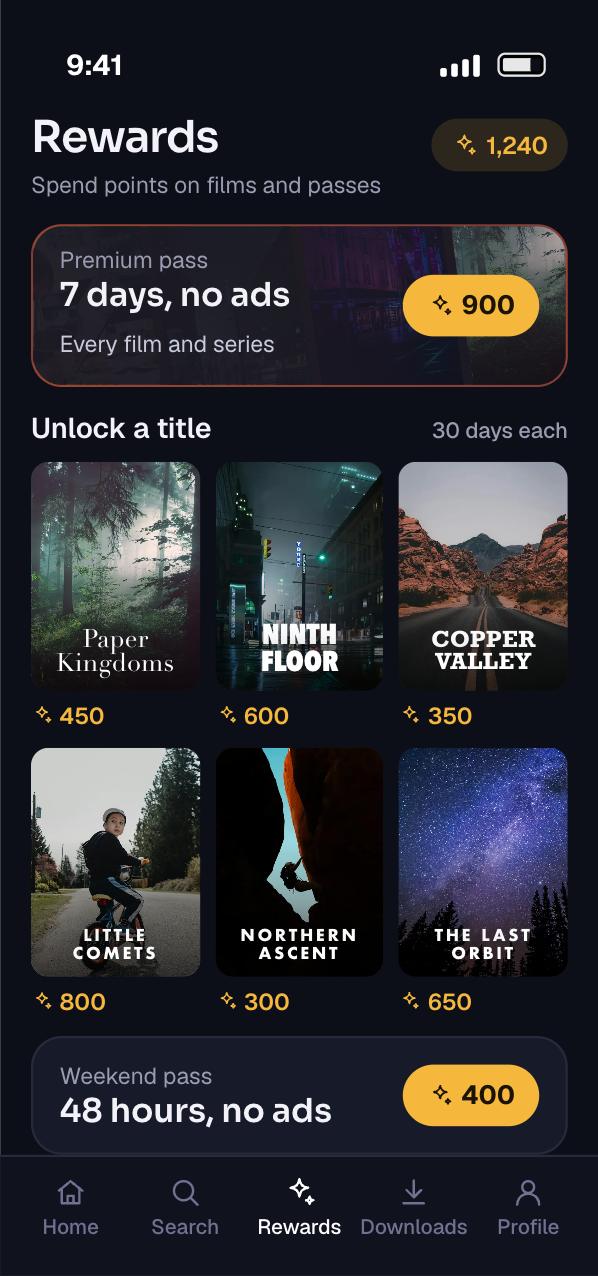
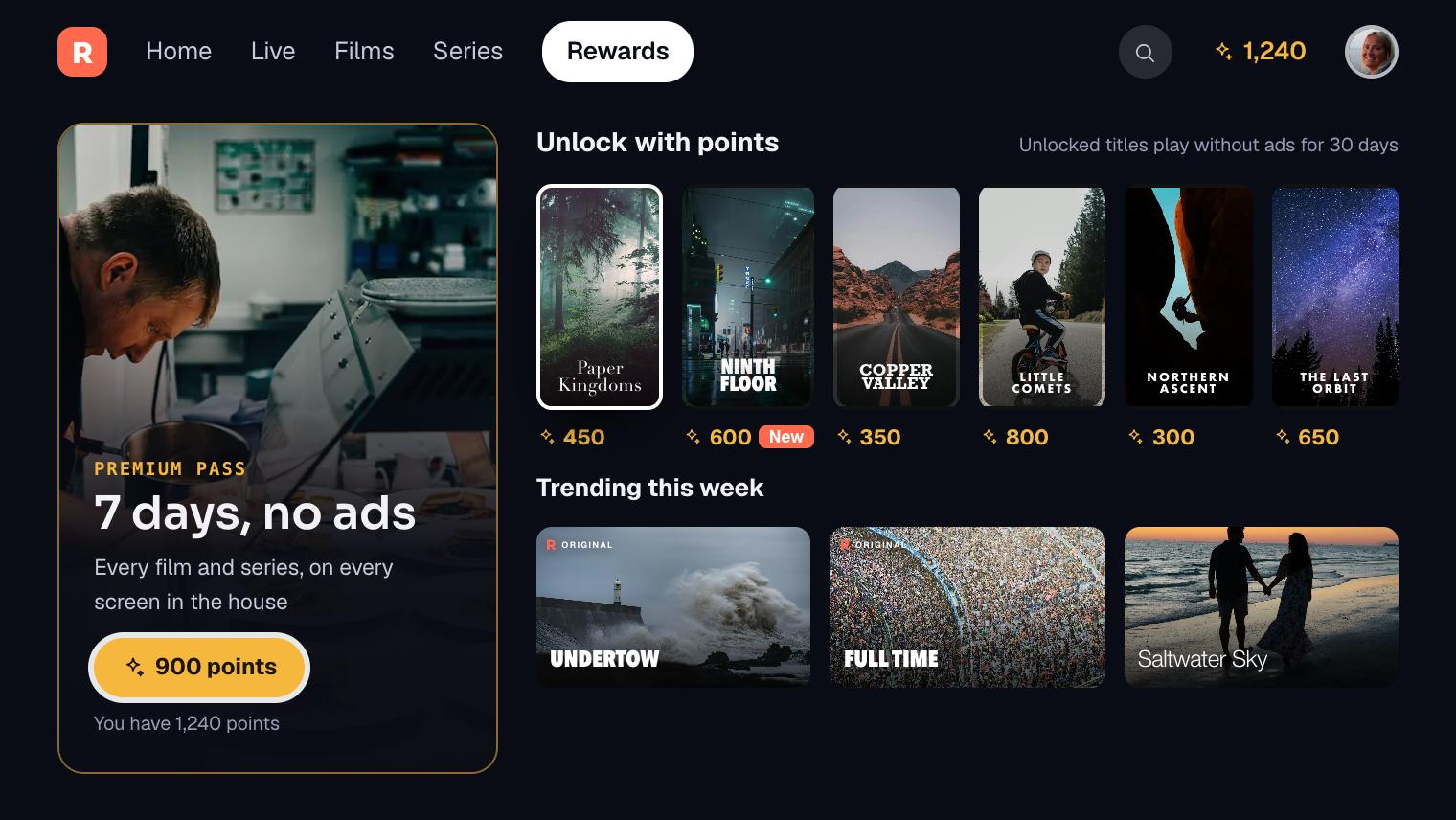
Points buy two kinds of reward. The first unlocks one film or series for that viewer. The second is a pass that opens premium viewing for a set number of days.
The content team sets the points price of each reward in the admin dashboard. It can feature a title in the store for a week, then take it out again.
- 07
Plans, renewals and single purchases
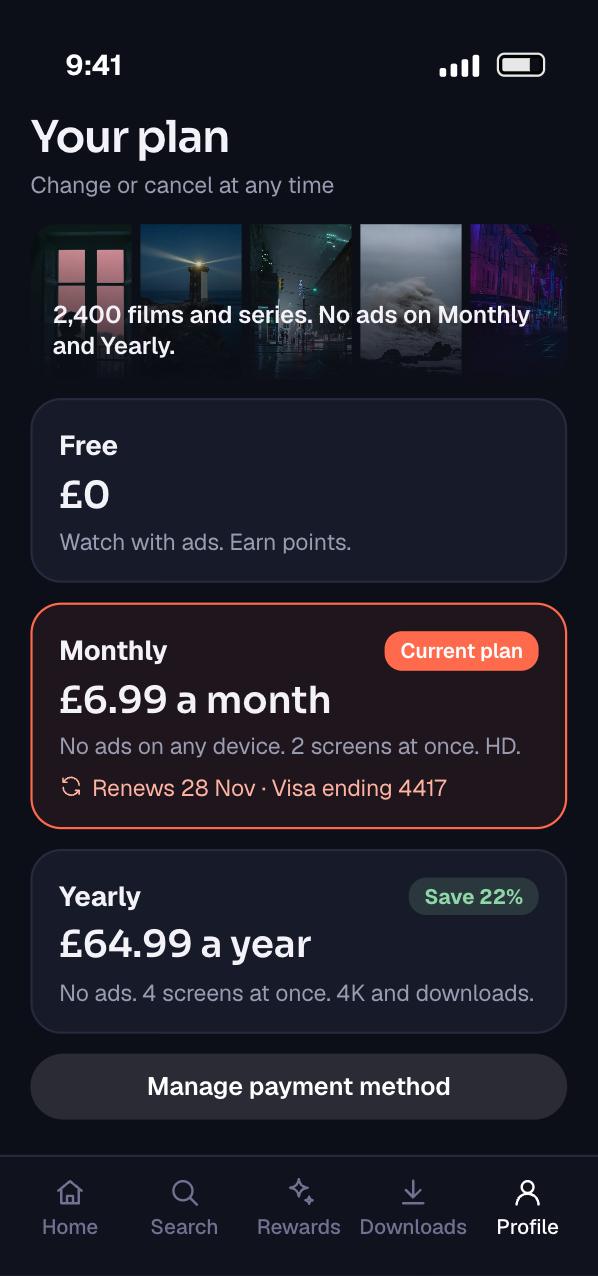
The plans screen lists the free plan with ads and the paid plans, with the price and what each includes. A subscriber sees the current plan, the renewal date and a way to manage it.
Single purchases sit on each title page. Payment runs through secure payment gateway APIs, and the app never stores card details.
- 08
Profiles and parental controls
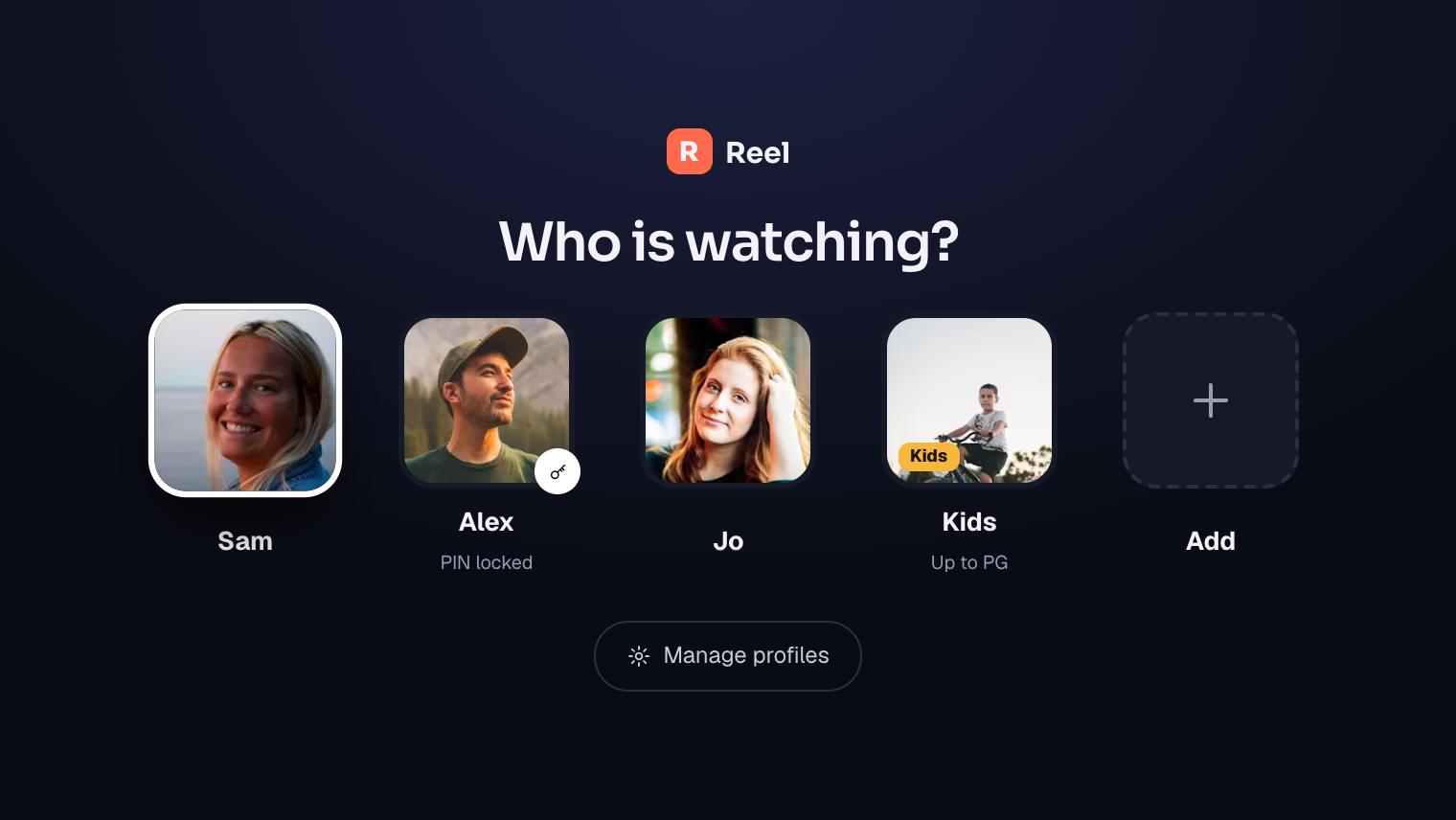
One account holds several profiles, each with its own watchlist, history and picks. A children’s profile shows only titles inside its age rating.
Adult profiles can be locked with a PIN, so a child cannot step out of their profile. The same rules apply on every phone and TV signed in to the account.
More screens from the TV app
Planning something like this? Talk it through with the team that built it, in a free 30-minute call.
Book a free 30-minute callHow it works
A streaming service is three systems that have to agree. The video pipeline turns master files into streams. The ad path decides what free viewers see. The money path decides who may watch what. This is how we build all three for a service like this one, on the stack it runs on.
The architecture
Video never passes through the API. The API decides access, then hands the player a link to the right stream. Points, purchases and plans all end in the same place: an access record on the server.
People and devices
- Admin dashboardWeb app for the content team
Play
 Phone appFlutter for iPhone and Android
 TV appAndroid TV, built for a remote
Our system
Encode
 Ingest and transcodingMasters uploaded to storage, then encoded to HLS
Store
 Amazon S3Master files, HLS renditions, artwork and captions
Deliver
- CDNServes segments from servers near viewers
Stitch ads
- Ad stitchingPuts ads into the stream for free viewers
Access path
 REST API in Node.jsOne entry point for every app, over HTTPS
- Catalogue and rowsTitles, channels, categories and home rows
- Profiles and historyProfiles, age limits, watchlists, resume points
- Access and pointsPlans, purchases, passes and the points ledger
Data
 MongoDBAccounts, catalogue, access records and the points ledger
Outside services
- Ad decision serverChooses which ads fill each break
- Payment gatewayTakes card payments and sends billing events
- Admin dashboard to Ingest and transcoding: Master files
- Ingest and transcoding to Amazon S3: HLS renditions
- Amazon S3 to Ad stitching: HLS with ad markers
- Ad decision server to Ad stitching: Ads for each break
- Ad stitching to CDN: A stream per viewer
- CDN to Play: HLS playlists and segments
- Play and Access path: Sign-in, access and resume points
- Admin dashboard to Access path: Titles and home rows
- Access path to MongoDB: Access records and the points ledger
- Payment gateway to Access and points: Billing events by webhook
What happens when a viewer unlocks a film with points
Seven steps run from the tap to carrying on from the sofa. Points leave the wallet and access appears in one step, or neither happens.
-
01Ask to unlockPhone to APIThe app sends the title, the profile and a one-time request key, so a double tap cannot spend twice.
-
02Check the balanceAPI to LedgerInside one database transaction, the API sums the viewer’s ledger and checks it covers the price.
-
03Spend and grantAPI to AccessIn the same transaction it writes the spend line and the access record. Both commit together, or neither does.
-
04ConfirmAPI to PhoneThe app gets the new balance and redraws the title page with a Play button.
-
05Ask to playPhone to APIOn play, the API checks the access record again and returns a short-lived link to the stream.
-
06Stream the filmPhone to CDNThe player reads the HLS playlist and fetches segments from the CDN. Unlocked titles get a stream with no ads stitched in.
-
07Carry on on the TVTV to APILater the TV asks for the same title. The unlock and the resume point belong to the account, so it plays on, without ads.
From master file to playable title
Every title starts as a large master file from the content owner. The admin dashboard asks our API for a presigned upload link. Amazon S3 then accepts the file straight from the browser, without the uploader holding any AWS credentials.
Masters are large, so we use S3 multipart upload. The file goes up in parts, in parallel, and a failed part is resent on its own. Each upload can have up to 10,000 parts. We add a lifecycle rule to clear uploads that never finish, which AWS recommends to keep storage costs down.
When the file lands, S3 sends an Object Created event to Amazon EventBridge. A rule picks it up and starts an AWS Elemental MediaConvert job. The job encodes the master into an HLS ladder of qualities and writes it back to storage.
MediaConvert reports through EventBridge as well. Its COMPLETE event lists the output files and manifests. A small function reads that event and marks the title as ready in the catalogue. A failed job raises an alert to the content team instead.
Subtitles come in as sidecar caption files beside the master. MediaConvert carries them into the HLS output. For timecode-based caption formats, the input timecode source must match the captions, or they drift from the speech.
A title only goes live when its video, artwork, captions, rating and price are all in place. The dashboard shows a checklist for each one, so a half-finished title never reaches viewers.
Live channels
Live channels need a different pipeline from the library. AWS Elemental MediaLive takes the incoming live feed and encodes it in real time. AWS Elemental MediaPackage then packages it on demand for each kind of player and acts as the origin.
A live HLS playlist is a moving window. The HLS specification lets the server drop old segments from the playlist, in order. Each removal must raise the playlist’s media sequence number by one, or players can malfunction.
Not every channel needs a live feed. AWS Elemental MediaTailor can assemble a linear channel from titles already in the library. It works on manifests only, so the segments still come straight from our origin. That gives the service a themed channel at very little extra running cost.
Ads stitched into the stream
Free viewing pays for itself through ads, so the ad path has to be dependable on every device. We stitch ads into the stream on the server. The player then sees one continuous stream, and a TV that struggles with ad SDKs still plays the breaks.
MediaTailor does the stitching. It reads the ad markers in the origin manifest, asks the ad decision server what to play, and returns a personalised manifest for that viewer. For on-demand titles it inserts ads where SCTE-35 markers appear. A cue-out marker with a duration of zero means insert, rather than replace.
Ads arrive in many formats. MediaTailor transcodes ads, bumpers and slate to match the stream, so a break does not jump in quality or shape.
Advertisers need proof that ads played. MediaTailor can send the tracking beacons from the server, or leave that to the player. We choose server-side reporting for TVs, where player support varies most.
Subscribers and viewers with an unlocked title never see ads. The API decides this before it returns a stream link. Paying viewers get a link that skips ad stitching, and free viewers get the stitched one.
Newer players can use server-guided ad insertion instead. Here MediaTailor points the player to ads as separate playlists. A playback configuration set to Player select lets each player choose, which keeps older TVs on full stitching.
Plans and single purchases
Card payments run through a payment gateway. We use Stripe Billing as our example here, because its documentation is explicit about the states a plan moves through.
A new plan that needs payment starts as incomplete. It becomes active once the first invoice is paid. If the first payment never arrives within 23 hours, the plan expires and the invoice is voided.
A failed renewal moves the plan to past due, and Stripe retries on the schedule we set. We keep the viewer watching during those retries and show a message to fix the card. Access ends only when the retries run out.
The server learns all of this from webhooks. Stripe signs each event, and verification needs the raw request body, so we keep our framework away from it. Stripe retries a failed delivery for up to three days in live mode.
Events can arrive twice and out of order. Stripe warns against relying on order, and advises tracking event IDs to spot duplicates. So we store every event ID we have handled, and our handlers read the current state rather than assume a sequence.
Inside the iPhone and Android apps, store rules come first. Apple’s guideline 3.1.1 says unlocking premium content in an app must use in-app purchase. Google Play has a matching payments policy. So in-app purchases go through each store’s billing, and both routes write the same access record on our server.
A points ledger that cannot lose a point
Points look simple, but they behave like money. A viewer who taps Unlock twice on a slow network must be charged once. A server that fails halfway must not take points without granting the film.
So points live in a ledger: one record for every point earned or spent, never edited after it is written. The balance is the sum of the ledger. We keep a running total on the account for speed, and rebuild it from the ledger when they disagree.
Every spend carries a request key chosen by the app. A unique index in MongoDB makes a second write with the same key fail. A double tap then becomes a harmless duplicate instead of a double charge.
The spend and the grant must happen together. A single-document write in MongoDB is atomic, but this touches the ledger and the access record. MongoDB supports multi-document ACID transactions on replica sets, so both writes commit as one, or neither does.
Earning has its own rules. Each eligible activity has a points value and a daily cap. The ledger records the reason for every award, so the business can see which activities give away the most points.
Store rules apply to points as well. Apple’s guidelines bar apps from using their own mechanisms, such as licence keys or QR codes, to unlock content. So we design points to be earned, never sold, and we explain the scheme in the review notes for each store before launch.
Time-limited passes
A pass unlocks premium viewing for a set time, such as seven days. We store it as an access record with a start and an end, the same shape as a plan. The play check then needs no special case.
Every play request compares the pass end time with the server clock, never the phone’s clock. A viewer cannot stretch a pass by changing the date on their device.
Expired passes stay in the database as history. MongoDB TTL indexes can delete documents automatically after a set number of seconds. We use them for short-lived things such as playback sessions, not for access history that support staff may need.
Profiles, parental controls and picks
An account owns profiles, and each profile owns its history, watchlist and picks. Each title carries an age rating, and each profile a limit. The API filters every row, search and stream request against that limit, so a children’s profile cannot reach an adult title by a direct link.
The ICO’s Children’s code sets 15 standards for online services likely to be used by children. It asks for high privacy settings by default and the minimum data collected. So a children’s profile turns off personalised ads and keeps only the history it needs for Continue Watching.
Picks come from viewing behaviour. Amazon Personalize is a managed service that builds recommendations mainly from item interaction data. It accepts both historical records in bulk and real-time events. We send it plays, finishes and saves as they happen, so picks change during a session.
A new title has no viewing history, so the content team’s rows carry it at first. Personalised rows take over as viewers start to watch it.
Delivering the TV app
The phone app is Flutter, and Android TV runs Android. So the TV app can share the Flutter code for the catalogue, profiles, access and player. The screens still have to be rebuilt for a remote.
Flutter’s focus system decides which control receives input, and its traversal policies set the order focus moves in. For a TV we use a directional policy, so the arrow keys move focus up, down, left and right in a predictable grid.
Android has its own rules for TV apps. The manifest must declare a launcher activity with the LEANBACK_LAUNCHER category, or Google Play will not show the app on TVs. It must also declare that a touchscreen is not required.
Google’s TV quality guidelines ask that the whole app works with a five-way D-pad. We test every screen with only a remote in hand, ads and the points store included.
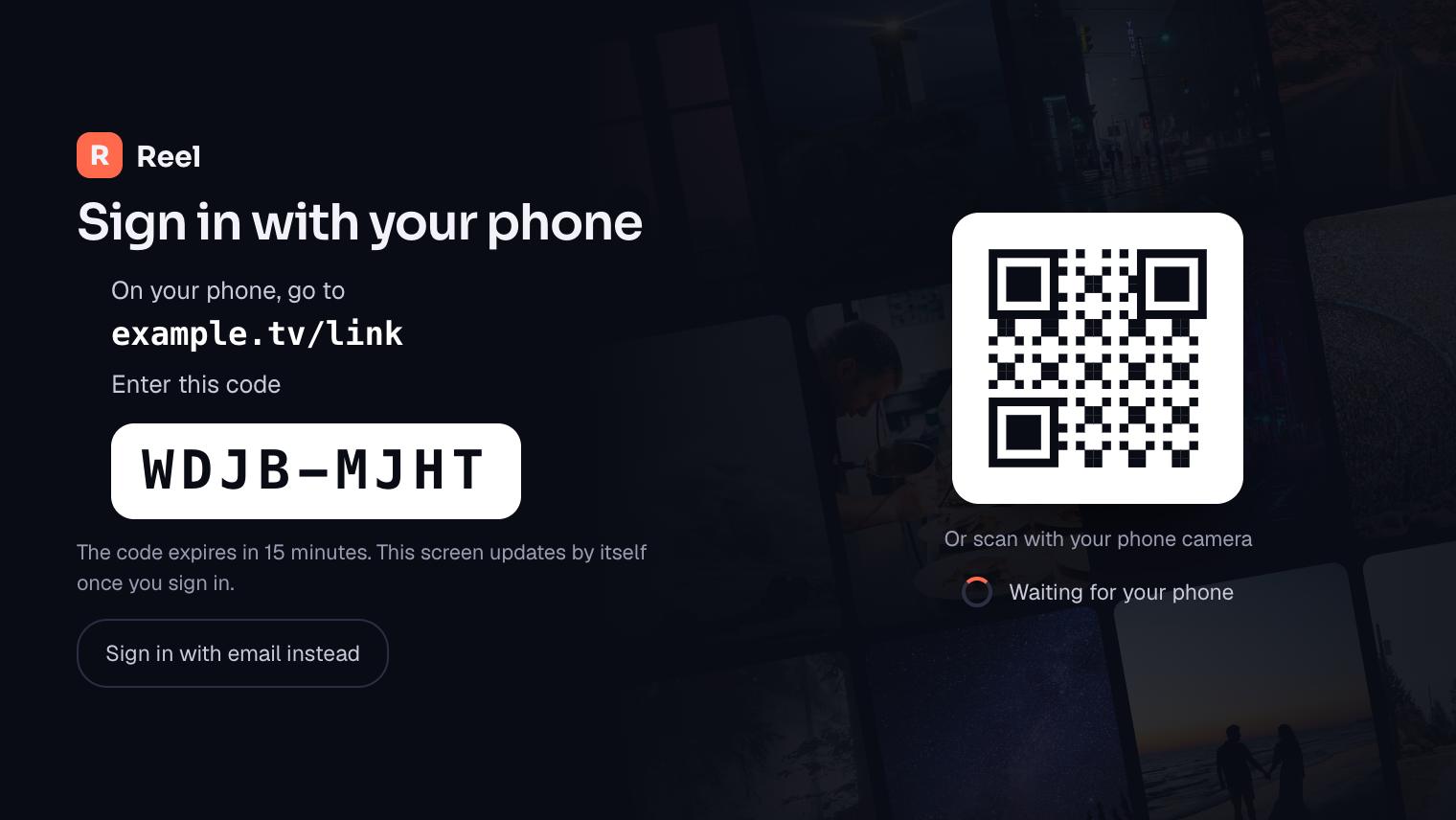
Typing an email and password with a remote is slow. So the TV signs in with a code, using the OAuth 2.0 device authorisation grant from RFC 8628. The TV shows a short user code and a web address. The viewer enters the code on their phone, and the TV is signed in.
While it waits, the TV polls our token endpoint. RFC 8628 sets the polling interval at five seconds if none is given, and a slow_down reply tells the TV to back off. Each code expires after a set time, so an old code on a screen is useless.
Android TV also has a Watch Next row on its home screen. The app can add titles a viewer stopped part-way through, the next episode of a series, new episodes and saved titles. Each is its own program type, such as WATCH_NEXT_TYPE_CONTINUE. Viewers can resume without opening the app first.
Watch history across devices
The player saves a resume point every few seconds while a title plays. It is keyed to the profile and the title, so the TV and the phone read the same point.
Other services need to react when that changes, such as the Watch Next row or the picks feed. MongoDB change streams let a service subscribe to changes on a collection and act straight away. They need a replica set, which the transactions above need anyway.
The admin dashboard and analytics
The content team runs the service from a web dashboard. It covers uploads, titles and channels, categories and home rows, prices and points costs, and viewer accounts.
Staff roles limit what each person can change. A content editor can publish titles but not change prices. Every change to prices, points or a viewer’s balance is written to an activity log with who made it and when.
Reports cover what the business asked to see: viewing by title and device, plans started and cancelled, points earned and spent, and rewards redeemed. Those reports read from summaries built overnight, so heavy queries never slow down playback.
Privacy, tracking and protection
Ads and analytics rely on identifiers stored on the device. Under the UK’s PECR rules, the ICO says consent for cookies must be active and clear, and that this also covers apps on smart TVs. So the apps ask before any tracking for ads, and free viewers who say no still get ads, just not personalised ones.
Licensed titles need protection on the CDN too. Stream links are signed and short-lived, so a copied link stops working. Titles whose licence requires DRM get it, and the rest stay simple and cheap to serve.
We encrypt data in transit and at rest. Admin access is limited by role and every sensitive action is logged.
The stack and why we chose each part
| Layer | Technology | Why we chose it |
|---|---|---|
| Phone apps | Flutter | One codebase for iPhone and Android, and most of that code carries over to Android TV. |
| Backend | Node.js, REST APIs | Fast to build for an API that mostly checks access and returns small JSON documents, in one language across the server. |
| Database | MongoDB | Flexible documents suit a catalogue where films, series and channels carry different fields. Transactions keep the points ledger exact. |
| Cloud | AWS | Storage, encoding, live packaging and ad stitching are managed services that grow with viewing. |
| Video delivery | HLS and CDN | HLS adjusts quality to the network on every device, and the CDN serves busy evenings from servers near viewers. |
| Media storage | Amazon S3 | Holds masters, renditions, artwork and captions, and accepts large uploads in parts. |
| Payments |   Payment gateway APIs, App Store and Google Play billing | A gateway for card payments outside the apps, and each store’s billing where its rules require it. |
| Sign-in |  Secure login, OAuth device code sign-in | Accounts, profiles and roles on the server, with a code-based sign-in for TVs. |
| Notifications | Push notifications, in-app alerts | Tells viewers about new episodes, expiring passes and points they can spend. |
| Analytics | Viewer activity tracking | Viewing, billing and points reports for the content team. |
The build plan
This is how we would plan a service like this today. The weeks assume one team working on the video pipeline, the backend and the apps in parallel.
- DiscoveryWeeks 1 to 2
- Agree the four ways to watch and their prices
- Points rules: what earns, what it costs, daily caps
- Map titles, channels, ratings and categories
- Clickable prototype of phone and TV home screens
- Video pipelineWeeks 3 to 8
- Multipart uploads and event-driven transcoding
- HLS ladder, captions and artwork checks
- Live channel encoding and packaging
- CDN with signed, short-lived links
- Backend and ledgerWeeks 3 to 10
- Catalogue, profiles and resume point APIs
- Points ledger with request keys and transactions
- Access records for plans, purchases and passes
- Admin dashboard for titles, rows and prices
- Phone appsWeeks 6 to 14
- Flutter home, title pages and player
- Wallet, rewards store and plans screens
- Gateway payments and store billing
- Profiles, PIN locks and age limits
- Ads and TVWeeks 11 to 20
- Server-side ad stitching and beacons
- Android TV screens with directional focus
- Sign-in with a code from a phone
- Watch Next row on the TV home screen
- Testing and launchWeeks 19 to 26
- Playback tests on weak networks and real TVs
- Ledger and billing tests with forced failures
- Store reviews with points notes
- Monitoring and 3 months of fixes
- 01Weeks 1 to 2
Discovery
- Agree the four ways to watch and their prices
- Points rules: what earns, what it costs, daily caps
- Map titles, channels, ratings and categories
- Clickable prototype of phone and TV home screens
- 02Weeks 3 to 8
Video pipeline
- Multipart uploads and event-driven transcoding
- HLS ladder, captions and artwork checks
- Live channel encoding and packaging
- CDN with signed, short-lived links
- 03Weeks 3 to 10
Backend and ledger
- Catalogue, profiles and resume point APIs
- Points ledger with request keys and transactions
- Access records for plans, purchases and passes
- Admin dashboard for titles, rows and prices
- 04Weeks 6 to 14
Phone apps
- Flutter home, title pages and player
- Wallet, rewards store and plans screens
- Gateway payments and store billing
- Profiles, PIN locks and age limits
- 05Weeks 11 to 20
Ads and TV
- Server-side ad stitching and beacons
- Android TV screens with directional focus
- Sign-in with a code from a phone
- Watch Next row on the TV home screen
- 06Weeks 19 to 26
Testing and launch
- Playback tests on weak networks and real TVs
- Ledger and billing tests with forced failures
- Store reviews with points notes
- Monitoring and 3 months of fixes
Testing and release
This service handles video, money and something that behaves like money. So testing goes beyond screens. We break the payment path and the ledger on purpose, and watch the video on the cheapest TV we support.
The ledger under pressure
We fire the same unlock request many times at once and check that points leave the wallet once. Then we stop the server between the spend and the grant, and check that both are rolled back.
A nightly job rebuilds every balance from its ledger and compares it with the running total. Any difference raises an alert before a viewer notices.
Billing events out of order
Stripe’s test mode and command-line tool can resend events. We replay renewals, failures and refunds twice and in the wrong order. Access on the server must match the plan state in Stripe every time.
In-app purchases go through Apple and Google sandbox accounts, across buy, renew, cancel and restore.
Video and ads on real devices
We throttle the network mid-film and check the player drops quality instead of pausing. Ad breaks are checked for matching quality, working beacons and no ads for paying viewers.
Live channels are left running for hours to catch playlist and clock drift that a short test would miss.
TVs and store review
Every TV screen is tested with a remote only, including the points store and code sign-in. We use Google’s TV quality checklist as our minimum standard.
Each store gets review notes, a test account and a short note on how points are earned and spent.
Results
This is what the build delivered, counted from its recorded scope. Viewing and revenue figures belong to the business, so they are not shown here.
- 4ways to watch in one app: free with ads, a plan, a single purchase or points
- 2kinds of video on one player: on-demand titles and live channels
- 2rewards for points: single titles or a time-limited premium pass
- 8core features, from discovery and the player to profiles and parental controls
Viewers who would never pay a monthly fee can still watch with ads, and earn their way to premium titles through points. Viewers who want everything can subscribe.
The content team runs uploads, rows, prices, points costs and reports from one dashboard. It sees which titles are watched, what is redeemed and how plans change.
Since launch
A streaming service keeps changing after launch. These are the improvements a service like this receives in its first six months.
- 01Points rules tuned
Earning values and daily caps adjusted from the ledger reports on which activities gave away the most points.
- 02Ledger checks automated
The nightly balance rebuild added to monitoring, with alerts sent to the team.
- 03Gentler failed renewals
Clearer in-app messages during payment retries, with a direct link to update the card.
- 04More captions
Caption files added across more of the library, with a caption check before a title goes live.
- 05Playback monitoring
Start-up time, stalls and errors tracked by device, with fixes for the TVs that struggle most.
- 06Better search
Search that forgives typos and finds titles by cast and genre as well as name.
Want a result like this for your own product? Get a written view of scope, time and price within two working days.
- 95%+ delivered on or before the agreed date
- 60% of clients come back for a second project
- 3 months of fixes after launch in the build price
What this would cost to build today
These are our published prices, in pounds, excluding VAT, as of November 2026. A service at this scope, with phone and TV apps, live channels, ads, plans and a points ledger, sits in the full app range.
- Discovery£3,000 to £6,0002 weeks
Pricing and points rules, scope, clickable prototype and a fixed quote. It comes off the build price if you continue.
- First version£15,000 to £40,0008 to 14 weeks
Flutter phone apps, on-demand HLS through a CDN, an admin dashboard and one or two ways to pay.
- This caseFull service like this one£40,000 to £90,0004 to 8 months
Phone and TV apps, live channels, stitched ads, plans and single purchases, the points ledger and rewards store, profiles and reports.
- Support and runningfrom £750 a monthMonthly
OS and store updates, fixes, ledger checks and monitoring. Minimum 3 months, then 30 days’ notice.
- Fixes after launch are included in the build price for 3 months.
- Video running costs are separate: encoding, live channels, ad stitching and CDN delivery are billed by your providers and grow with viewing.
- Payment gateway and store fees, and any ad revenue share, are set by those providers, not by us.
Questions about building a streaming service
How much does it cost to develop an OTT app?
With us, a first version on phones costs £15,000 to £40,000 over 8 to 14 weeks. A full service with TV apps, live channels, ads, plans and rewards costs £40,000 to £90,000 over 4 to 8 months. Prices exclude VAT. Encoding and CDN delivery are billed by your providers.
Can I make my own OTT platform?
Yes. You need titles you hold the rights to, a pipeline that encodes them to HLS and a CDN. You also need apps for each screen and a way to earn money. Managed cloud services now handle encoding, live packaging and ad stitching, so the build is mostly the apps, access rules and billing.
How to make money from OTT?
The usual routes are ads, plans and single purchases. This service runs all three, plus points that viewers earn and spend on titles or a time-limited pass. Each route ends in the same access record on the server, so a viewer can mix them freely.
How do streaming services insert ads?
Either the player fetches ads and switches to them, or a server stitches ads into the stream before it reaches the player. Server-side stitching reads ad markers in the stream, asks an ad decision server what to play and returns one personalised stream to each viewer.
How can I develop an app for my smart TV?
Start with the platform. Android TV apps need a TV launcher entry in the manifest and must work fully with a D-pad. If your phone app is Flutter, much of its code carries over to Android TV, but the screens are rebuilt for a remote and focus moves in a grid.
How much does it cost to develop a live streaming app?
Live adds an encoding and packaging pipeline to the build, plus running costs while each channel is on air. With us, live channels sit inside the full service price of £40,000 to £90,000. Channels built from titles you already hold cost far less to run than a live feed.
Planning a streaming service?
Tell us about your catalogue and your viewers. A developer reads your brief. We reply within 30 minutes.