Telehealth app for appointments and video consultations
We built this telehealth app for Android and iOS, and it turned phone queues and clinic trips into a few taps. Patients find a clinician, book a slot, see the doctor on video, and keep their prescriptions, results, records and bills in one place.
- iPhone
- Android
- Clinician web
- 30,000+patients using the app
- 25,000+appointments booked in the app
- 12,500+consultations held on video
- 18,000+lab reports opened on a phone
The brief: care without the queue
Demand for appointments had outgrown the phone lines, and clinic timetables kept moving. Patients waited on hold, and many were uneasy about sitting in a waiting room at all.
The provider wanted one app that let people reach care from home. It had to handle the whole visit: finding a clinician, booking, the consultation itself, and everything that follows it.
We built that app for Android and iOS. Six problems shaped the work. Each one is below with the answer we built.
Who the app is for
- The patient
Books, joins video visits, reads results and pays bills from a phone.
- The clinician
Sees the day’s list, runs video visits and issues prescriptions and results.
- The front desk
Manages timetables, changes and payments without a call for every booking.
- The administrator
Controls who can see what, and keeps the audit trail.
Six problems and what we did about each
- 01The problem
Clinics were busy and their timetables kept changing, so getting a booking meant long calls.
What we builtBooking inside the app: search clinicians, see open times, book, move or cancel.
- 02The problem
A trip to the clinic for a short conversation carried a risk of infection that patients wanted to avoid.
What we builtVideo consultations, so the patient and the clinician meet from wherever they are.
- 03The problem
After a visit, patients lost track of what had been prescribed and how to take it.
What we builtA prescriptions section listing each medicine, its dose and who prescribed it.
- 04The problem
Test results meant another phone call to the clinic, sometimes several.
What we builtA results section where each report appears on the phone once the clinic releases it.
- 05The problem
Visit notes, documents and history lived in different places.
What we builtOne medical record in the app: visit summaries, history and documents together.
- 06The problem
Bills, paper forms and follow-up calls took time from patients and staff alike.
What we builtBills and payment in the app, forms to fill in before the visit, and reminders.
What we built
Eight features make up the patient app, with a browser screen for clinicians behind it, shown in the page image. The screens are our designs of each one, with fictional patients, clinicians and readings.
- 01
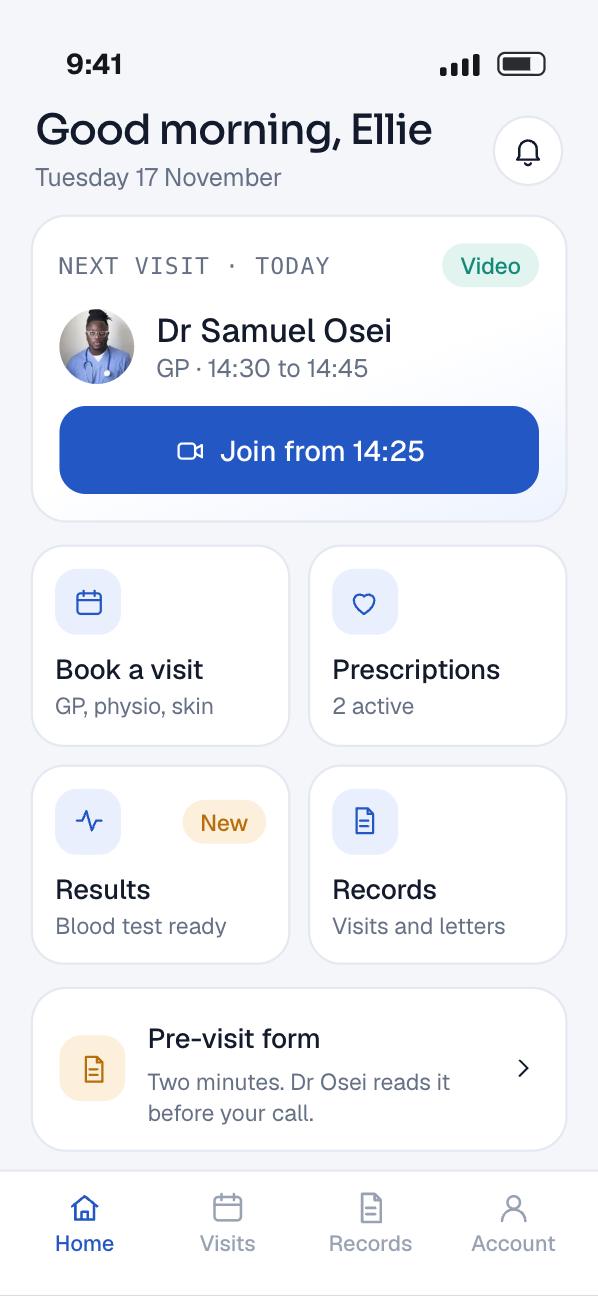
One home screen for the whole visit
The home screen leads with the next appointment. A video visit shows a join button from a few minutes before it starts.
Below it sit shortcuts to booking, prescriptions, results and records. Anything new, such as a released result, carries a small badge.
The app is the same on Android and iOS, so a family can help each other whatever phone they own.
- 02
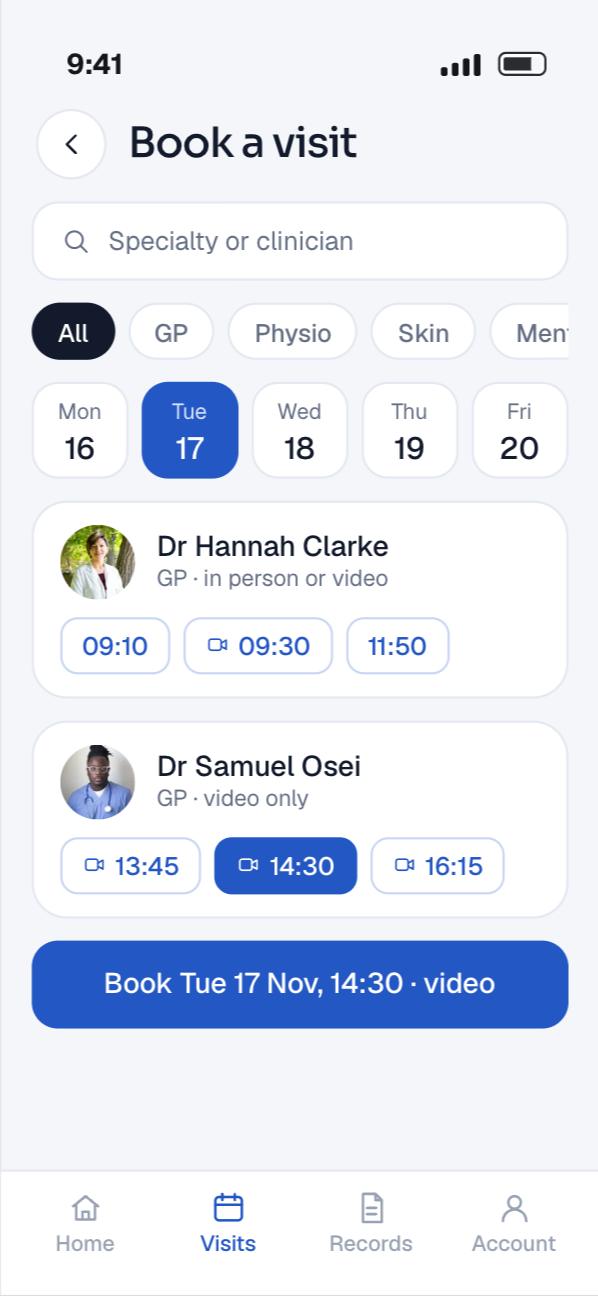
Find a clinician and book a time
Patients search by specialty or by name and see who has time this week. Each slot says whether it is in person or on video.
A tap holds the slot while the patient confirms. The booking lands in the clinic’s timetable at once, so the front desk sees it without a call.
Upcoming and past visits sit together in one list. A patient can move or cancel a booking there, and the freed slot opens for someone else.
- 03
Video consultations
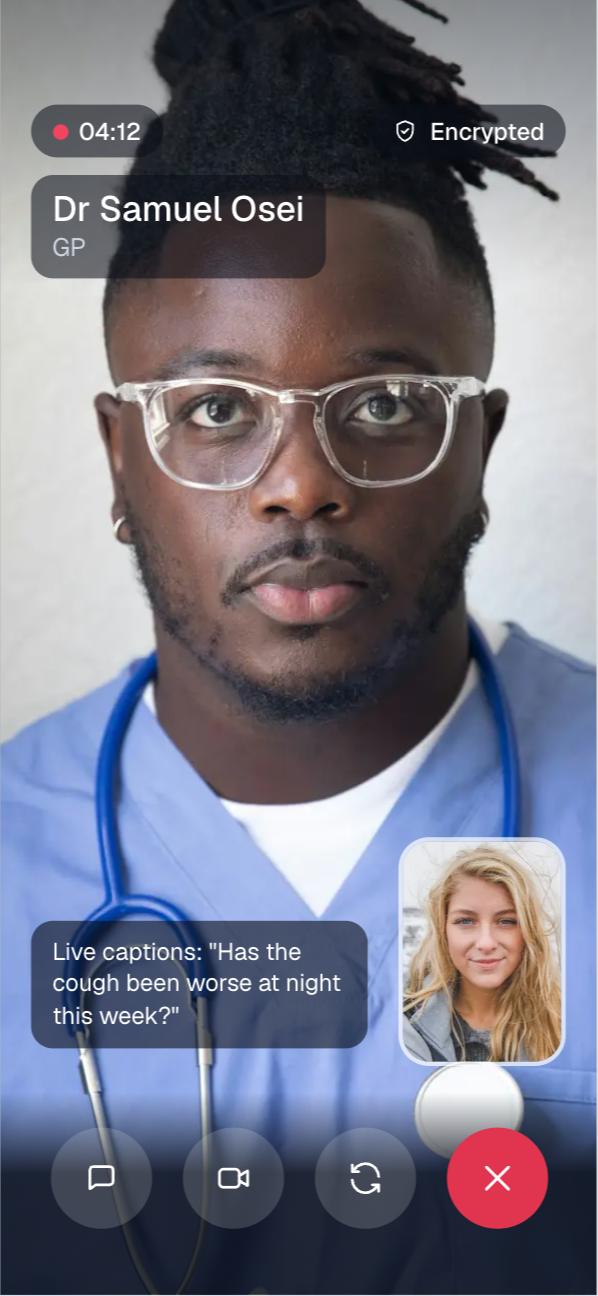
At the booked time, the patient taps join and the call opens inside the app. There is no separate meeting link and no other app to install.
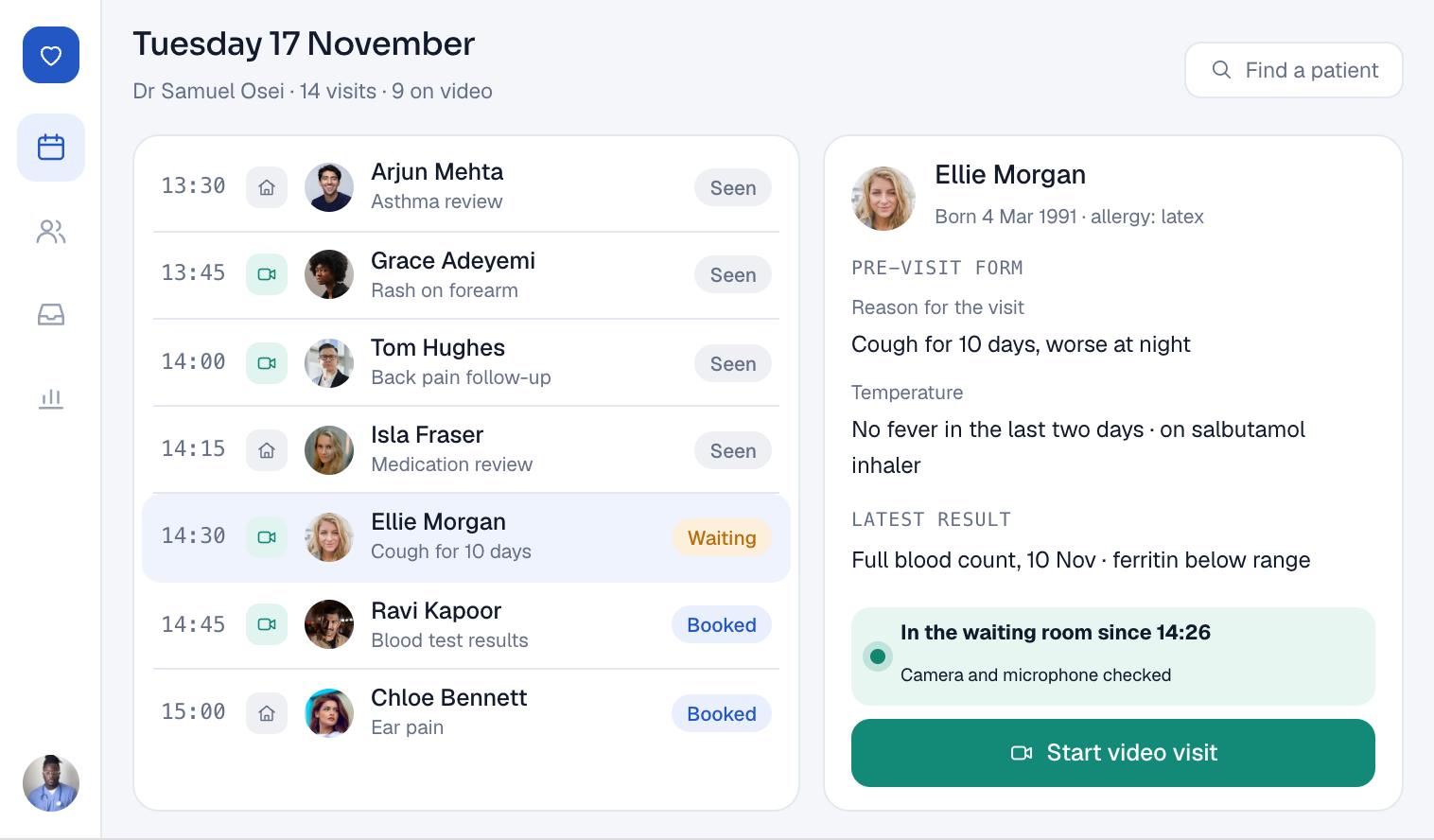
The clinician joins from the browser screen with the patient’s notes beside the call. Microphone, camera and speaker controls are large and clear.
This is the feature that kept people out of waiting rooms. More than 12,500 consultations took place this way.
- 04
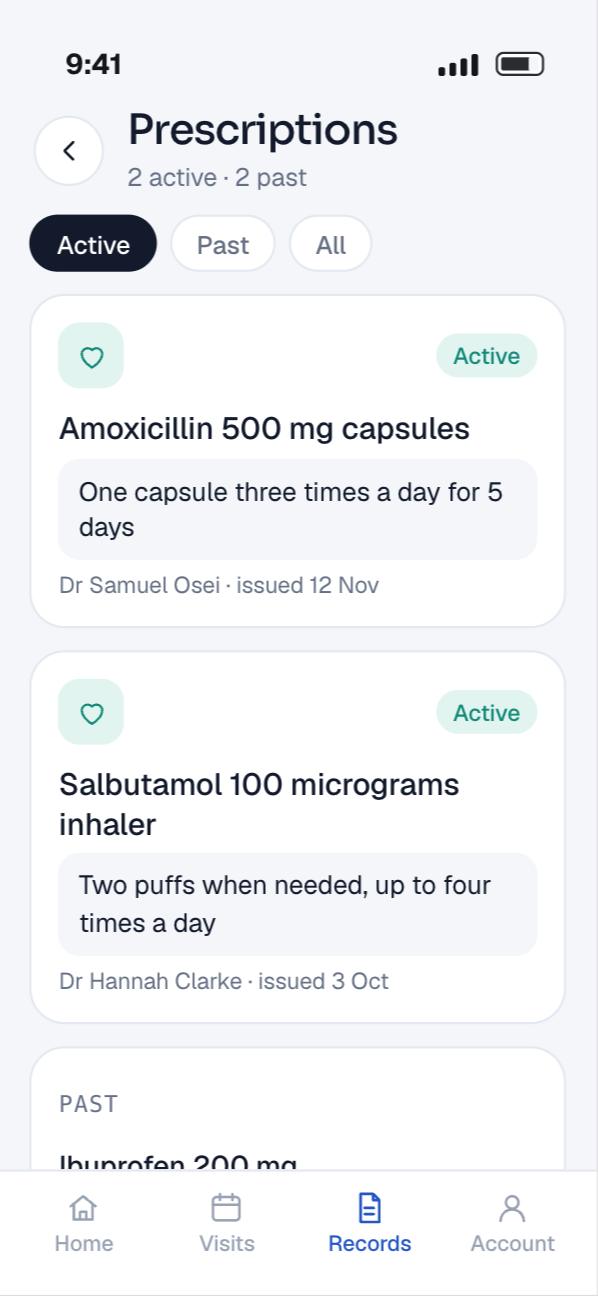
Prescriptions on the phone
Each medicine appears with its dose, how often to take it, the prescriber and the date issued. Patients no longer rely on a paper slip they might lose.
More than 15,000 prescriptions reached patients through their accounts.
- 05
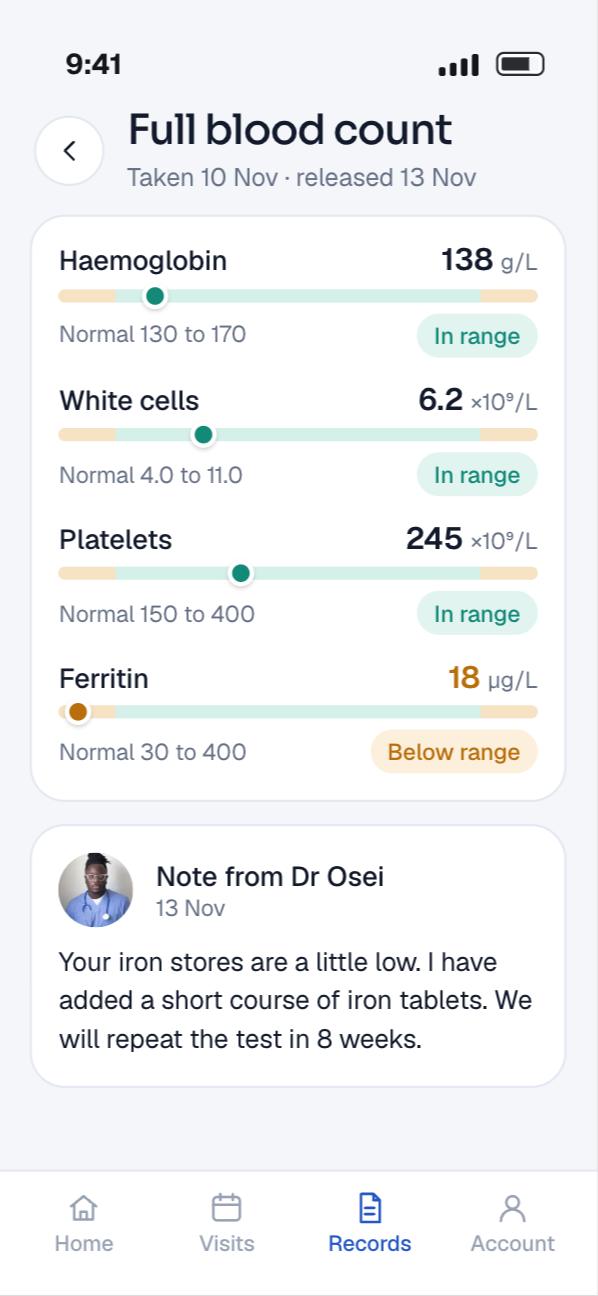
Lab results and reports
Results appear once the clinic releases them, with each value beside its normal range. A clinician can add a short note so the numbers are not read alone.
Patients opened more than 18,000 reports on their phones, and each one was a call the clinic did not have to take.
- 06
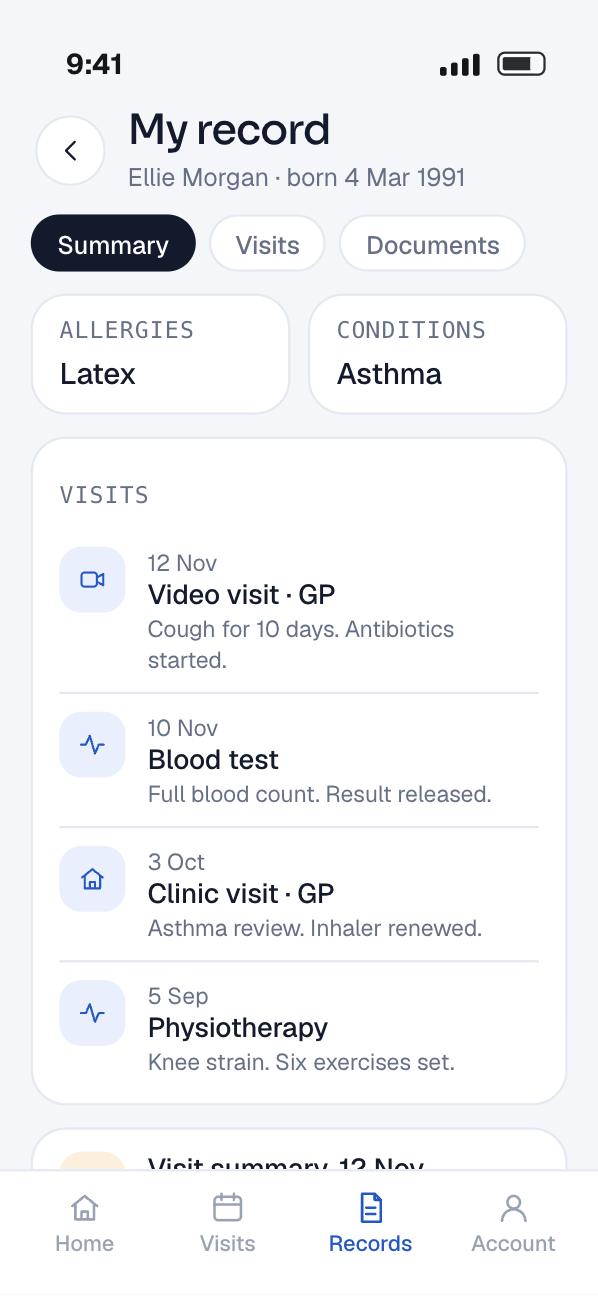
Medical records in one place
History, visit summaries, allergies and documents sit in one record. A timeline shows every past visit, newest first.
Patients can show a summary at another appointment straight from the phone, instead of asking for copies.
- 07
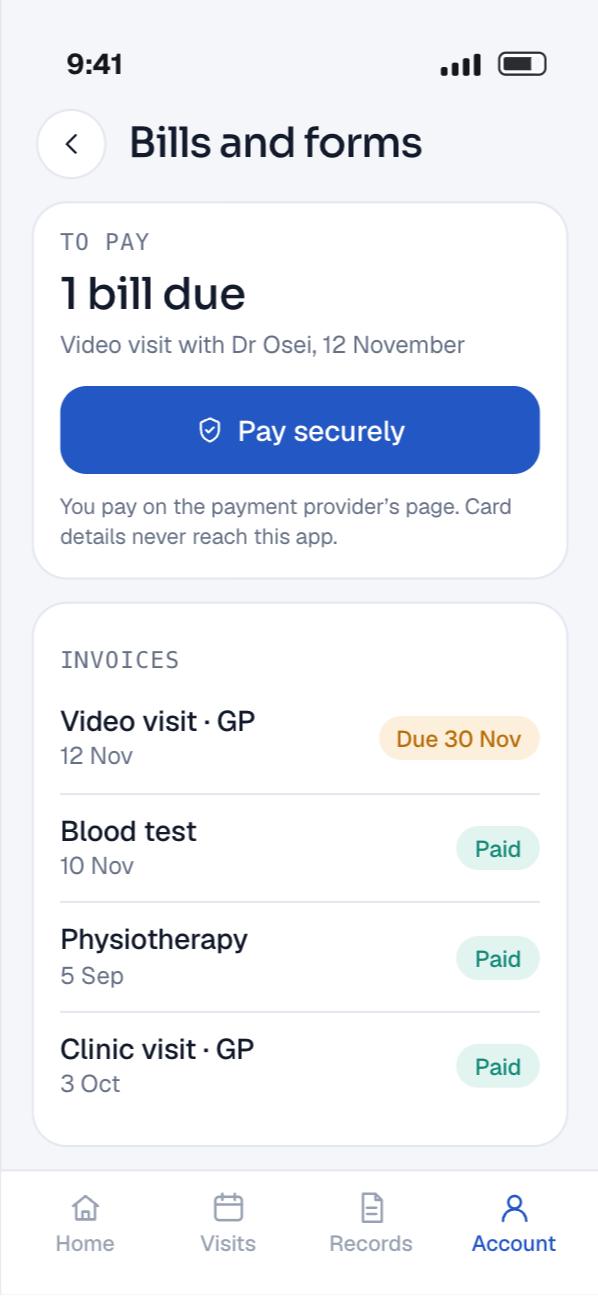
Bills, payments and pre-visit forms
Patients see what they owe, open past invoices and pay in the app. Card details go to the payment provider, never to our servers.
Forms that used to be filled in on a clipboard are sent before the visit. The clinician reads the answers before the call starts.
- 08
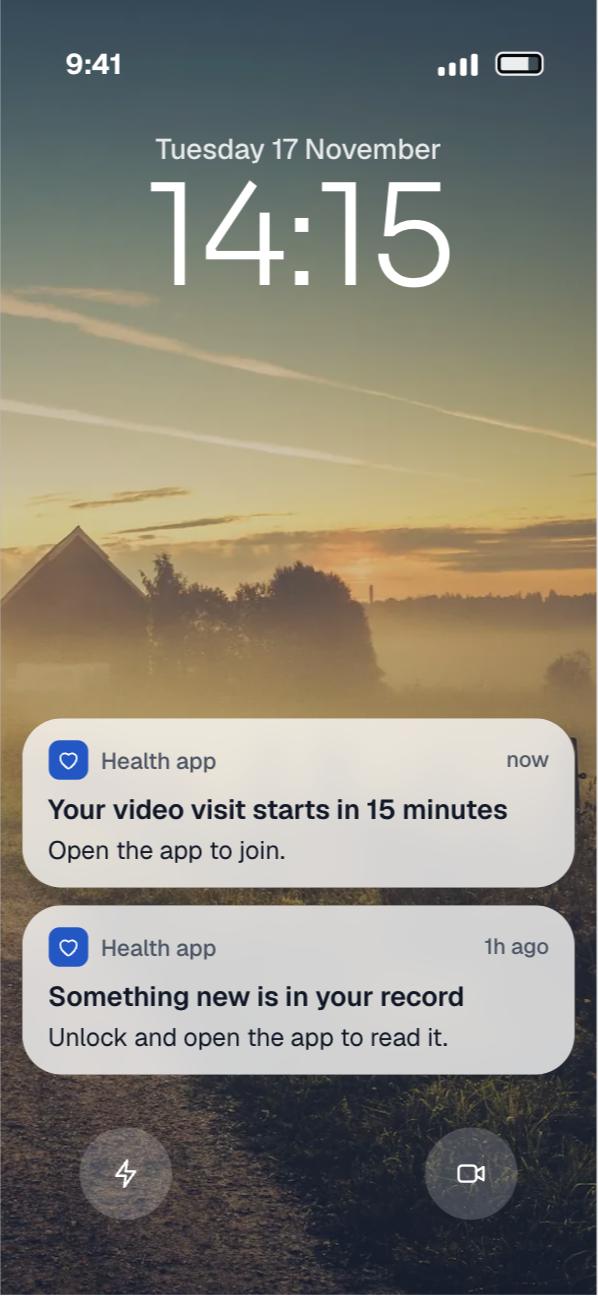
Reminders, and a clinician screen behind them
Patients get a reminder before each appointment, plus a notice when a result or prescription is ready. The notice says something new is waiting, not what it is.
Clinicians and the front desk work in a browser. They see the day’s list, the video visits, and each patient’s pre-visit answers.
The clinician web app
Planning something like this? Talk it through with the team that built it, in a free 30-minute call.
Book a free 30-minute callHow it works
A telehealth app is a booking system, a video service and a medical record that all have to agree with each other. This is how we build one today, on the stack we use for this kind of app, written to UK rules.
The architecture
Patients and clinicians reach one API. Video runs on a separate media path, and the API only hands out the keys to each call.
People and devices
Clinician
- Clinician webDay list, video visits, prescriptions and results
Patient
 Patient appFlutter on Android and iOS: booking, visits, records and bills
Our system
- Media in a UK regionEncrypted audio and video between the two people
 Amazon Chime SDKCreates each visit’s meeting and a join token per person
Booking and records path
 REST API in Node.jsSign-in, roles and every request, over HTTPS
- Booking serviceSchedules, slots and appointments
- Clinical servicePrescriptions, results, records and forms
- Billing serviceInvoices and payment status
Data
 PostgreSQLPatients, appointments and records, encrypted at rest
- Document storeReports and letters, behind short-lived links
Outside services
- Payment providerTakes card details on its own page
 Firebase Cloud Messaging and APNsReminders that reach a closed app
- Patient app and Media in a UK region: Patient’s camera and microphone, encrypted
- Clinician web and Media in a UK region: Clinician’s camera and microphone, encrypted
- Amazon Chime SDK to Media in a UK region: Meeting in a UK media region
- Booking and records path to Amazon Chime SDK: Create meeting and join tokens
- Patient to Booking and records path: Bookings, records and bills over HTTPS
- Clinician to Booking and records path: Prescriptions and results
- Firebase Cloud Messaging and APNs to Patient: Visit reminders
- Booking and records path to Data: Appointments, records and letters
- Billing service to Payment provider: Payment session
What happens when a patient books and joins a video visit
Eight steps run from tapping a free slot to seeing the clinician. The API checks the person at every step, and no health detail travels in a notification.
-
01Ask for free timesPatient app to APIThe app asks for open video slots for one clinician this week.
-
02Book the slotAPI to DatabaseIn one transaction, the slot changes from free to busy and an appointment is created as booked.
-
03ConfirmDatabase to APIIf another patient took the slot a moment earlier, the change fails and the app offers the next free time.
-
04Schedule remindersAPI to PushReminders are queued for the day before and fifteen minutes before. They say a visit is coming, nothing more.
-
05Tap joinPatient app to APIAt the booked time, the app asks to join. The API checks this person owns this appointment.
-
06Create the meetingAPI to VideoThe API creates the meeting in a UK media region, if it does not exist yet, and an attendee for each person.
-
07Hand over the tokenVideo to Patient appEach person gets their own join token. The call connects, with audio and video encrypted on the way.
-
08Clinician joinsVideo to ClinicianThe clinician joins from the browser. When both have left, the meeting ends and the visit is marked fulfilled.
Health data is special category data
Under UK GDPR, data concerning health is one of the special categories. The ICO points out that this covers more than it seems. A note about a broken leg is health data, just as a mental health record is.
So we treat almost every table in this app as special category data. That means a lawful basis and an Article 9 condition, recorded before the build starts, not after.
The ICO lists large scale processing of special category data as a reason a DPIA is required. A patient app with tens of thousands of users is a clear case. We write the data protection impact assessment in discovery and keep it current as features change.
Clinical safety: DCB0129 and DCB0160
DCB0129 is the NHS England standard for clinical risk management by manufacturers of health IT. It applies to whoever builds the software. DCB0160 is its partner standard for the organisation that deploys and uses it.
In practice, the manufacturer keeps a hazard log and a clinical safety case report. The hazard log records each way the software could harm a patient and what controls the risk.
For an app like this, typical hazards are concrete. A result shown on the wrong patient’s account. A reminder sent for a cancelled visit. A prescription shown after it was stopped. Each one gets a control and a test.
DTAC, if the NHS will buy it
The Digital Technology Assessment Criteria are what NHS buyers use to judge a digital health product. DTAC covers five areas: clinical safety, data protection, technical assurance, interoperability, and usability and accessibility.
NHS England refreshed the DTAC form in 2026 with a quarter fewer questions, and buyers move fully to the new form by 6 April 2026. We keep the current form beside the backlog, so the evidence exists when a buyer asks.
Whether software counts as a medical device depends on its intended purpose. We write the intended purpose down in discovery, because it decides which rules apply. A booking and records app is planned so that it does not drift into clinical decision making by accident.
Booking that never double-books
We model timetables the way FHIR does. A Schedule belongs to one clinician or one service. It holds Slots, and each Slot has a status: free, busy, busy-unavailable, busy-tentative or entered-in-error.
An Appointment links a patient to a slot. Its status moves through states such as booked, arrived, fulfilled, cancelled and noshow, so the app and the clinic always agree on where a visit stands.
Booking is one database transaction. The slot changes to busy only if it is still free, and the appointment is created in the same step. Two patients tapping the same slot at the same moment cannot both win.
Cancelling reverses it: the appointment becomes cancelled and the slot becomes free again, ready for the next patient.
Speaking FHIR UK Core
Clinics already run patient administration and clinical systems. A new app that keeps its own copy of everything soon drifts out of step with them.
So our API speaks FHIR R4 at its edges, using the UK Core profiles. NHS England governs UK Core as the basis for sharing patient information between systems. Its terminology comes from SNOMED CT and the Dictionary of Medicines and Devices.
Inside the app we map to a small set of resources. Appointment and Slot for bookings, MedicationRequest for prescriptions, DiagnosticReport for lab reports. When a clinic system is connected, data flows in and out in a shape both sides already understand.
Video on its own path
Video is the hardest part to build well, so we do not build the media layer ourselves. We use the Amazon Chime SDK, which runs on WebRTC and has client libraries for Android, iOS and the web.
Chime separates control from media. Our server calls the control API to create a meeting and an attendee for each person. Each attendee gets a join token, and the app uses that token to connect. Our API never carries the video itself.
Meetings are created in a media region we choose, and Europe (London) is one of them. So the audio and video for a UK service stays in a UK region.
The SDK reports meeting events such as attendee joined and dropped, and a meeting ends on its own when nobody has been connected for five minutes. We use those events to mark a visit as fulfilled, or to show the clinician that the patient lost signal.
Chime has no official Flutter package. So the call screen talks to the native Android and iOS SDKs through Flutter platform channels. Flutter recommends its Pigeon package for new work, because it generates type-safe bindings for those calls.
Signing in, and who sees what
Patients sign in with their email and a one-time code, and we add biometric unlock on the phone. For an NHS service, NHS login is the better route. It is built on OpenID Connect, and the service chooses the level of identity check it needs.
Roles decide what each person can see. A patient sees only their own record. A clinician sees the patients on their list. An administrator manages accounts but does not read clinical notes by default.
We enforce that in the database as well as in the API. PostgreSQL row-level security policies restrict which rows a query can return, so a bug in one endpoint cannot leak another patient’s results.
Encryption and records that last
Every connection uses TLS. At rest, the PostgreSQL database runs on Amazon RDS with encryption on. RDS encrypts with AES-256, and that covers the storage, logs, automated backups, read replicas and snapshots.
Reports and letters live as files, not database rows. The app gets a link that works for a few minutes, so a forwarded link soon stops working.
Every read of a clinical record is written to an audit log with who, what and when. That log is what an administrator checks when a patient asks who has seen their data.
Reminders that give nothing away
Firebase Cloud Messaging delivers reminders on Android, and it hands iOS messages to Apple’s push service, APNs. Both reach a closed app.
A lock screen can be read by anyone nearby. So notifications never carry a diagnosis, a result or a medicine name. They say a result is ready and open the app, where the patient must unlock to read it.
We send these as data messages, which the app handles itself, rather than plain display messages. That keeps the wording under our control on both platforms.
Payments without card data
Bills are created by the billing service and paid on the payment provider’s own hosted page. Card numbers never reach our API or database.
The provider tells our server when a payment succeeds, and only then does the invoice show as paid. A patient who closes the app half way does not end up with a bill marked paid that was not.
The stack and why we chose each part
| Layer | Technology | Why we chose it |
|---|---|---|
| Mobile apps | Flutter | One codebase for Android and iOS, so both get every feature on the same day. Native code only where the video SDK needs it. |
| Backend | Node.js | A fast API layer for many small requests, with mature libraries for FHIR, OpenID Connect and payments. |
| APIs |  REST, FHIR R4 UK Core at the edges | REST for the apps. FHIR so clinic and NHS systems can connect without custom mapping on each side. |
| Database |  PostgreSQL on Amazon RDS | Transactions keep bookings exact, row-level security keeps records apart, and encryption at rest is built in. |
| Video consultations | Amazon Chime SDK | WebRTC video with native Android and iOS libraries, and a media region we choose. |
| Notifications | Firebase Cloud Messaging, APNs | Reminders reach a closed app on both platforms through one sending service. |
| Cloud |  AWS | Database, files, video and keys in one account, in a UK region. |
| Security | TLS, AES-256 at rest, MFA, roles | Encryption on every link and every disk, strong sign-in, and access set by role. |
The build plan
This is how we would plan an app like this today. The weeks assume one team working on the backend, the apps and the clinician screen in parallel, with a clinical safety officer reviewing from the first week.
- Discovery and safetyWeeks 1 to 3
- Intended purpose statement and DPIA
- Clinical risk management plan and first hazard log
- Roles for patients, clinicians, desk and admin
- Clickable prototype of booking and video
- Backend and recordsWeeks 3 to 10
- REST API with roles and audit log
- Schedules, slots and appointments
- Prescriptions, results and records tables
- FHIR UK Core mapping for each resource
- Patient appWeeks 5 to 14
- Flutter screens for home, booking and records
- Sign-in, one-time codes and biometric unlock
- Prescriptions, results and documents
- Bills and pre-visit forms
- Video and remindersWeeks 9 to 16
- Chime meetings in a UK media region
- Native call screens through platform channels
- Meeting events to update each visit
- Push reminders with no health detail
- Clinician screen and paymentsWeeks 11 to 18
- Day list and patient summary
- Issuing prescriptions and releasing results
- Hosted payments and paid status
- Admin tools for accounts and access
- Assurance and launchWeeks 17 to 24
- Clinical safety case report signed off
- Penetration test and fixes
- Accessibility checks on both platforms
- Store release and 3 months of fixes
- 01Weeks 1 to 3
Discovery and safety
- Intended purpose statement and DPIA
- Clinical risk management plan and first hazard log
- Roles for patients, clinicians, desk and admin
- Clickable prototype of booking and video
- 02Weeks 3 to 10
Backend and records
- REST API with roles and audit log
- Schedules, slots and appointments
- Prescriptions, results and records tables
- FHIR UK Core mapping for each resource
- 03Weeks 5 to 14
Patient app
- Flutter screens for home, booking and records
- Sign-in, one-time codes and biometric unlock
- Prescriptions, results and documents
- Bills and pre-visit forms
- 04Weeks 9 to 16
Video and reminders
- Chime meetings in a UK media region
- Native call screens through platform channels
- Meeting events to update each visit
- Push reminders with no health detail
- 05Weeks 11 to 18
Clinician screen and payments
- Day list and patient summary
- Issuing prescriptions and releasing results
- Hosted payments and paid status
- Admin tools for accounts and access
- 06Weeks 17 to 24
Assurance and launch
- Clinical safety case report signed off
- Penetration test and fixes
- Accessibility checks on both platforms
- Store release and 3 months of fixes
Testing and release
In a health app, a bug is not only an annoyance. A wrong result on the wrong account is a safety incident. So testing follows the hazard log, not just the feature list.
Tests written from the hazard log
Every hazard in the log has at least one automated test that proves its control works. If a control changes, the test fails until the hazard log is updated too.
Data in every test environment is fictional. No real patient record is ever copied out of production to test with.
Booking under pressure
We fire many booking requests at the same slot at once and check that exactly one succeeds. We also move clocks across the change to summer time and back, so reminders still arrive at the right hour.
Video on real networks
Calls are tested on real Android and iOS phones, on Wi-Fi and on weak mobile data. We drop the connection mid-call and check that the app rejoins and the clinician sees what happened.
We check that the call screen survives a phone call coming in, the app going to the background and the screen locking.
Security and accessibility
An independent penetration test runs before launch, and its findings are fixed and retested. We try reading another patient’s records with a valid token for the wrong account, and check it is refused.
Screens are tested with VoiceOver and TalkBack and with large text, because many patients rely on them.
Results
The app moved bookings, visits and paperwork out of phone queues and waiting rooms. These are the figures recorded for it.
- 30,000+patients using the app on Android and iOS
- 25,000+appointments booked through the app
- 12,500+consultations held on video
- 18,000+lab reports opened on a phone
- 15,000+prescriptions delivered to patient accounts
- 8core patient features in one app
Each of those figures is a call or a trip that did not happen. More than 18,000 reports opened on a phone means more than 18,000 times a patient did not ring the clinic to ask for a result.
The video figure matters most to us. More than 12,500 consultations took place with nobody in a waiting room, which was the point of the build.
Since launch
A patient app keeps improving once people use it every day. These are the improvements an app like this receives in its first six months.
- 01Waiting list for cancelled slots
Patients can ask to be told when an earlier slot opens with the same clinician.
- 02Calendar export
A booked visit can be added to the phone’s own calendar in one tap.
- 03Video pre-call check
The app tests the camera, microphone and connection before the patient joins.
- 04Clearer result notes
Clinicians can attach a plain-language note before a result is released.
- 05Repeat prescription requests
Patients ask for a repeat from the prescriptions screen, for the clinician to approve.
- 06Accessibility fixes
Larger tap areas and better screen reader labels after testing with patients.
- 07Operating system updates
Each new Android and iOS version tested, with store requirements kept current.
- 08Faster records screen
Long histories load page by page instead of all at once.
Want a result like this for your own product? Get a written view of scope, time and price within two working days.
- 95%+ delivered on or before the agreed date
- 60% of clients come back for a second project
- 3 months of fixes after launch in the build price
What this would cost to build today
These are our published prices, in pounds, excluding VAT, as of November 2026. An app at this scope, with booking, video visits, records, payments and a clinician screen on Android and iOS, sits in the full app range.
- Discovery£3,000 to £6,0002 weeks
Intended purpose, DPIA draft, first hazard log, prototype and a fixed quote. It comes off the build price if you continue.
- First version£15,000 to £40,0008 to 14 weeks
Booking, appointment list, reminders and records on Android and iOS, with a simple staff screen.
- This caseFull app like this one£40,000 to £90,0004 to 8 months
Video visits, prescriptions, results, payments, pre-visit forms, clinician screen and FHIR UK Core links.
- Support and runningfrom £750 a monthMonthly
Fixes, operating system updates, monitoring and hazard log upkeep. Minimum 3 months, then 30 days’ notice.
- Fixes after launch are included in the build price for 3 months.
- Cloud and video minutes are billed by your providers and grow with the number of visits.
- A penetration test and a clinical safety officer’s time are quoted separately when an outside party provides them.
Estimate your health app in a minute with our healthcare calculator
Questions about building a telehealth app
How much does it cost to develop a healthcare app?
With us, a first version with booking, reminders and records costs £15,000 to £40,000 over 8 to 14 weeks. A full app with video visits, prescriptions, results and payments on Android and iOS costs £40,000 to £90,000 over 4 to 8 months. Prices exclude VAT.
How much does telehealth software cost?
Building your own costs the figures above, then cloud and video minutes billed by your providers. Video is priced by use, so the running cost grows with the number of consultations rather than staying fixed.
How do I develop a booking app?
Model clinicians’ timetables as schedules made of slots. Book in one database transaction that changes a free slot to busy and creates the appointment together. Then add reminders, cancelling and moving, and a screen for staff to manage it all.
What apps do doctors use for telemedicine?
Many use a video feature inside the system their clinic already runs. A dedicated app like this one puts the call inside the patient’s booking, so the clinician sees the notes and pre-visit answers beside the video.
Is telehealth business profitable?
That depends on the service model, not the software. The software side is predictable: a fixed build price, then support from £750 a month and video minutes billed by use. We help model those running costs in discovery.
Does a telehealth app need DTAC?
If you want NHS organisations to buy it, yes in practice. NHS buyers use DTAC to judge clinical safety, data protection, technical assurance, interoperability, and usability and accessibility. We build the evidence alongside the app.
Is a booking and video app a medical device?
It depends on its intended purpose. Software that diagnoses or guides treatment can be a medical device. An app for booking, video visits and records usually aims to stay outside that, so we write the intended purpose early and design to it.
Planning a telehealth app?
Tell us about your patients and your clinicians. A developer reads your brief. We reply within 30 minutes.